








How to Set Data Usage Limit in Windows 10
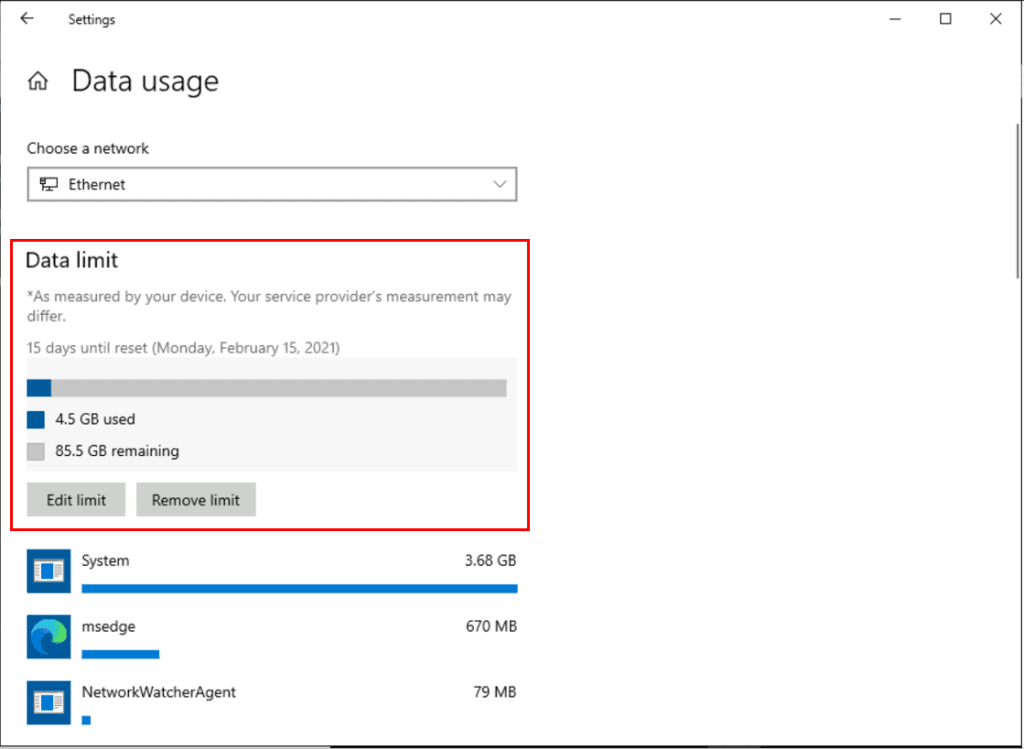
In this blog, I will explain how we can set data usage limit in Windows 10. This setting can help you to stay under your data plan limit and reduce data usage in Windows 10 devices. After you set a data limit, whenever you will connect to that network. You will be notified with a message when you are getting near your network data limit.
Let’s go through the step by step process –
Set Data Usage Limit in Windows 10
- In Windows 10 device, Select the Start button, then select Settings > Network & Internet.

- Network & Internet > Status, Under the network you’re connected to, select Data usage.
Note – You may experience different options if you are not using Windows 10, version 2004 or later. In that case you need to access Data Usage option available in Network & Internet for setting up.

- Once choose network under Data limit, select Enter limit.

- Choose the Limit type that you want to use, specify the other limit information and then select Save. For example, if you selected Limit type the Monthly option, you will need to specify-
Monthly reset data — Specify a day of month on which this automatically reset data usage. i.e your billing period date
Data limit — Allows you to specify a limit to the amount of data your Windows 10 device can use.
Unit — Specifies the data limit in megabytes (MB) or gigabytes (GB).

- Once you completed above steps, It will monitor your Windows 10 device data usage. You will get alert message when you are getting near your network data limit.
Use the HTMD Forum the one-stop-shop for all your device management queries related to ConfigMgr (a.k.a SCCM), Intune, and more!
Resources
- Set your data limit – Windows 10
- Use the Settings app Group Policy in Windows 10
- How to Manage Virtual Desktops in Windows 10
- How to Change Screen Brightness in Windows 10
- How to Set File Explorer to Open This PC instead of Quick Access in Windows 10
- FIX This PC can’t be upgraded to Windows 10 version 2004 or 20H2 Issue | Upgrade on Hold
- How to Disable User Sign-in Animation in Windows 10 | First
- FIX Black or frozen screen in Skype for Business during Screen Share | SfB | Windows 10
- How to Hide or Show Cortana Button on Taskbar in Windows 10
- Install .NET Framework 3.5 in Windows 10 | Quick Easy Way
- How to Unblock App Files in Windows 10
- SCCM Task Sequence Available Deployment Options in Distribution Points Tab | ConfigMgr
- How to Extract Specific Windows Index from Windows 10 Multiple Edition ISO
- How to Hide or Show Pages from Windows 10 Settings App Using Group Policy


Discussion