






Skip to content
HTMD Newsletter from 7th to 11th February 2022

HTMD Newsletter from 7th to 11th February 2022

Welcome to the Twenty-third (23rd) HTMD Community newsletter from 7th to 11th February 2022! This is the list of posts that the HTMD Community published this week and news from the IT industry. You can get all the information and details from Windows 10, Windows 11, Cloud PC, SCCM, Intune, and Azure Virtual Desktop (AVD).

Exciting news that we want to share this week is HTMD Community is planning to relaunch the Intune Daily Training classes in a couple of months from now. Keep looking for updates here in our weekly newsletters!

👉 Here’s how you can be part of the HowToManageDevices Community. You can Join us here!

22nd HTMD Newsletter – HTMD Newsletter from 31st January to 4th February 2022
21st HTMD Newsletter – HTMD Newsletter from 24th to 28th January 2022
20th HTMD Newsletter – HTMD Newsletter from 17th to 21st January 2022

7th February 2022

Turn Off Windows Activity History Timelines using Intune – https://www.anoopcnair.com/turn-off-windows-activity-history-timelines-using-intune/

Enable Disable Delivery Optimization Using Intune SCCM for Windows 11 PCs – https://www.anoopcnair.com/enable-delivery-optimization-using-intune-sccm/

HTMD Newsletter from 7th to 11th February 2022

8th February 2022

FIX Unknown Device Drivers in Device Manager – https://www.anoopcnair.com/fix-unknown-device-drivers-in-device-manager/

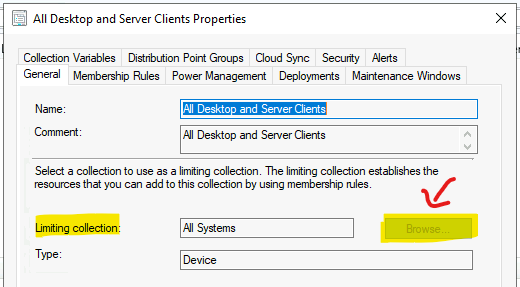
Fix SCCM Limiting Collection Issue | Stop Using Collections Limited to All Systems or All Users – https://www.anoopcnair.com/fix-sccm-limiting-collection-issue-stop-using/
HTMD Newsletter from 7th to 11th February 2022

9th February 2022

Windows 10 KB5010342 LDAP Issue is Fixed | February 2022 Patches using SCCM Intune – https://www.anoopcnair.com/windows-10-kb5010342-ldap-issue-is-fixed-sccm/

Best Guide for Dell Driver Management Using SCCM – https://www.anoopcnair.com/download-dell-driver-management-using-sccm/

HTMD Newsletter from 7th to 11th February 2022

10th February 2022

Windows 11 Reset Network Settings | Track Internet Data Usage – https://www.anoopcnair.com/windows-11-reset-network-settings-internet-use/

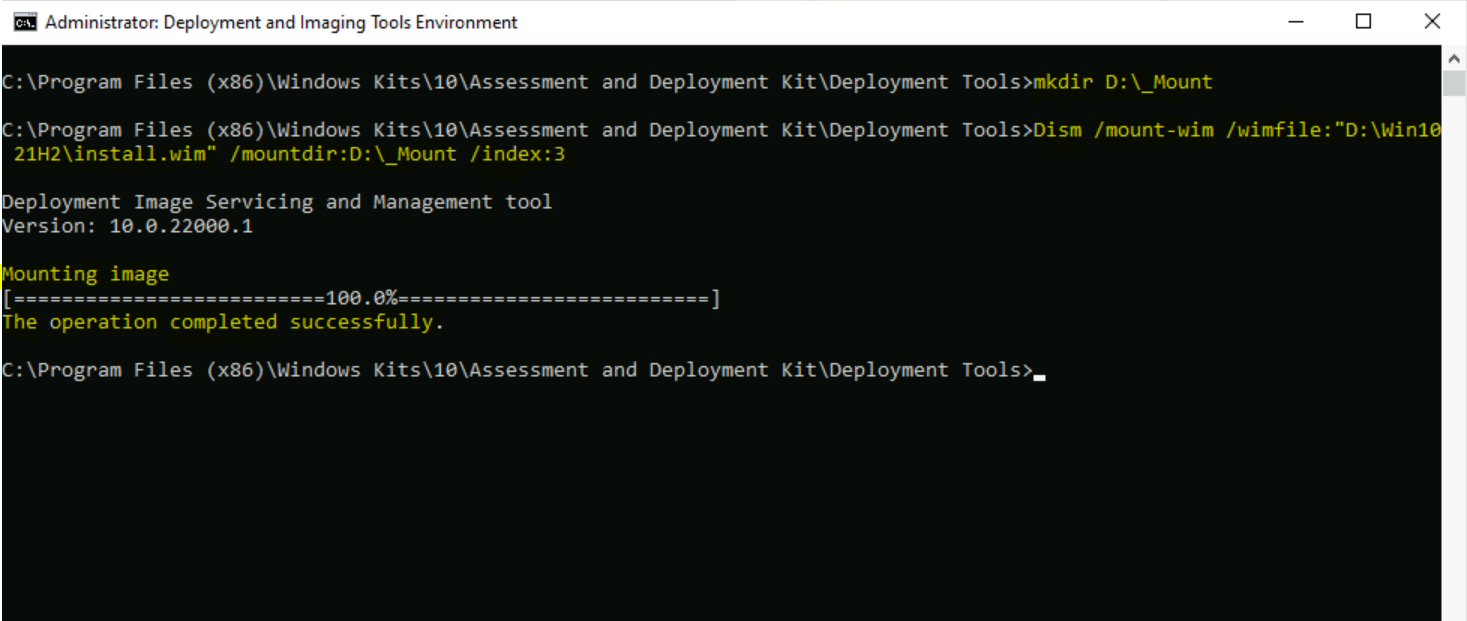
Add Language Packs Offline In Windows Image Using DISM – https://www.anoopcnair.com/add-language-packs-offline-in-image-using-dism/
HTMD Newsletter from 7th to 11th February 2022

11th February 2022

How to Troubleshoot Network Connectivity Issues on Windows 11. Check Firewall Port is Open or Block on Windows 11 using PowerShell Command – Check? – https://www.anoopcnair.com/check-firewall-port-is-open-or-block-windows-11/

Easy Steps to Extend Task Sequence Error Prompt Duration – https://www.anoopcnair.com/extend-sccm-task-sequence-error-prompt-duration/

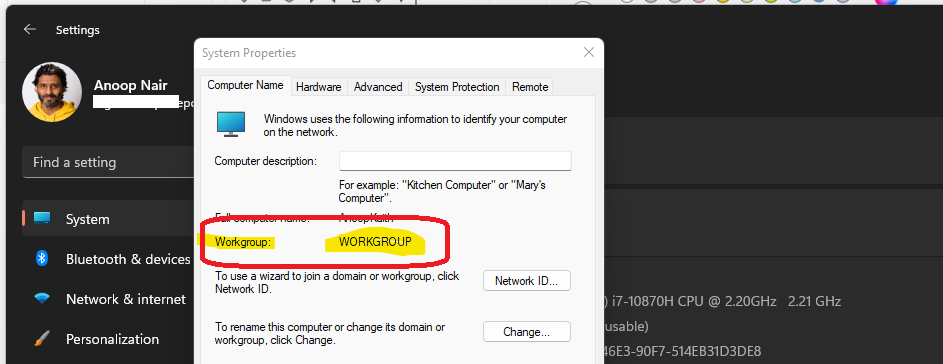
Install SCCM Client on Workgroup Non-Domain Joined Windows 11 PC – https://www.anoopcnair.com/install-sccm-client-on-workgroup-windows-11-pc/
HTMD Newsletter from 7th to 11th February 2022
Debabrata
Written by

Deb is an SCCM and Intune admin with many years of experience in enterprise environments. He is interested in Windows management, Task Sequence, SCCM, and modern management.

Discussion

Join the discussion

Your email address will not be published. Required fields are marked *

Related guides

Newsletter

Microsoft Intune and Windows 365 Weekly Highlights: 270th HTMD Newsletter 2nd to 6th November 2026

270th HTMD Newsletter 2nd to 6th November 2026! Microsoft Intune Highlights: This week’s Intune updates include faster Windows script delivery using push notifications, helping devices receive script changes sooner. Additionally, scoped permissions for Role-Based Access Control (RBAC) are now generally available, providing more control over administrative access. Windows 365 Highlights: Windows 365 introduces the auto-deprovisioning […]

AC Anoop C Nair 6 min read
Newsletter

Microsoft Intune and Windows 365 Weekly Highlights: 269th HTMD Newsletter 26th to 30th October 2026

Microsoft Intune and Windows 365 Weekly Highlights: 269th HTMD Newsletter 26th to 30th October 2026. Microsoft Intune helps organisations strengthen device compliance by implementing security baselines and enabling network configuration changes without granting users administrative rights. These capabilities improve security while maintaining better control over managed devices. Intune also helps IT administrators plan Windows quality […]

AC Anoop C Nair 6 min read
Newsletter

Microsoft Intune and Windows 365 Weekly Highlights: 268th HTMD Newsletter 19th to 23rd October 2026

Microsoft Intune and Windows 365 Weekly Highlights: 268th HTMD Newsletter 19th to 23rdOctober 2026 Microsoft Intune updates include Security Copilot as part of Microsoft 365 E5/E7 plans, and Windows 11 26H2 is now fully available. However, some admins have reported 26H2 appearing on devices that were expected to stay on 25H2. Android enrollment now requires […]

AC Anoop C Nair 6 min read
Newsletter

Microsoft Intune and Windows 365 Weekly Highlights: 267th HTMD Newsletter 12th to 16th October 2026

Windows 365 highlights this week included the general availability of default display settings for Cloud PCs and external identity support on iOS. Microsoft Intune introduced Advanced Capabilities, formerly known as Microsoft Intune Suite, and released a new version of Remote Help for Windows. More control over Windows update approvals and a File Explorer black screen […]

AC Anoop C Nair 6 min read