











214th HTMD Newsletter 6th to 10th October 2025
Welcome to the 214th HTMD Newsletter,6th to 10th October 2025! This is the list of posts and videos the HTMD Community published this week, and news from the IT industry. You can get all the information and details from Windows 11, Cloud PC, SCCM, Intune, Azure Virtual Desktop (AVD), Android, iOS, and Mac.
Previous Weeks Newsletter
- 211th HTMD Newsletter – HTMD Newsletter 15th to 19th September 2025
- 212th HTMD Newsletter – HTMD Newsletter 22nd to 26th September 2025
- 213rd HTMD Newsletter – HTMD Newsletter 29th September to 3rd October 2025
Monday 6th October 2025
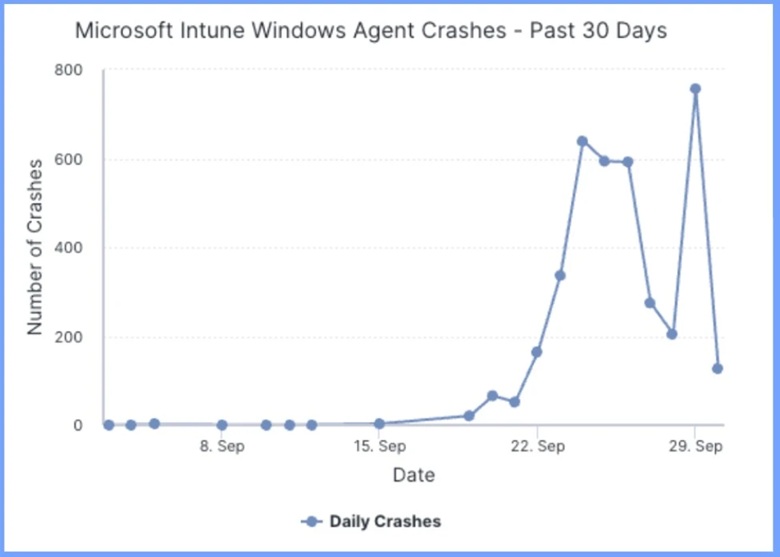
🎆How to Fix Intune Agent Crash Access Violation Error 0xc0000005
–https://www.anoopcnair.com/intune-access-violation-error-0xc0000005/
📌Intune Agent Crash Access Violation 0xc0000005
📌Version-Specific Crashes
📌Other Error Codes Besides 0xc0000005
📌Crashes Do Not Happen in a Consistent Way
📌New Connections in Version 1.95.103.0
📌Possible Root Cause of the Issue
📌Workaround for the Issue
🎆How to Fix Google Meet Links not Opening on Intune Managed Devices Issue
–https://www.anoopcnair.com/google-meet-links-not-opening-on-Intune/
✅ Introduction What’s the Issue?
🚨 Symptoms of the Problem
🧾 Affected Apps and Scenarios
🔍 Possible Causes of Google Meet Links Not Opening
🔐 Understanding How Intune Policies May Block Link Handling
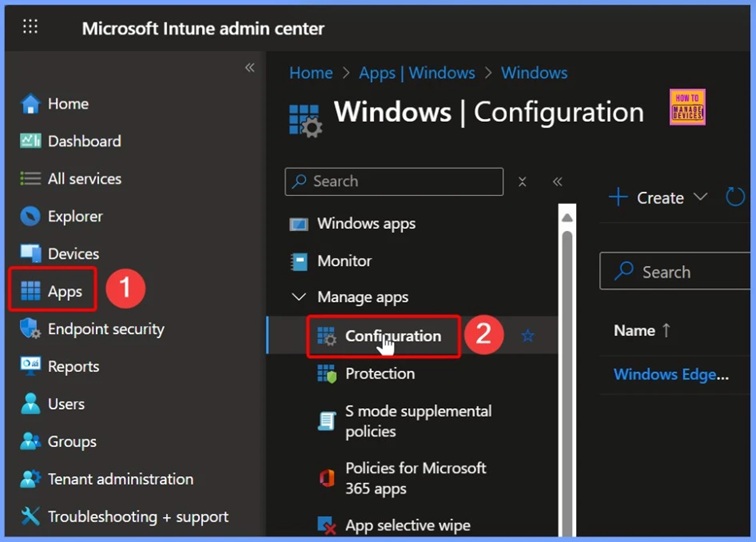
🛠️ Step-by-Step Fix for Google Meet Link Issue
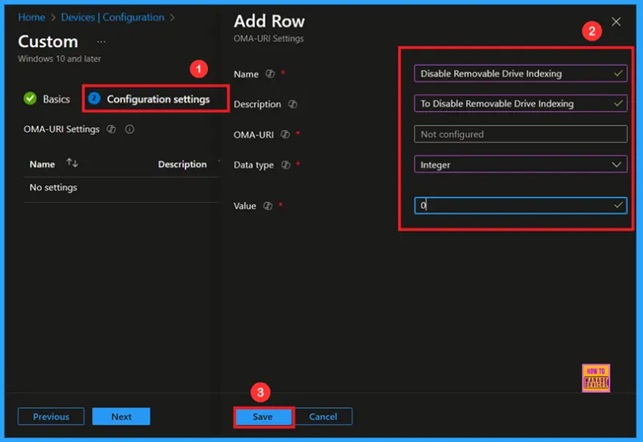
🎆Enable Removable Drive Locations Policy in Windows for Indexing Control using Intune
–https://www.anoopcnair.com/removable-drive-locations-indexing-using-Intune/
🔔Enable Removable Drive Locations Policy
🔔Protects Sensitive Data
🔔Reduces the Risk of Malware Spreading via USB
🔔Helps Organizations Maintain Compliance with Data Protection Rules
🔔Device and User Check-in Status
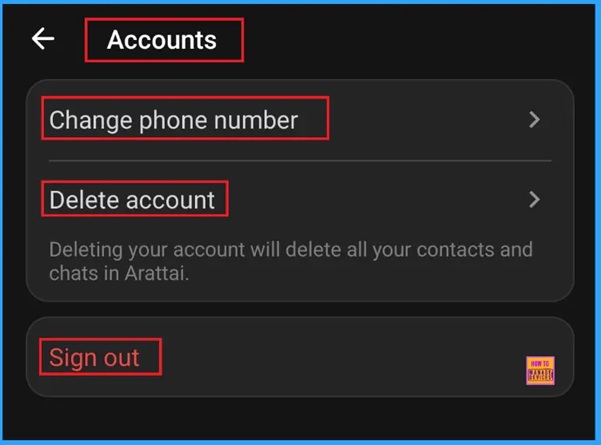
🎆Best Guide to Install and use Aratti App an Alternative to WhatsApp
–https://www.anoopcnair.com/install-and-use-aratti-app-alternative-WhatsApp/
🔔Install and use Arattai App
🔔Supports Text, Voice, Video calls, and File Sharing
🔔Works on Phone, Desktop, and TV with Multi-device support
🔔Regular Updates for Speed, Safety, and New Features
🔔Spyware-Free and does not Sell User Data
Tuesday 7th October 2025
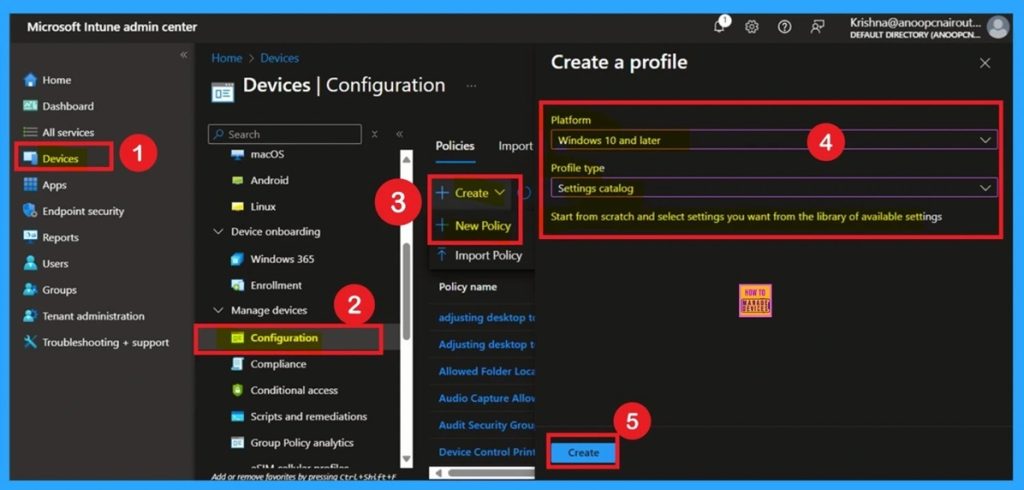
🎯How to Block App Location Access in Windows using Intune Policy
–https://www.anoopcnair.com/app-location-access-in-windows-using-intune/
🔥Control App-Level Location Tracking Across Managed Devices
🔥Strengthen Organizational Privacy by Restricting Location Access
? Windows CSP Details
🔥Prevent Unauthorized Location Usage with Force Deny Configuration
🔥What Does the LetAppsAccessLocation Policy Allow You to Configure?
🔥Apply Settings Globally
🔥Client-Side Impact
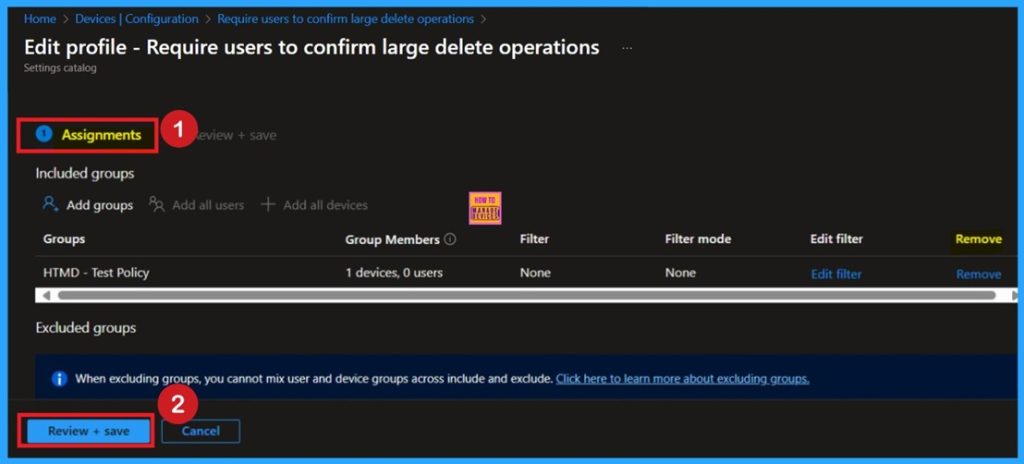
🎆Require Users to Confirm Large Delete Operations in OneDrive using Intune Policy
–https://www.anoopcnair.com/confirm-large-delete-operations-OneDrive-Intune/
🔔Enable Confirmation Prompts for Large File Deletions
🔔Protects Against Accidental Data Loss in Synced Folders
🔔Improves Organizational Data Security and Compliance
🔔Minimizes Downtime and Reduces IT Recovery Efforts
🔔Policy Blocks Deletion if Not Confirmed Within 7 Days
🔔Client-Side Impact: Users Must Acknowledge Before Deleting
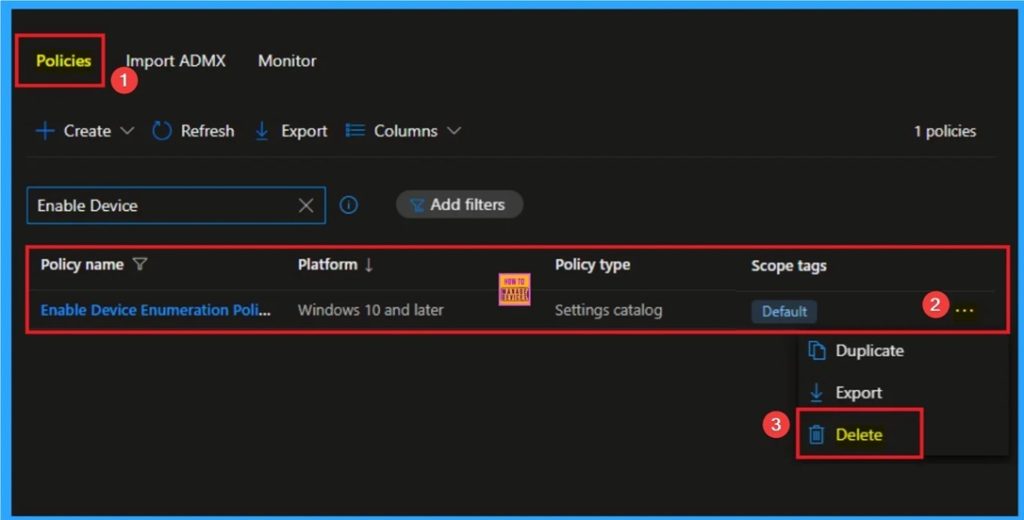
👉How to Enable Device Enumeration Policy to Block Untrusted DMA Devices using Intune
–https://www.anoopcnair.com/device-enumeration-block-untrusted-dma-Intune/
✍Device Enumeration Policy to Block Untrusted DMA Devices
✍Enhance Security against Malicious Direct Memory Access
✍What are the Benefits of Device Enumeration Policy?
✍Steps to Configure Device Enumeration Policy
✍Helps to Mitigate Cold Boot Attack
✍Device and User Check-in Status
✍Client-Side Verification through Event Viewer
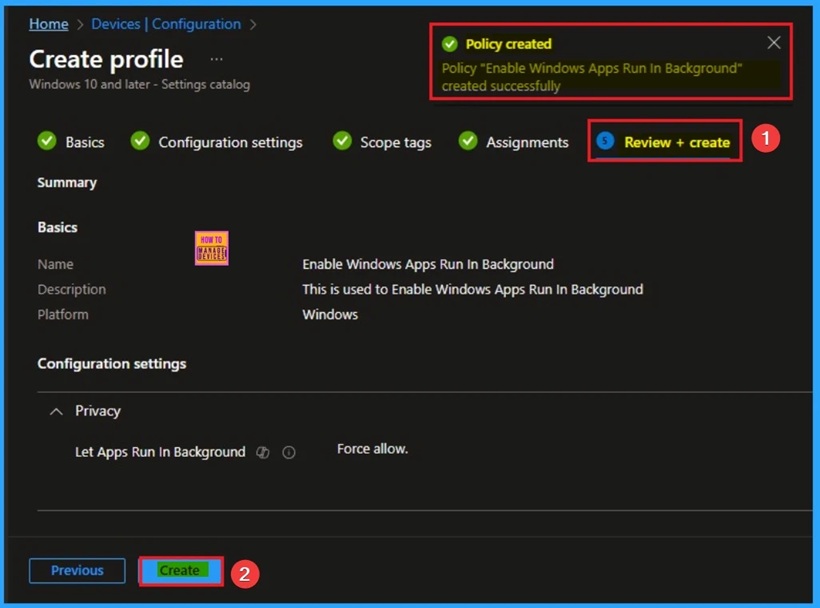
🎯Enable Windows Apps Run in Background to Manage Privacy using Intune
–https://www.anoopcnair.com/windows-apps-run-in-background-using-Intune/
🔥Windows Apps Run in Background
🔥Real Word Example of Windows Apps Run in Background Policy
🔥Helps to Manage Privacy
🔥How this Policy Helps Admins
🔥Minimize the Risk of Data Leakage
🔥Client-Side Behavior
Wednesday 8th October 2025
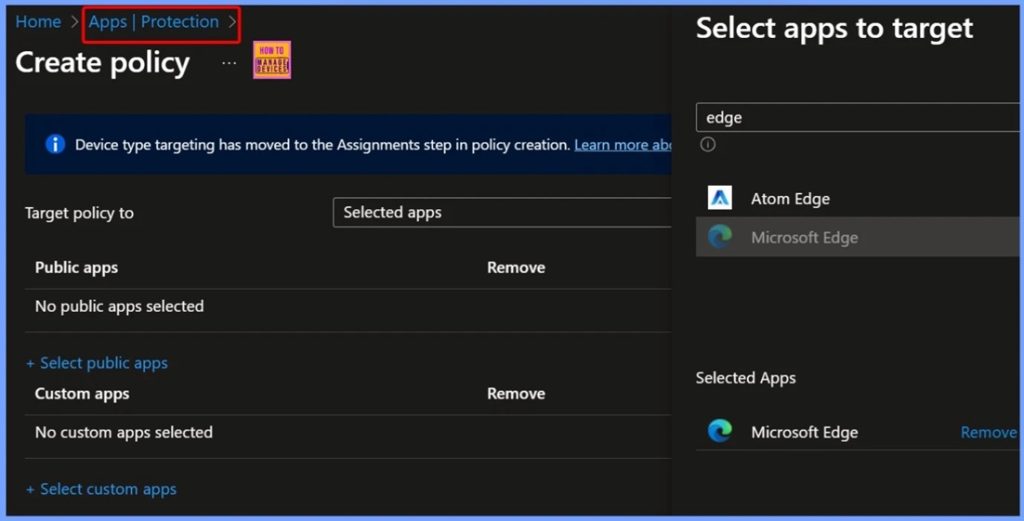
🎆Intune Policies Blocking Edge Browser Callback during SSO Authentication on Android Work Profile
–https://www.anoopcnair.com/Intune-policies-blocking-edge-browser-callback/
🔥Overview of Microsoft Intune on Android Devices
🔥Matter Most SSO Authentication
🔥Controlling App Communication and Data Security
🔥Authentication Flow: User Sign-In through Microsoft Edge
🔥Expected Callback to Matter Most: Completing the Login Process
🔥How Intune Policies Affect Matter Most SSO Authentication
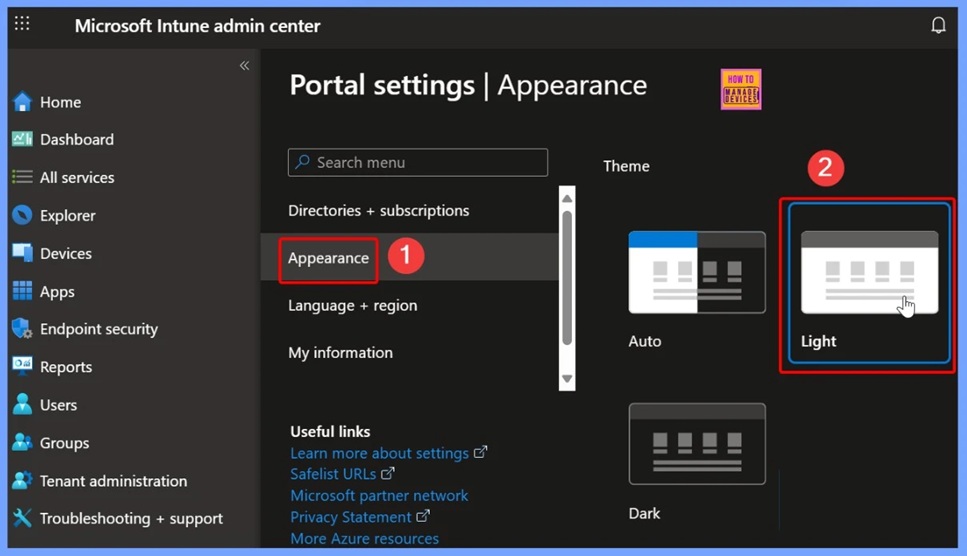
🎆Why Intune Update Reports show Blank Number Cards in Dark Mode
–https://www.anoopcnair.com/intune-update-reports-show-blank-number-cards/
📌Overview of the Issue
📌Impact on IT Administrators
📌Windows 11 Version 25H2 and Feature Update Policies
📌Cause of Blank Number Cards in Dark Mode
📌Workarounds
🎆Fix Devices Missing from WUfB Reports after Intune Autopatch and Log Analytics Configuration
–https://www.anoopcnair.com/devices-missing-from-wufb-reports-after-intune/
🎉Devices Missing from WUfB Reports
🎉Issue Occurred after Intune Autopatch and Log Analytics Configuration
🎉Reasons of Devices Missing from WUfB Reports
🎉After Effects of this Issue
🎉Different Fixes of Issue
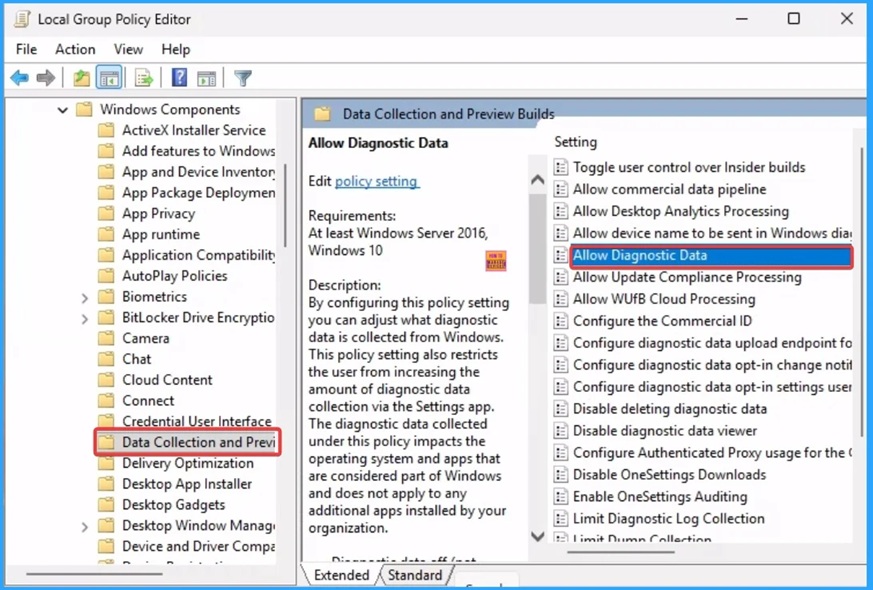
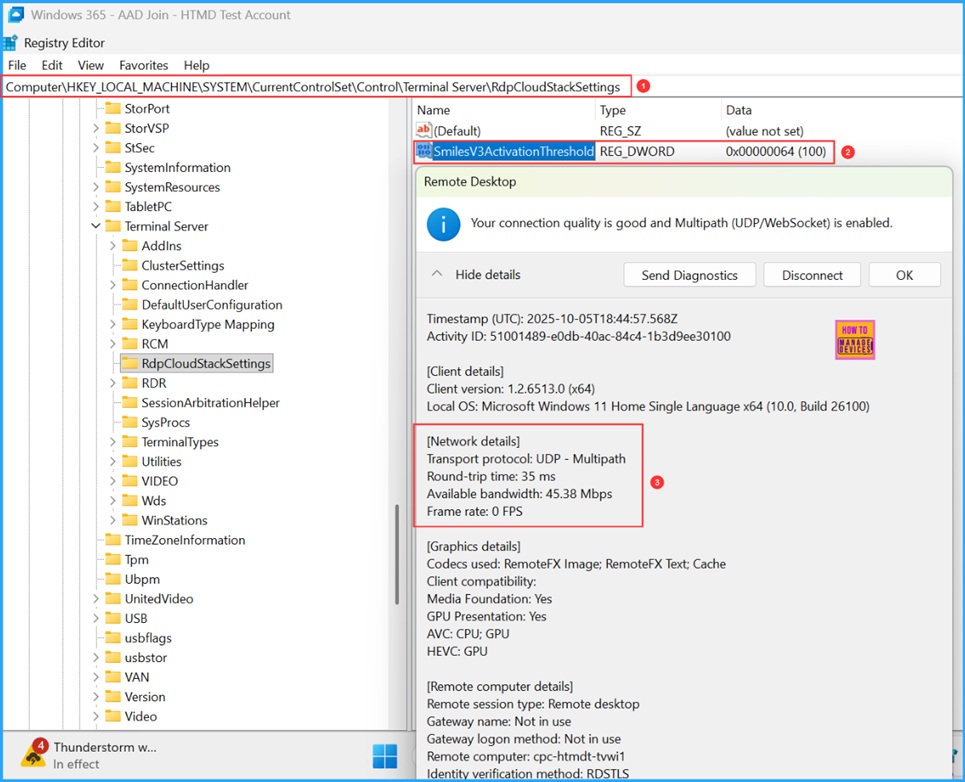
📌How to Enable RDP Multipath on Windows 365 Cloud PCs using Intune PowerShell Script
–https://www.anoopcnair.com/how-enable-rdp-multipath-on-windows-365-intune/
💡Why to Enable RDP Multipath in Windows 365 Cloud PCs
💡How RDP Multipath Work?
💡Create a Platform Script in Intune to Enable RDP Multipath
💡PowerShell Script to Enable RDP Multipath on Windows 365 Cloud PCs
💡Monitor the Enable RDP Multipath on Windows 365 Cloud PCs Deployment
Thursday 9th October 2025
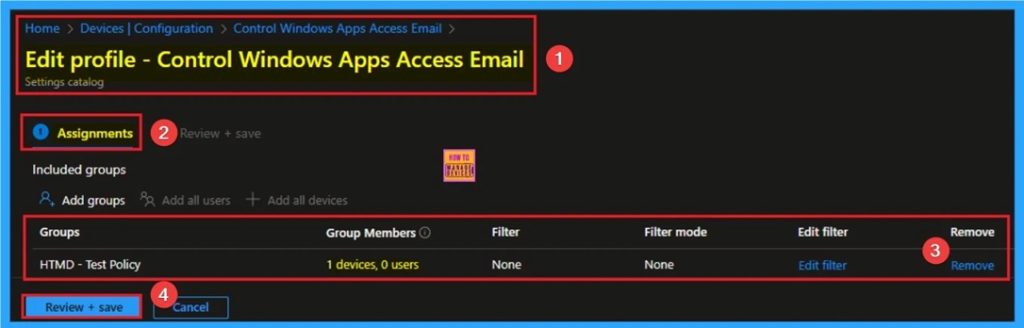
🎯Control Windows Apps Access Email to Preventing Data Leakage using Intune
–https://www.anoopcnair.com/windows-apps-access-email-to-using-intune/
🔥Windows Apps Access Email Policy
🔥Real Word Example of Windows Apps Access Email Policy
🔥Helps to Preventing Data Leakage
🔥How this Policy Helps Admins
🔥Improve Productivity
🔥Client Side Behavior
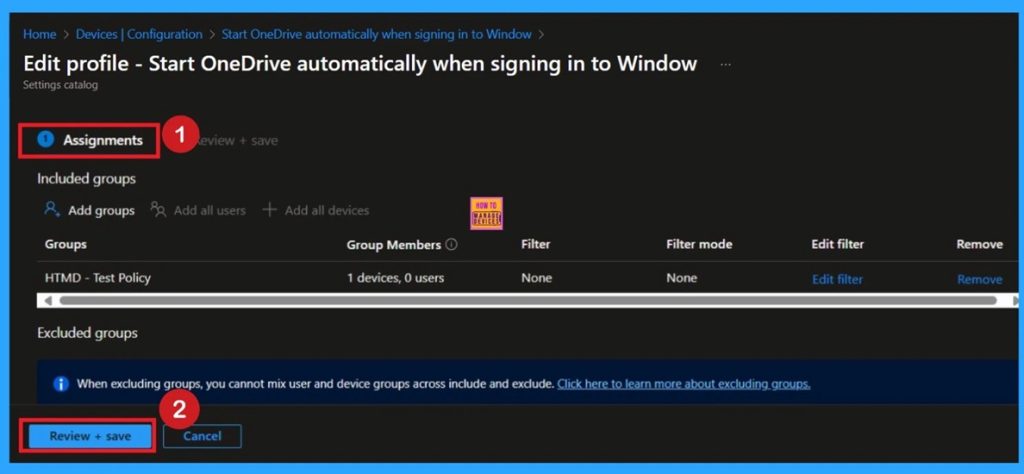
👉Start OneDrive Automatically when Signing in to Windows for OneDrive using Intune Policy
–https://www.anoopcnair.com/start-OneDrive-automatically-when-Intune/
✍Enable OneDrive Auto-Start via Intune
✍Ensure Seamless File Sync at User Sign-In
✍Benefits of Auto-Start for Corporate and Educational Environments
✍Steps to Configure OneDrive Auto-Start Policy
✍Prevents Data Loss and Version Conflicts
✍Requires OneDrive Sync App Restart for Activation
✍Improves User Experience and Productivity
🎯Control Windows Advertising ID for Enhanced Privacy using Intune
–https://www.anoopcnair.com/windows-advertising-id-for-privacy-using-intune/
🔥Windows Advertising ID Policy
🔥Real Word Example of Advertising ID Policy
🔥Helps to Enhance Privacy
🔥How this Policy Helps Admins
🔥Prevent Ads tracking
🔥Client-Side Behavior
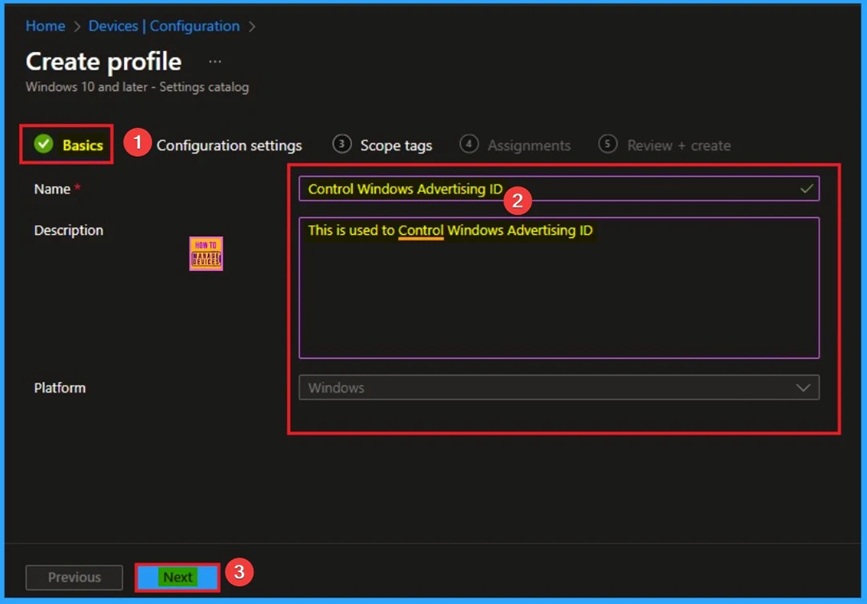
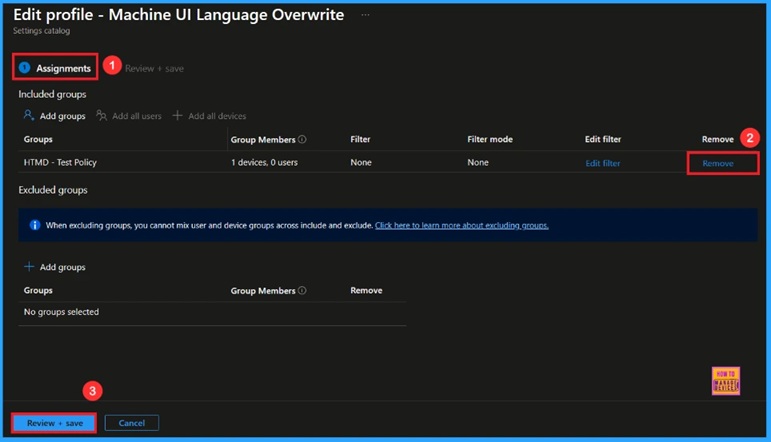
🎆Stop User Language Overrides Deploy a Bulletproof Default UI Language on all your Windows Devices using Intune
–https://www.anoopcnair.com/stop-user-language-windows-devices-using-intune/
🔔Enable User Interface Language Policy
🔔Forces a Specific Language for Consistency
🔔Simplifies Support by Limiting Language Variation
🔔Ensures Standardization Across all Managed Computers
🔔Device and User Check-in Status
Friday 10th October 2025
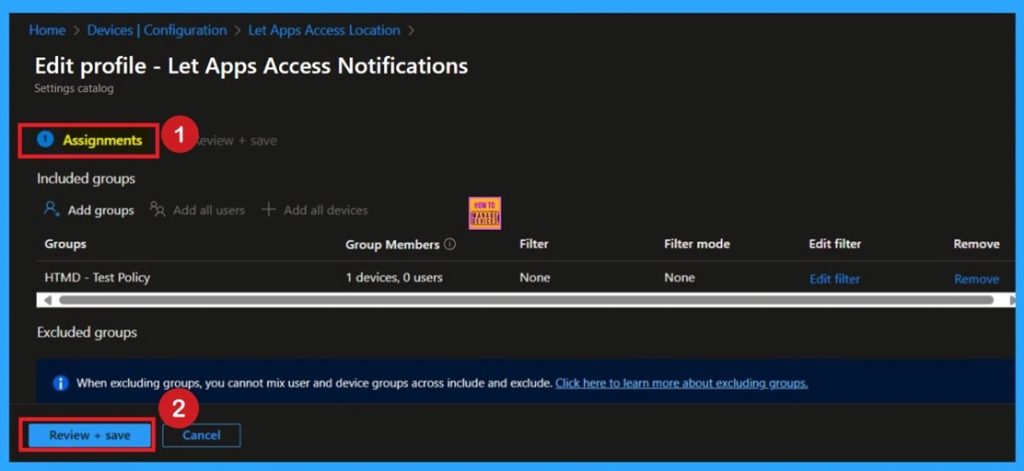
👉How to Control App Access Notifications Policy for Windows using Intune
–https://www.anoopcnair.com/access-notifications-policy-for-windows-intune/
✍Configure App Notification Access via Intune Settings Catalog
✍Strengthen Privacy Controls Across Windows Devices
✍Benefits of Managing Notification Access Policy
✍Steps to Deploy Notification Access Policy in Intune
✍User Control When Policy is Not Configured
✍Empowers Admins to Balance Usability and Privacy
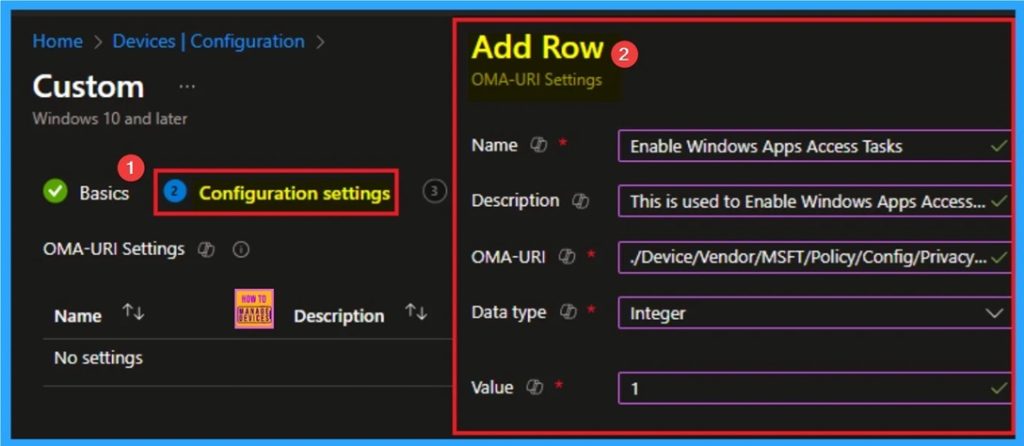
🎯Enable Windows Apps Access Tasks to Prioritizing Security and Privacy using Intune
–https://www.anoopcnair.com/enable-windows-apps-access-tasks-using-Intune/
🔥Windows Apps Access Tasks Policy
🔥Real Word Example of Windows Apps Access Tasks Policy
🔥Helps to Prioritizing Security and Privacy
🔥How this Policy Helps Admins
🔥Prevents Unauthorized Apps Access
🔥Client Side Behavior
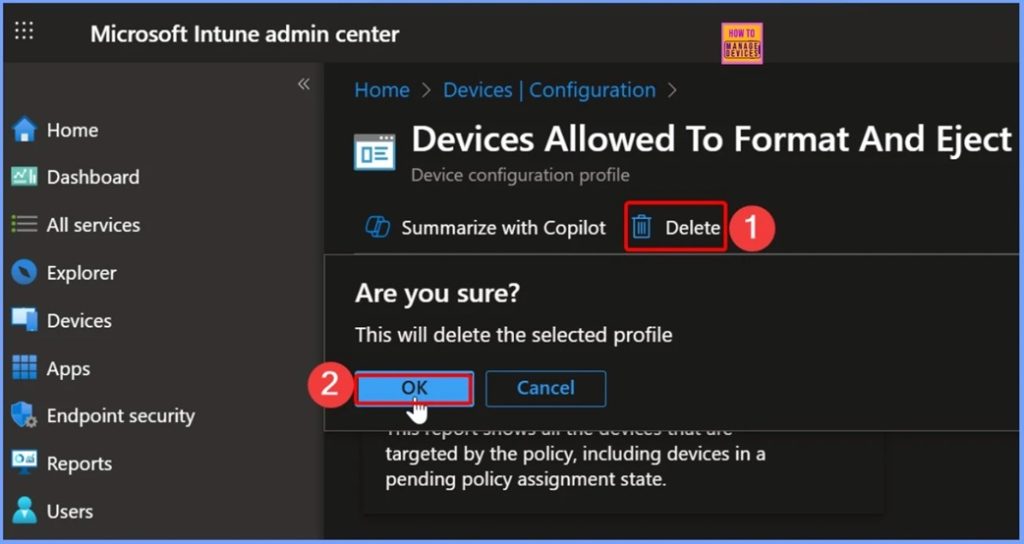
🎆How to Control Access to Format and Eject Removable Media in Windows using Intune Policy
–https://www.anoopcnair.com/format-and-eject-removable-media-windows-Intune/
🔊Basics Settings Allow Undock Without Having to Log On in Intune
🔊Configuration Settings using the + Add Settings Option in Intune
🔊Default Configuration for the Devices Allow Undock Without Having To Logon policy is Set to Allow
🔊Devices Allow Undock Without Having To Logon – Block
🔊Policy Created Notification
🔊Device and User Check-in Status
🔊Client Side Verification
🔊Devices_AllowUndockWithoutHavingToLogon – Windows CSP Details
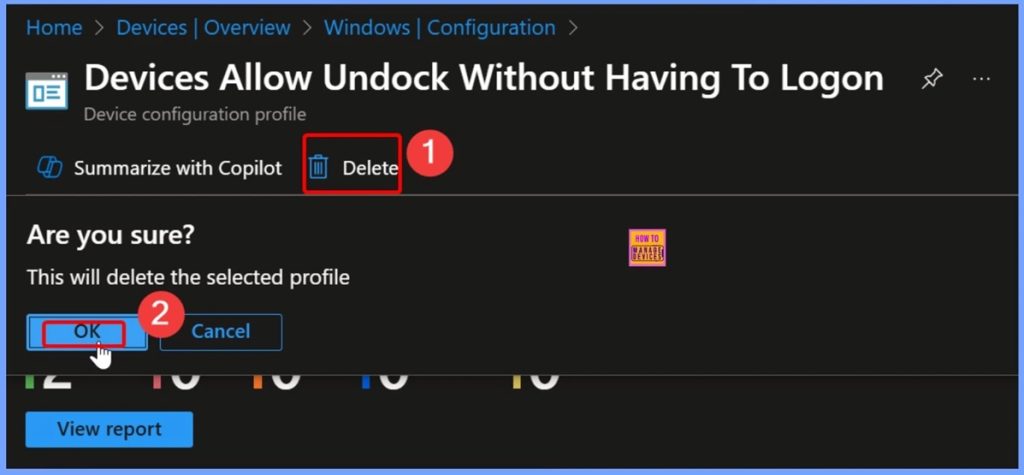
🎆Allow Undocking without Logging on Security Setting Explained using Intune Policy
–https://www.anoopcnair.com/undocking-without-logging-on-security-Intune/
🔊Basics Settings Allow Undock Without Having to Log On in Intune
🔊Configuration Settings using the + Add Settings Option in Intune
🔊Default Configuration for the Devices Allow Undock Without Having To Logon policy is Set to Allow
🔊Devices Allow Undock Without Having To Logon – Block
🔊Policy Created Notification
🔊Device and User Check-in Status
🔊Client Side Verification
🔊Devices_AllowUndockWithoutHavingToLogon – Windows CSP Details
Connect with the HTMD Community
Join the Telegram group to get the latest step-by-step guides and news updates. Join our Meetup Page to participate in User group meetings. Also, join the WhatsApp Community to get the latest news on Microsoft Technologies. We are there on Reddit as well.
HTMD Community Social Media Platform Links
| Social Media Platform | Link |
| LinkedIn: HTMD Community | https://www.linkedin.com/company/how-to-manage-devices/ |
| Telegram: SCCM Intune Technical Discussions | https://t.me/joinchat/Q9lE6G1_BO_bGq97 |
| Telegram: JOB SCCM Intune Group | https://t.me/joinchat/SIKr3OugR2FQ-Ej9 |
| WhatsApp: HTMD Community | https://chat.whatsapp.com/CeMXHSD61HtDBJwe78IZwV |
| Telegram: AVD/Windows 365 User Group | https://t.me/Inwvdcommunity |
| https://www.facebook.com/HTMDCommunity | |
| https://www.instagram.com/htmd_community/ | |
| https://twitter.com/htmdcommunity | |
| Facebook Group: SCCM | https://www.facebook.com/groups/ConfigMgr2012/ |
| Facebook Group: Intune | https://www.facebook.com/groups/1738789256382744 |

Anoop C Nair is Workplace Technology solution architect with 25+ years (as of 2026) of experience in global enterprise organizations such as JP Morgan, Capgemini, etc. Microsoft Certified Trainer (MCT). Microsoft MVP from 2015 onwards for consecutive 11+ years! He also conducts Intune and modern workplace tech training for enterprise organizations. He is Blogger, Speaker, and Founder of HTMD Community and HTMD Conference. His main focus is on Device Management technologies like Intune, Windows, Cloud PC. He writes about technologies like Intune, SCCM, Windows, Cloud PC, Windows, Entra, Microsoft Security.

Discussion