











ConfigMgr 2104 Technical Preview New Features | SCCM
In this post, you will see the list of features released in ConfigMgr 2104 Technical Preview. Microsoft recently released SCCM Technical Preview version 2104. The technical preview introduces new functionality that Microsoft is working on and features that aren’t yet included in the current branch of Configuration Manager.
It’s good to have a Technical Preview version lab for Configuration Manager, try out all exciting added features, help the Configuration Manager product team, continuously work for us, and provide them your valuable feedback about the new features in the technical preview before the Microsoft product team finalizes the features. Here you can start – How to Build Configuration Manager Technical Preview LAB.
Important – Technical Preview version of ConfigMgr is not supported for use in a production environment.
2103 is the latest baseline version of Configuration Manager (a.k.a SCCM) Supported to use for the production environment. You can check out 📢SCCM 2103 Step By Step Upgrade Guide | ConfigMgr | Prerequisites
ConfigMgr Technical Preview 2104 New Features
Let’s check the new features to try out the technical preview. You can explore for more details about Features in Configuration Manager technical preview version 2104.
Tenant attach: BitLocker recovery keys
You can now get BitLocker recovery keys for a tenant-attached device from the Microsoft Endpoint Manager admin center. For example, a help desk technician who doesn’t have access to Configuration Manager could use the web-based admin center to help an end user get a recovery key for their device.

Tenant attach: Historical inventory data in resource explorer
Resource explorer can display a historical view of the device inventory in the Microsoft Endpoint Manager admin center.

Tenant attach: Offboarding
This feature helps you to remove your Configuration Manager hierarchy from the Microsoft Endpoint Manager admin center.
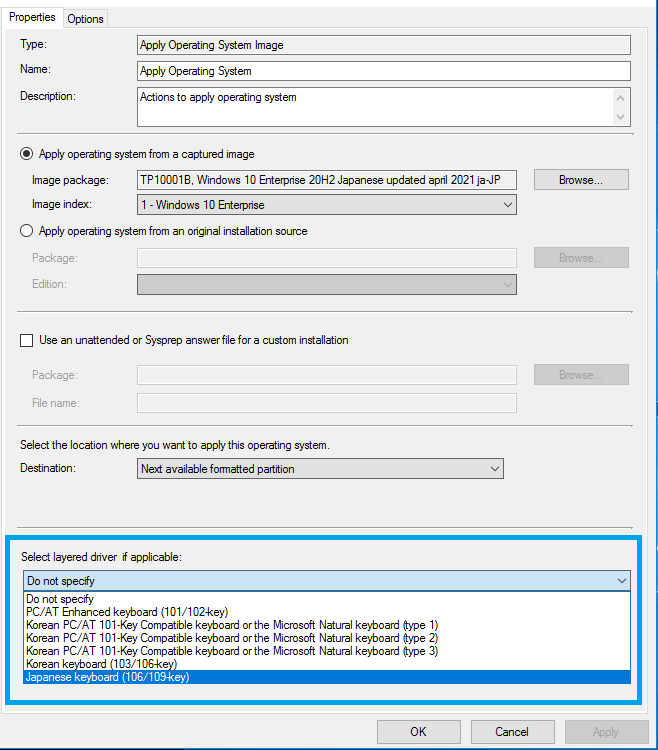
Support layered keyboard driver during OS deployment
This release adds support for layered keyboard drivers during OS deployment. This driver specifies other types of keyboards that are common in Japanese and Korean languages.
Here’s how –
- In SCCM Console, Navigate to Software Library > Operating Systems > Task Sequences. Create a task sequence to install an OS image.
- Edit the task sequence.
- On the Apply OS Image step, in the section to Select layered driver if applicable, choose one of the following options –
Improvements to Support Center
The Content view in the Support Center Client Tools has been renamed to Deployments. From Deployments, you can review all of the deployments currently targeted to the device.
The new view is grouped by Category and Status. The view can be sorted and filtered to help you find the deployments you’re interested in. Select a deployment in the results pane to display more information in the details pane.
Related Post – SCCM Support Center Tool Video Review & Remote Client Support
Run software updates evaluation from deployment status
You can now right-click and notify devices to run a software updates evaluation cycle from the software update deployment status. Target a single device under the Asset Details pane or select a group of devices based on their deployment status.

Improvements to CMTrace
This release includes multiple performance improvements to the CMTrace log viewer. Configuration Manager automatically installs this tool in the following locations:
- The site server’s tools directory. For example:
cd.latest\SMSSETUP\Tools\CMTrace.exe - The Management point’s installation directory. For example:
C:\SMS_CCM\CMTrace.exe - The client installation directory. For example:
C:\Windows\CCM\CMTrace.exe - OS deployment boot images. For example:
X:\sms\bin\x64\CMTrace.exe

Try out all the features, let us know your thoughts on the feature.


Discussion