











216th HTMD Newsletter 20th to 24th October 2025
Welcome to the 216th HTMD Newsletter,20th to 24th October 2025! This is the list of posts and videos the HTMD Community published this week, and news from the IT industry. You can get all the information and details from Windows 11, Cloud PC, SCCM, Intune, Azure Virtual Desktop (AVD), Android, iOS, and Mac.
Previous Weeks Newsletter
- 213rd HTMD Newsletter – HTMD Newsletter 29th September to 3rd October 2025
- 214th HTMD Newsletter – HTMD Newsletter 6th to 10th October 2025
- 215th HTMD Newsletter – HTMD Newsletter 13th to 17th October 2025
Monday 20th October 2025
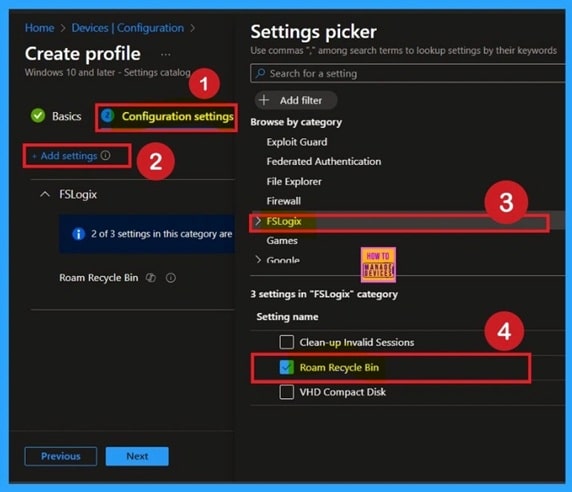
🎆How to Enable Roam Recycle Bin in FSLogix using Intune Policy
–https://www.anoopcnair.com/enable-roam-recycle-bin-in-fslogix-intune/
📌Why Roam Recycle Bin Matters in Non-Persistent VDI Environments
📌Persistent Recycle Bin Across Sessions
📌Optimized for Azure Virtual Desktop & Windows 365
📌Prevents Data Loss in Non-Persistent Environments
📌Device and User Check-in Status
📌Monitor Device and User Check-in Status
📌Recycle Bin Continuity Across Sessions
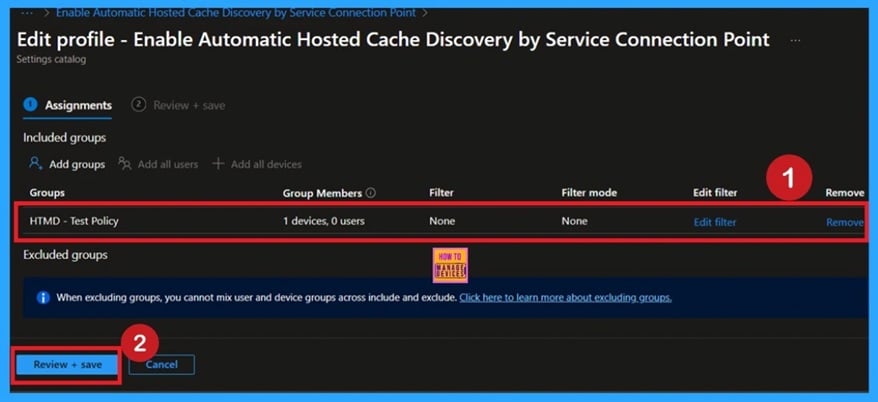
🎆How to Enable Automatic Hosted Cache Discovery by Service Connection Point using Intune Policy
–https://www.anoopcnair.com/enable-automatic-hosted-cache-discovery-Intune/
📌Enable Automatic Hosted Cache Discovery by Service Connection Point
📌Targets Network Settings under Windows Communication Foundation
📌Optimize Bandwidth and Improve Content Delivery
📌Ideal for Organizations using Branch Cache
📌Device and User Check-in Status
📌Monitor Device and User Check-in Status
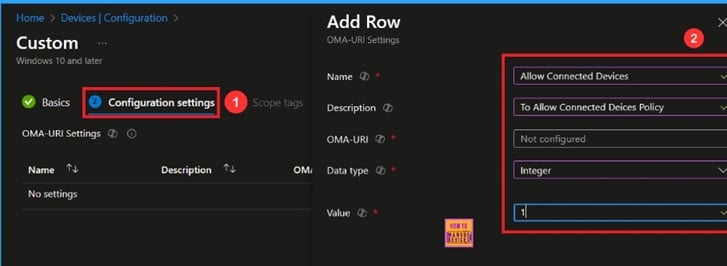
🎆How to Stop Bluetooth and Cloud Device Sync using CDP Policy in Intune
–https://www.anoopcnair.com/Bluetooth-and-cloud-device-sync-cdp-in-Intune/
🔔Allow Connected Devices Policy
🔔Improved Cross-Device Collaboration
🔔Support for Features like Nearby Sharing and Phone Link
🔔Enhanced User Productivity and Workflow Continuity
🔔Device and User Check-in Status
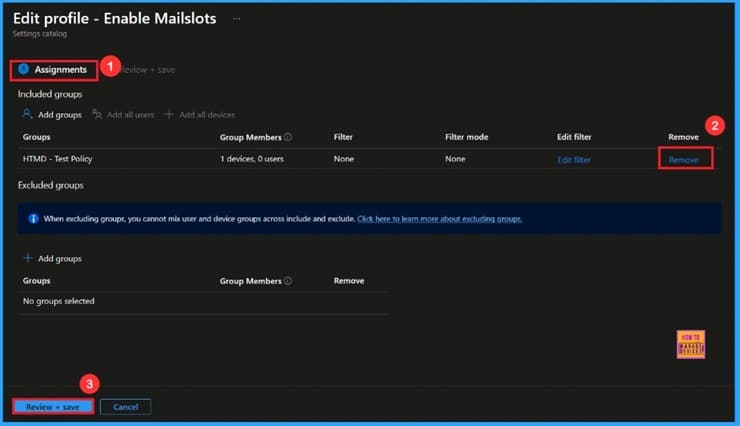
🎆How to Manage Legacy Network Discovery in Windows using Intune Policy
–https://www.anoopcnair.com/legacy-network-discovery-in-windows-Intune/
🔔Enable or disable Mail slots Policy
🔔Improves Network Stability and Performance
🔔Makes it Easier to Access Shared Files and Devices
🔔Enhances Network Control and Security for Administrators
🔔Device and User Check-in Status
Tuesday 21st October 2025
🎆How to Block Outlook Child Processes using Intune Attack Surface Reduction Rule
–https://www.anoopcnair.com/block-outlook-child-processes-using-Intune/
🔊Attack Surface Reduction Rules
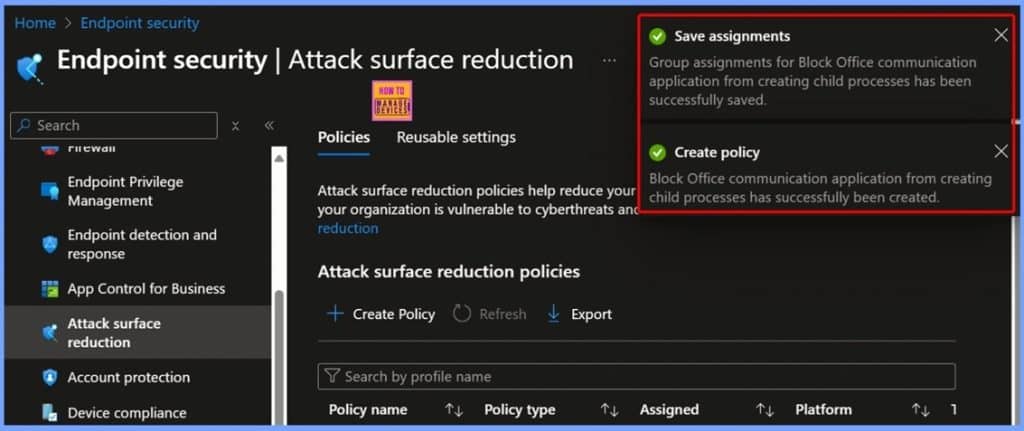
🔊Block Office Communication Application from Creating Child Processes
🔊Default ASR Setting Status – Not Configured
🔊Enable Protection by Selecting the Block Settings Option
🔊Configure Scope Tags for the ASR Policy
🔊Assign the ASR Policy to Devices Groups
🔊Review and Create the ASR Policy
🔊Policy Creation Confirmation and Assignment Save
🔊Device and User Check in Status
🔊Event Viewer – Attack Surface Reduction Rules
👉How to Enable OneDrive Files On-Demand using Intune Policy to Improve Storage Efficiency
–https://www.anoopcnair.com/how-to-enable-onedrive-files-on-demand-intune/
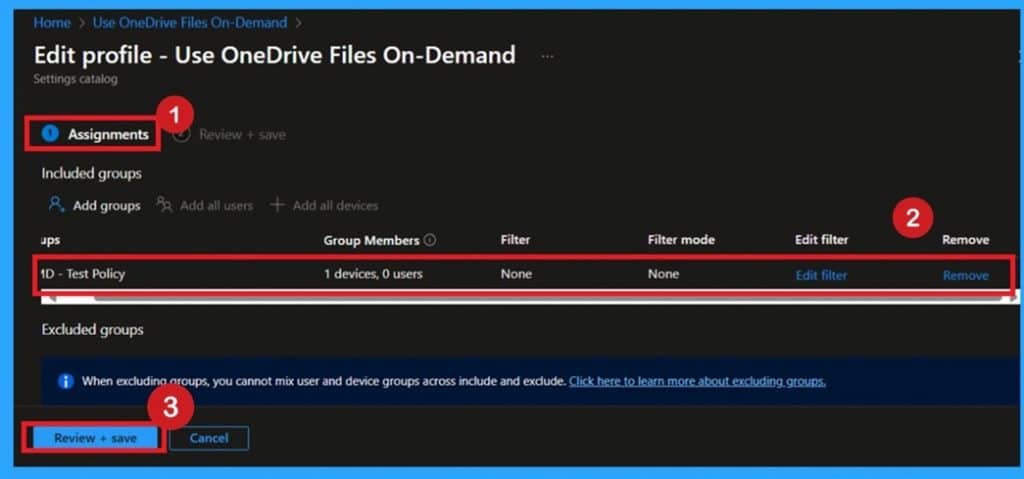
✍OneDrive Files On-Demand Intune Policy
✍Access All Files in File Explorer Without Full Downloads
✍Save Local Disk Space and Improve Device Performance
✍Ideal for Hybrid and Cloud-First Work Environments
✍Prevent Unnecessary Storage Consumption on User Devices
✍Enhance Productivity with On-Demand File Access
✍Disable Option Only When Full Offline Access is Required
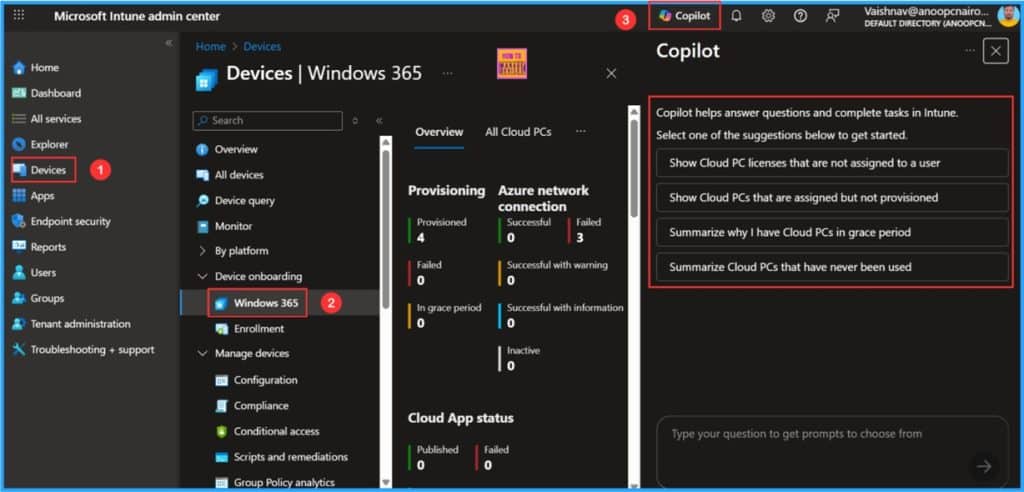
📌How to Enhance Windows365 AI-Enabled Endpoint Management using Copilot in Intune
–https://www.anoopcnair.com/windows365-ai-enabled-endpoint-copilot-intune/
💡Windows 365 Copilot Integration Key Points
💡How to Begin Windows365 AI-Enabled Endpoint Management
💡Enable Windows 365 Plugin in Security Copilot Portal
💡Start using Copilot in Intune to Manage Windows 365
💡End Result
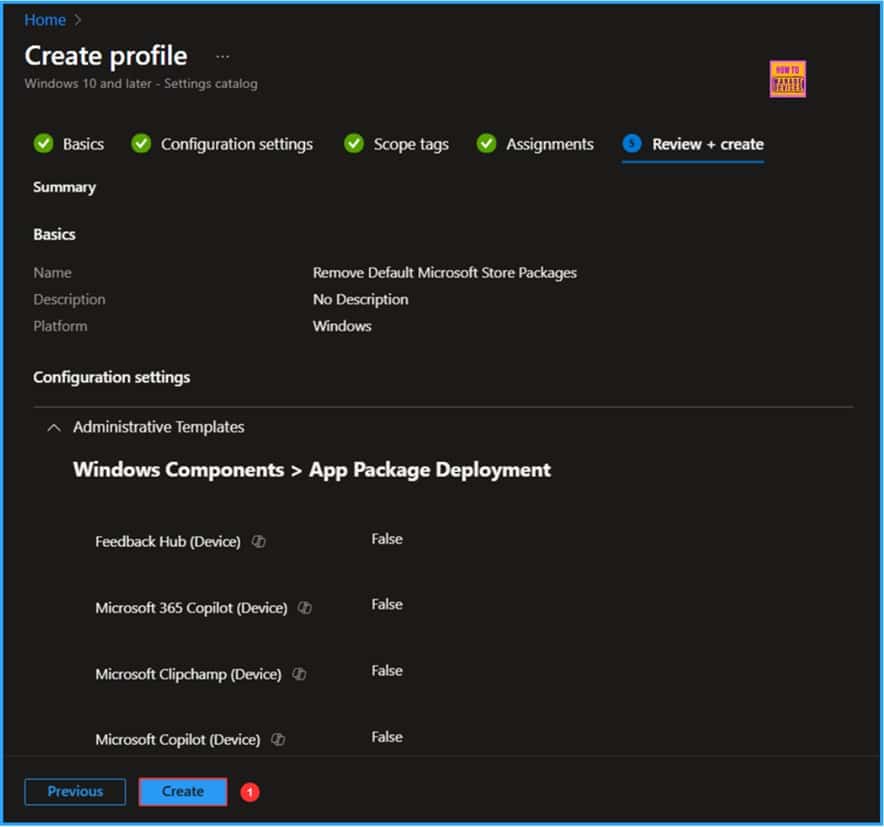
📌Best way to Remove Default Microsoft Store Packages using Intune
–https://www.anoopcnair.com/remove-default-microsoft-store-packages-intune/
☑Remove Default Microsoft Store Packages Supported Platforms Details
☑Create a Configuration Policy to Remove Default Microsoft Store Packages
☑Available Default Microsoft Store Packages in Intune Configuration
☑Monitor the Remove Default Microsoft Store Package Policy Deployment
☑Intune Event Log Analysis & End Result
Wednesday 22nd October 2025
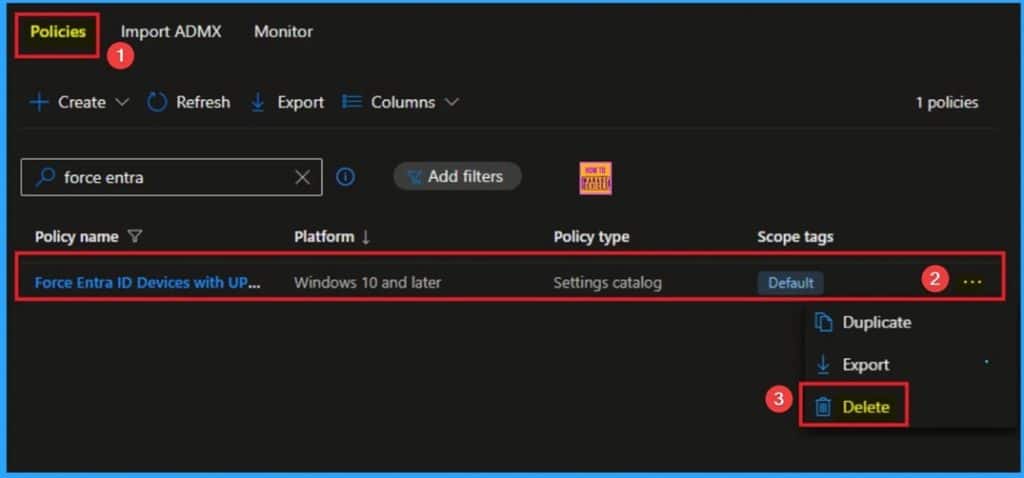
🎯How to Force Entra ID Devices with UPN Name Hints Policy to Find On-Prem AD DCs using Intune
–https://www.anoopcnair.com/entra-id-devices-with-upn-name-hints-intune/
🔥Enable UPN Name Hints Policy
🔥Real Word Example of UPN Name Hints Policy
🔥Helps to Addresses Challenge in Hybrid-Joined Devices
🔥Force Entra ID Devices with UPN Name Hints Policy
🔥How this Policy Helps Admins
🔥Improve Privacy and Security
🔥Client Side Behavior
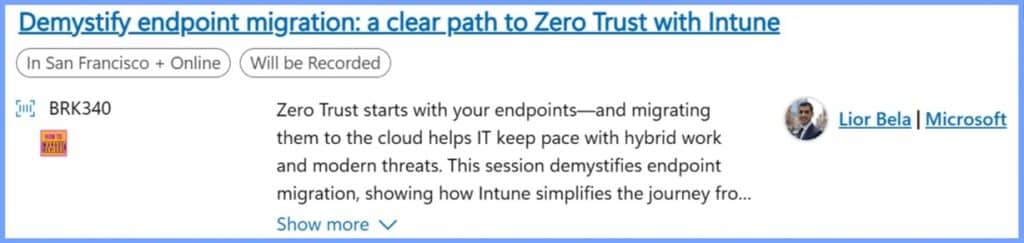
🎆List of Intune Sessions in Microsoft Ignite 2025
–https://www.anoopcnair.com/intune-sessions-in-microsoft-ignite-2025/
📌Microsoft Ignite 2025 Conference Pass Options
📌Clear Path to Zero Trust with Intune
📌What’s New in Intune: Empower IT, Protect Endpoints & Optimise with AI
📌Top Essentials for an Integrated, AI-Ready Security Foundation
📌Unlock the Full Power of Windows 365
📌Agents at Work: Windows Powers the Era of Intelligent Productivity
📌Advancing Windows Device Security through Surface Innovation
📌Unlock Efficiencies with Windows 365 Frontline & Cloud PC Devices
📌End-to-End Security for your AI Platforms, Apps, and Agents
📌Best way to Remove Default Microsoft Store Packages using Intune
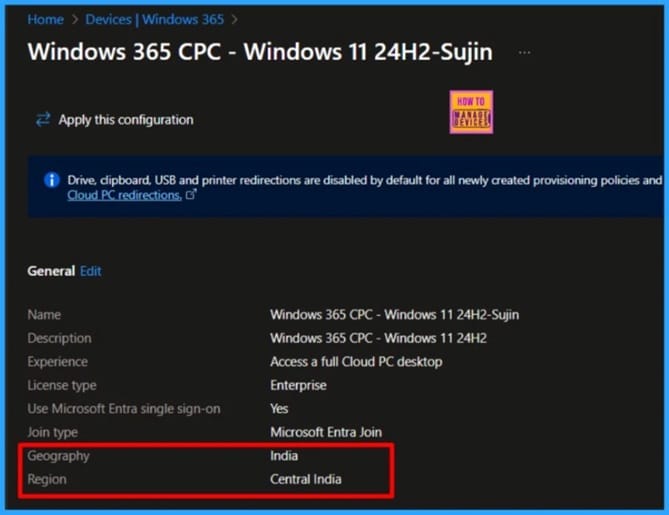
–https://www.anoopcnair.com/region-name-and-geography-of-microsoft-365/
☑ Windows 365 vs Azure Virtual Desktop: What’s the Difference
☑Working with Windows 365 Cloud PCs using the Microsoft Graph API
☑Required Microsoft Graph API Permissions to Manage Windows 365 Cloud PCs
☑Update Cloud PC Region Settings via Microsoft Graph API
☑End Result
☑PowerShell Script to Update Cloud PC Region Settings
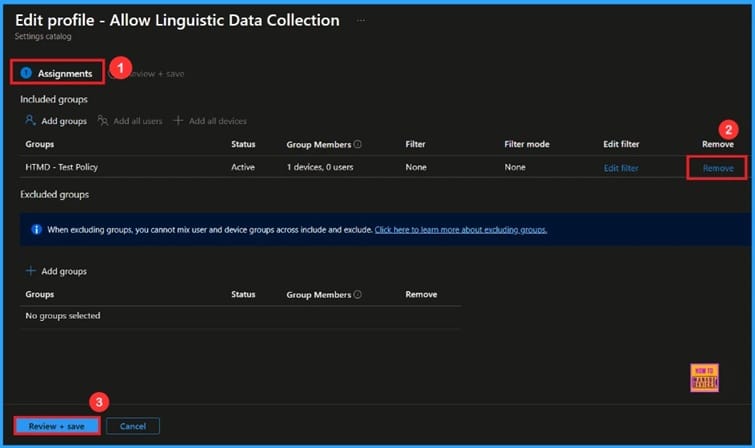
🎆Stop Spying Take Back Control of your Windows Typing Data using Intune
–https://www.anoopcnair.com/spying-take-back-windows-data-using-Intune/
🔔Stop Spying Take Back Control
🔔Improves Typing and Handwriting Accuracy
🔔Provides Better Word Suggestions and Autocorrect
🔔Enhances Language Recognition in Apps and Services
🔔Device and User Check-in Status
Thursday 23rd October 2025
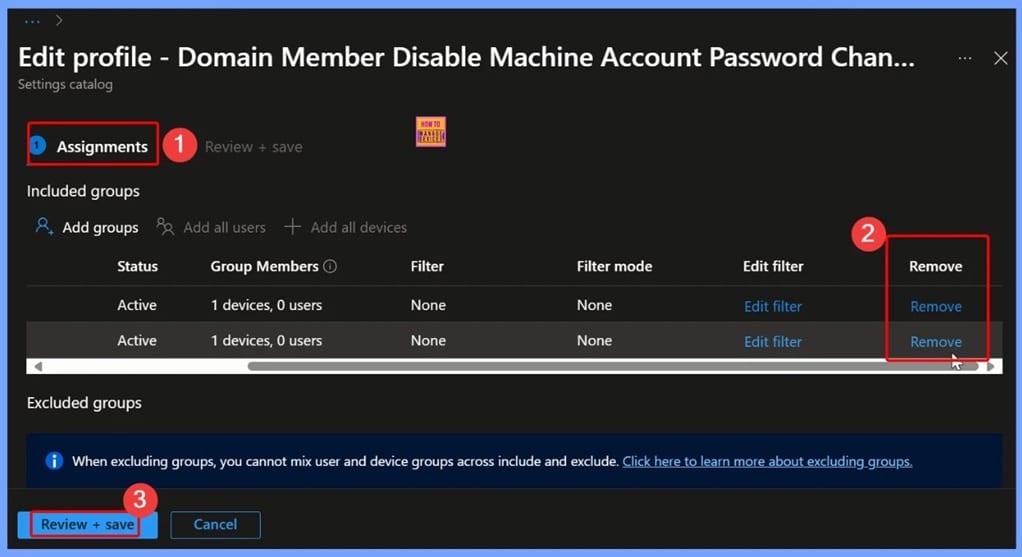
🎆How to Control Machine Account Password Changes for Domain Members using Intune Policy
–https://www.anoopcnair.com/control-machine-account-password-changes-Intune/
🔊What is a Machine Account Password
🔊How Does Windows Handle Machine Account Password Changes by Default
🔊What Happens if You Enable the Policy to Stop Password Changes
🔊How Does Disabling Automatic Password Changes Affect Security
🔊What is Microsoft’s Recommendation
🔊Local Policies Security Options
🔊Client Side Verification
🔊Windows CSP Details
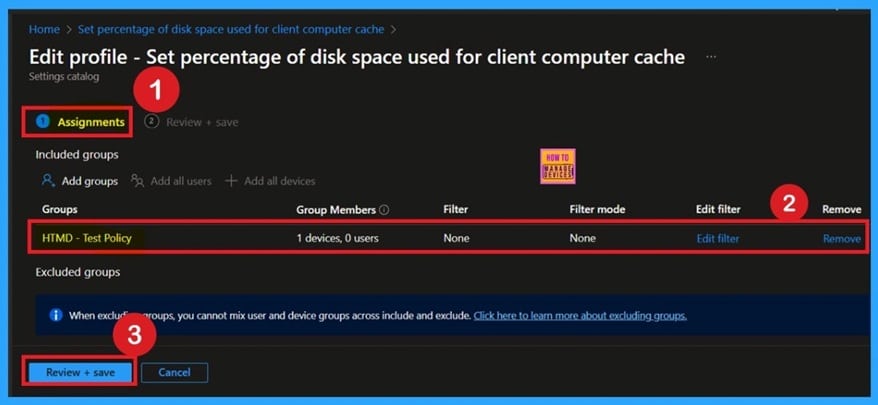
🎯Configure Percentage of Disk Space used for Client Computer Cache using Intune Policy
–https://www.anoopcnair.com/configure-percentage-of-disk-space-intune/
🔥Enable BranchCache Disk Cache Policy
🔥Real World Example of Managing Cache Allocation
🔥Helps Optimize Performance and Storage on Client Devices
🔥Configure Cache Percentage Centrally Using Settings Catalog
🔥How this Policy Helps Admins Maintain Uniformity
🔥Monitoring Status
🔥Client Side Behavior
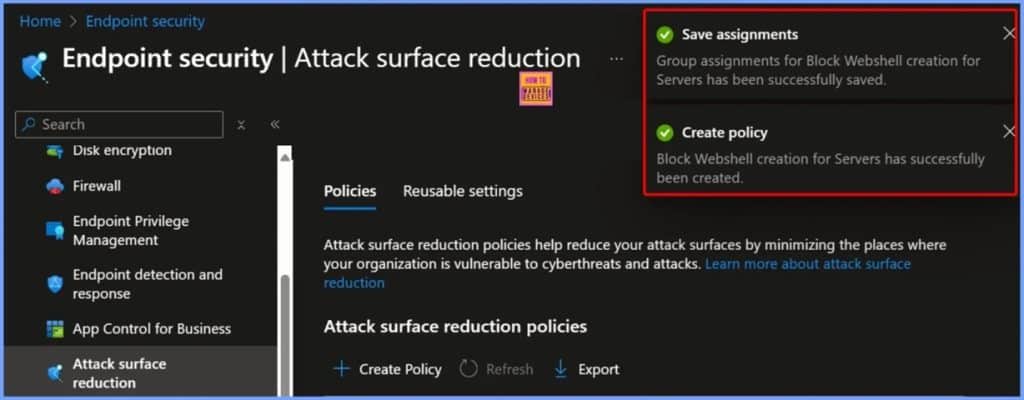
🎆Block Web shell and Suspicious Executable Creation on Servers using Intune ASR Rules
–https://www.anoopcnair.com/block-webshell-and-suspicious-executable-intune/
➡️What is a Web shell? How Can Web shells Affect Servers?
➡️Block Web shell Creation for Servers
➡️What is Application Control for Business?
➡️What Are the Benefits of Using ASR Rules?
➡️Device and User Check-in Status – Successful Deployment Status
➡️Client Side Verification
🎆How to Fix C Drive Out of Space Issue on Intune Managed Windows Devices
–https://www.anoopcnair.com/how-to-fix-c-drive-out-of-space-issue-on-intune/
🎉What is the C: Drive Out of Space Issue?
🎉How Does the Issue Appear?
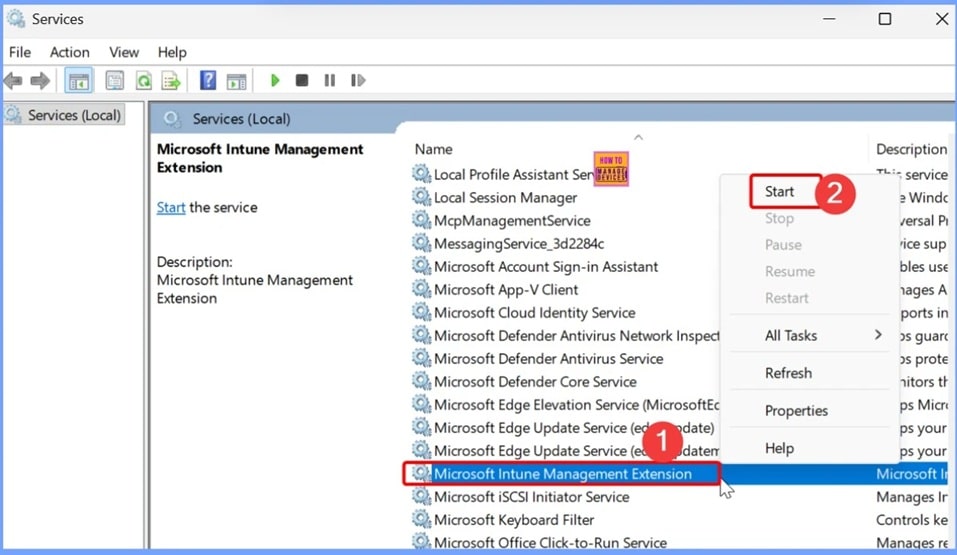
🎉Workaround for C: Drive Filling Issue on Intune-Managed Windows Devices
🎉How Intune Store App Can Cause C Drive to Run Out of Space
🎉Status – Service Degradation
🎉Incident ID IT1168328
Friday 24th October 2025
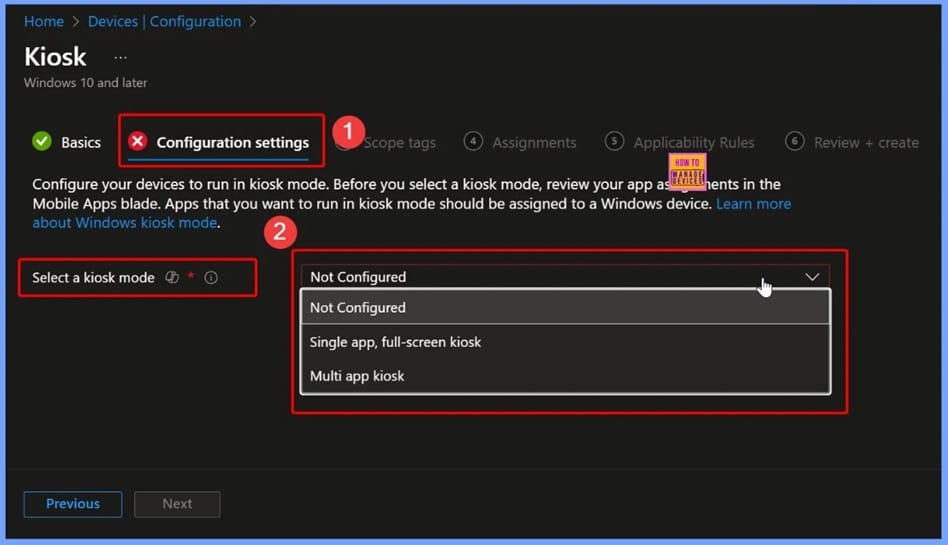
🎆How to Fix File Explorer Missing on Kiosk Start Menu in Intune
–https://www.anoopcnair.com/fix-file-explorer-missing-on-kiosk-start-intune/
➡️How File Explorer Impacts the Kiosk Experience
➡️What You Need to Check First
➡️How to Add File Explorer in Start Layout XML
➡️How to Deploy the Fix via Intune
➡️How This Fix Helps IT Admins
➡️How to Add File Explorer and Enable Printing on Intune Kiosks
➡️Fixing File Explorer in Intune Kiosk Start Menu
👉Configure BranchCache for Network Files using Intune Policies
–https://www.anoopcnair.com/configure-branchcache-for-network-files-intune/
✍Enable BranchCache for Network
✍Improve File Access Speed in Branch Office Scenarios
✍Reduce WAN Traffic with Local Caching of Shared Files
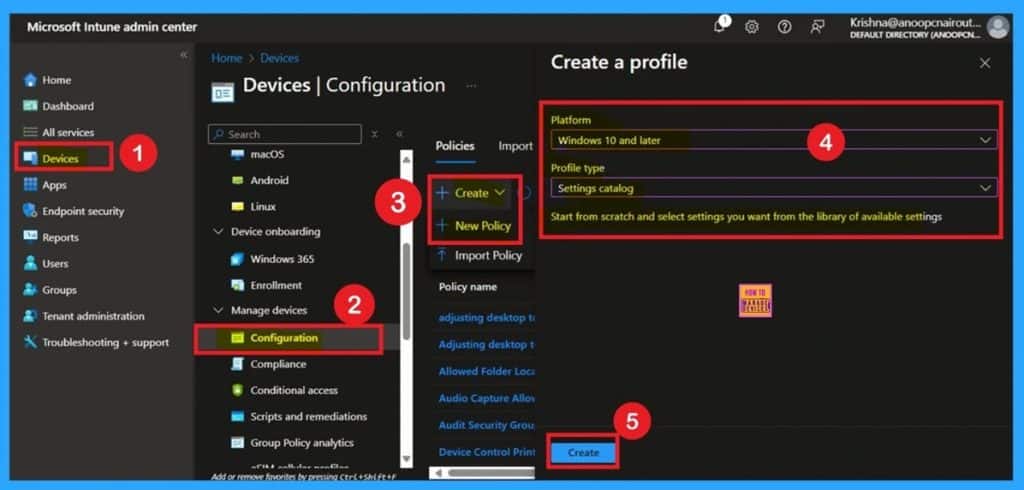
✍Steps to Deploy BranchCache Policy Using Intune
✍Control Maximum Round-Trip Latency for Caching
✍Fallback to Default 80ms Latency When Policy is Disabled
✍Enhance User Experience in High-Latency Environments
✍Optimize Network Efficiency for Remote and Branch Users
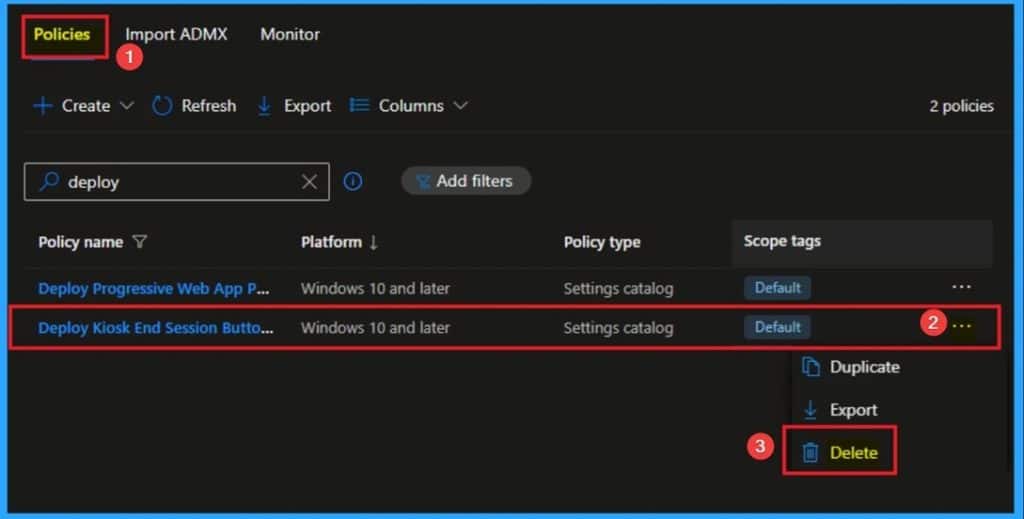
🎯Deploy Kiosk End Session Button Policy for Full Browser Reset with Intune
–https://www.anoopcnair.com/kiosk-end-session-button-policy-with-Intune/
🔥Kiosk End Session Button Policy
🔥Real Word Example of Kiosk End Session Button Policy
🔥Helps to Full Reset of the Browsing Session
🔥Enhance End User Privacy and Data Security
🔥How this Policy Helps Admins
🔥Client Side Behavior
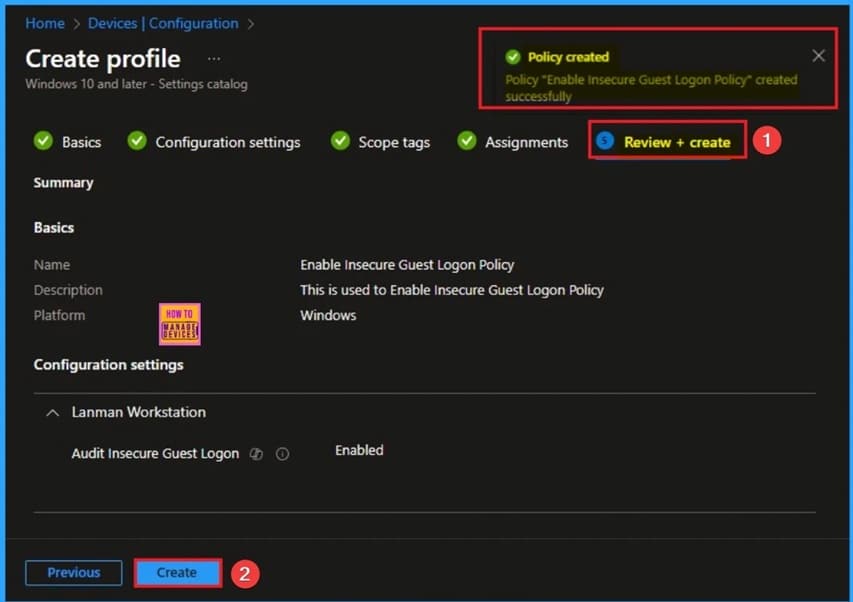
🎯Enable Insecure Guest Logon Policy to Find Hidden SMB Security Risks using Intune
–https://www.anoopcnair.com/insecure-guest-logon-policy-to-smb-using-Intune/
🔥Enable Insecure Guest Logon Policy
🔥Real Word Example of Enable Insecure Guest Logon Policy
🔥Protect Clients from Connecting to Vulnerable Servers
🔥Helps to Easily Track Misconfigured SMB Servers
🔥How this Policy Helps Admins
🔥Client Side Behavior
Connect with the HTMD Community
Join the Telegram group to get the latest step-by-step guides and news updates. Join our Meetup Page to participate in User group meetings. Also, join the WhatsApp Community to get the latest news on Microsoft Technologies. We are there on Reddit as well.
HTMD Community Social Media Platform Links
| Social Media Platform | Link |
| LinkedIn: HTMD Community | https://www.linkedin.com/company/how-to-manage-devices/ |
| Telegram: SCCM Intune Technical Discussions | https://t.me/joinchat/Q9lE6G1_BO_bGq97 |
| Telegram: JOB SCCM Intune Group | https://t.me/joinchat/SIKr3OugR2FQ-Ej9 |
| WhatsApp: HTMD Community | https://chat.whatsapp.com/CeMXHSD61HtDBJwe78IZwV |
| Telegram: AVD/Windows 365 User Group | https://t.me/Inwvdcommunity |
| https://www.facebook.com/HTMDCommunity | |
| https://www.instagram.com/htmd_community/ | |
| https://twitter.com/htmdcommunity | |
| Facebook Group: SCCM | https://www.facebook.com/groups/ConfigMgr2012/ |
| Facebook Group: Intune | https://www.facebook.com/groups/1738789256382744 |

Anoop C Nair is Workplace Technology solution architect with 25+ years (as of 2026) of experience in global enterprise organizations such as JP Morgan, Capgemini, etc. Microsoft Certified Trainer (MCT). Microsoft MVP from 2015 onwards for consecutive 11+ years! He also conducts Intune and modern workplace tech training for enterprise organizations. He is Blogger, Speaker, and Founder of HTMD Community and HTMD Conference. His main focus is on Device Management technologies like Intune, Windows, Cloud PC. He writes about technologies like Intune, SCCM, Windows, Cloud PC, Windows, Entra, Microsoft Security.

Discussion