











HTMD Newsletter 138 22nd to 26th April 2024
Welcome to the HTMD Newsletter 138 Summary from 22nd April to 26th April 2024! This is the list of posts and videos the HTMD Community published this week and news from the IT industry. You can get all the information and details from Windows 11, Cloud PC, SCCM, Intune, Azure Virtual Desktop (AVD), Android, iOS, and Mac.
Did you miss updates from last week? Check out the link below.
- 135th HTMD Newsletter – HTMD Newsletter 135 1st to 5th April
- 136th HTMD Newsletter – HTMD Newsletter 136 8th to 12th April
- 137th HTMD Newsletter – HTMD Newsletter 137 15th to 19th April
22nd April 2024 – HTMD Newsletter 138
🎆Renew SCIM Token in Apple Business Manager to Sync Microsoft Entra ID
https://www.anoopcnair.com/renew-scim-token-in-abm-sync-microsoft-entra-id/
➡Renew SCIM Token in Apple Business Manager
➡Your SCIM Token will Expire Soon
➡Testing Connection to Apple Business Manager SAML
➡Microsoft Entra Connect Sync

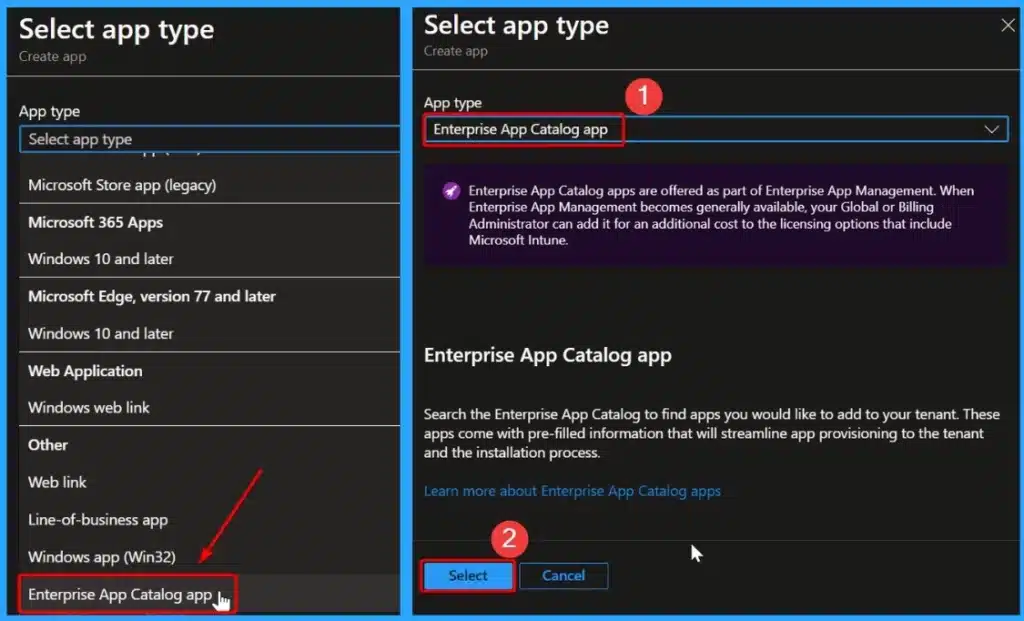
📌Install Evernote with Intune Enterprise App Catalog App
https://www.anoopcnair.com/enterprise-app-catalog-app-evernote-with-intune/
💡Enterprise App Catalog App
💡Evernote Package Details
💡Best Note-Taking App – Organize your Notes with Evernote
💡Monitoring Deployment Status
💡End-User Experience
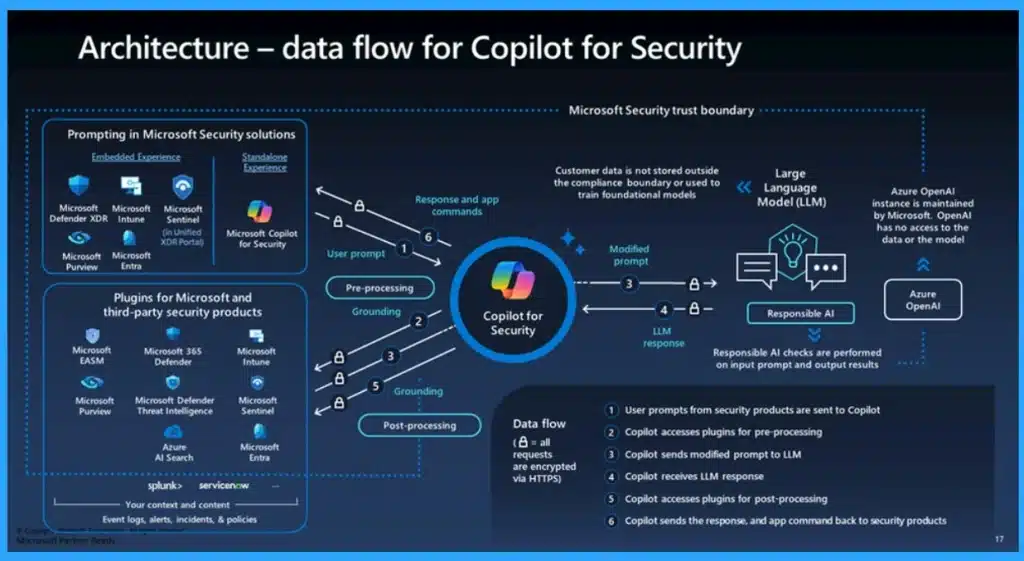
🎆Get Free Certification from Microsoft on Copilot for Security
https://www.anoopcnair.com/certification-microsoft-on-copilot-for-security/
🎊Advanced 400-Level Training Courses
🎊Overview of High level Modules
🎊Technical Skilling Curriculum
🎊knowledge check for the Microsoft Copilot for Security Training
🎊Microsoft Copilot for Security Training attestation
🎊Different Types of Course Level
⚙Different Ways to Find CPU or Processor Specs in Windows 11
https://www.anoopcnair.com/find-cpu-or-processor-specs-in-windows-11/
↘Find CPU/Processor Specs in Settings
↘Find CPU/Processor Specs Using System Information
↘Use PowerShell to find CPU/Processor Specs

23rd April 2024 – HTMD Newsletter 138
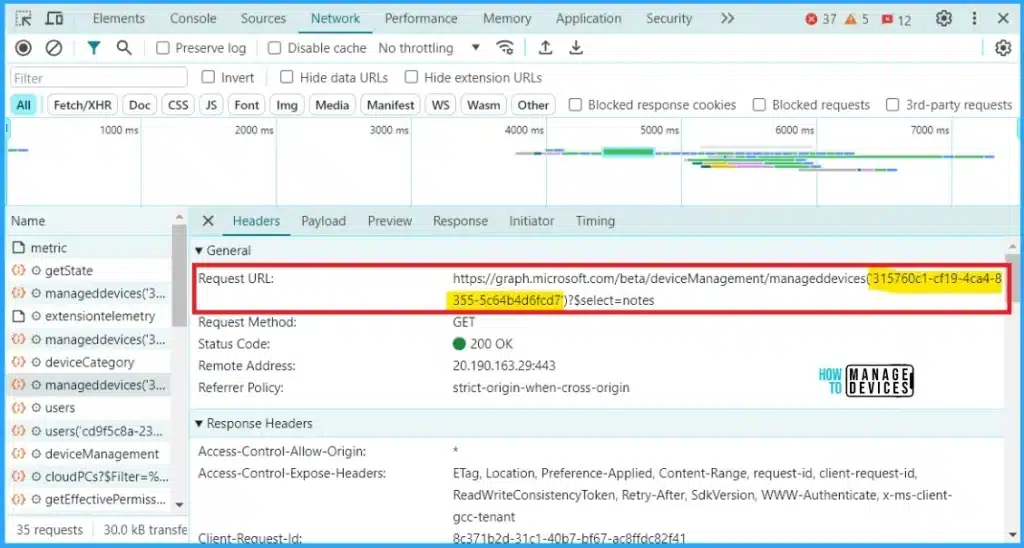
📍Best Guide to Restart Intune Devices Remotely using Microsoft Graph API and PowerShell
https://www.anoopcnair.com/restart-intune-devices-remotely-ms-graph/
📌Permissions Required to Call rebootNow Action
📌End User Experience After Calling rebootNow Action
📌Trigger Reboot using Microsoft Graph via PowerShell
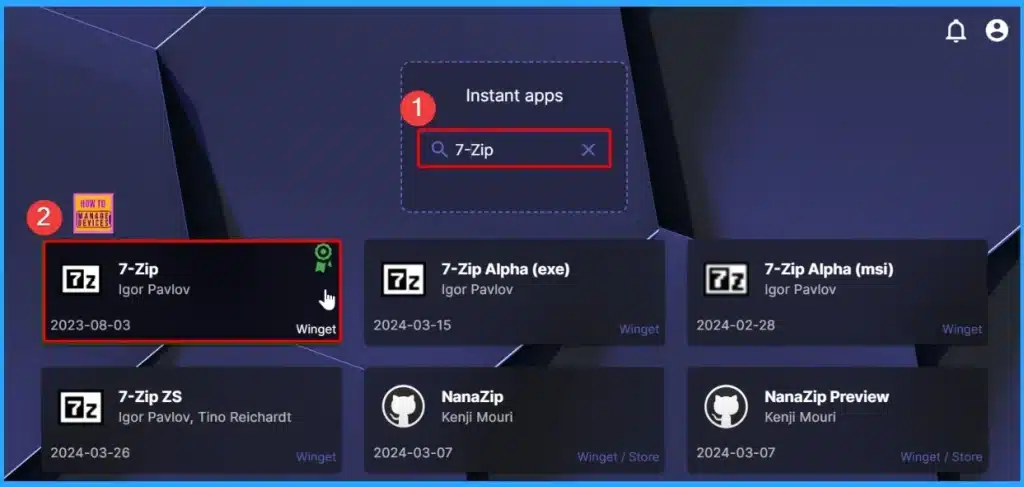
➡Robopack Makes Intune App Deployment to Next Level
https://www.anoopcnair.com/robopack-makes-intune-app-deployment/
✔Simplify Your App Deployment Process with Robopack
✔Effortless App Management and Updates with Robopack
✔Ultimate Solution for App Conversion
✔Integration with Winget and Microsoft Store
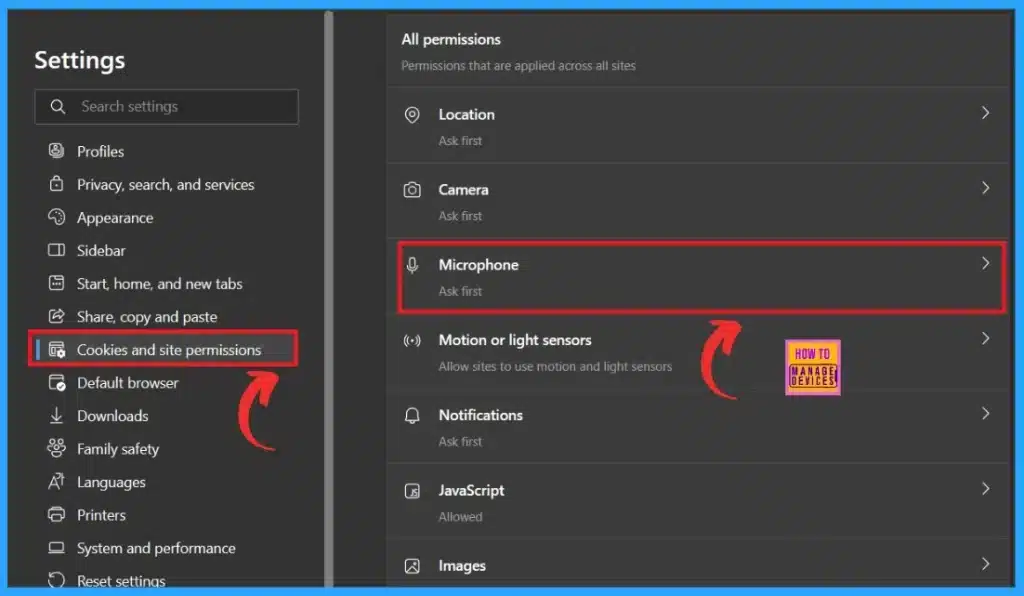
🎉How to Turn Off Microsoft Edge Notifications
https://www.anoopcnair.com/how-to-turn-off-microsoft-edge-notifications/
⏩Easily Block Browser Notifications
⏩Increase the Productivity and Improve Focus
⏩Minimizing the Distractions by Turn Off Notification
⏩Turn Off Notifications for Specific Websites
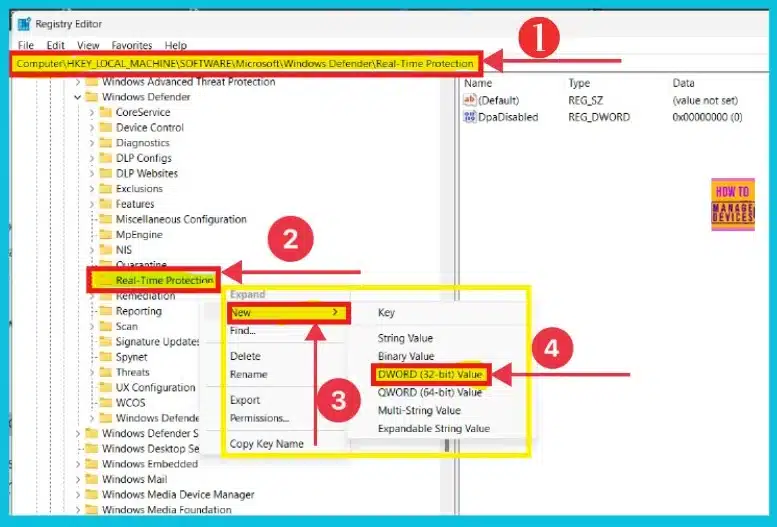
🎆Enable Disable Performance Mode for Dev Drive Protection in Windows 11
https://www.anoopcnair.com/performance-mode-for-dev-drive-protection/
📌Understanding Dev Drive
📌Protecting Dev Drive with Dev Drive Protection and Performance Mode
📌Enhancing Developer Performance with Performance Mode
📌Different Methods for Enabling and Disabling Performance Mode for Dev Drive Protection
📌Scans for Threats Asynchronously on the Dev Drive volume to Reduce Performance Impact
24th April 2024 – HTMD Newsletter 138
🔮Windows365 Enterprise Introduces Disk Storage Resizing for Cloud PCs with Step-Up Licenses
https://www.anoopcnair.com/windows365-disk-storage-resizing-for-cloud-pcs/
👉Disk Storage Resizing for Cloud PCs with Step-Up Licenses
👉HP Anywhere for Windows 365 Enterprise
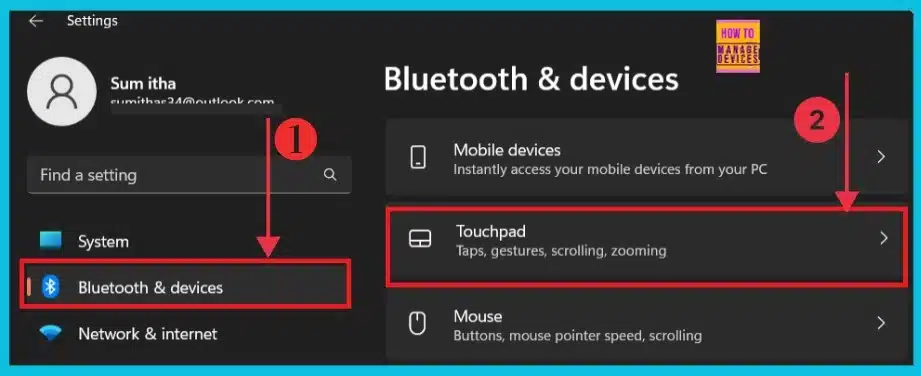
🔮Reset Touchpad Settings and Gestures to Default in Windows 11
https://www.anoopcnair.com/reset-touchpad-settings-to-default-windows-11/
💡Reset Touchpad Settings and Gestures to Default
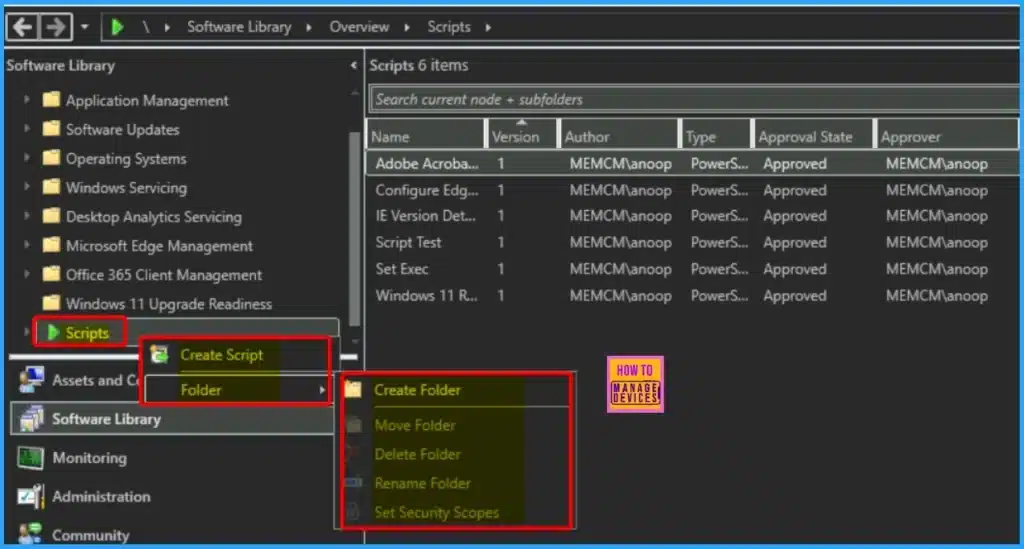
✔SCCM 2403 New Key Features and Improvements
https://www.anoopcnair.com/sccm-2403-new-key-features-and-improvements/
📌Key Highlights of SCCM 2403
📌Run Prerequisite Check for SCCM 2403
📌Install SCCM 2403 Update
📌Automated diagnostic Dashboard for Software Update Issues
📌Centralized Search Box in the SCCM Console
📌Added Folder Support for Scripts Node in Software Library
📌Enable HTTPS or Enhanced HTTP for Client Communication
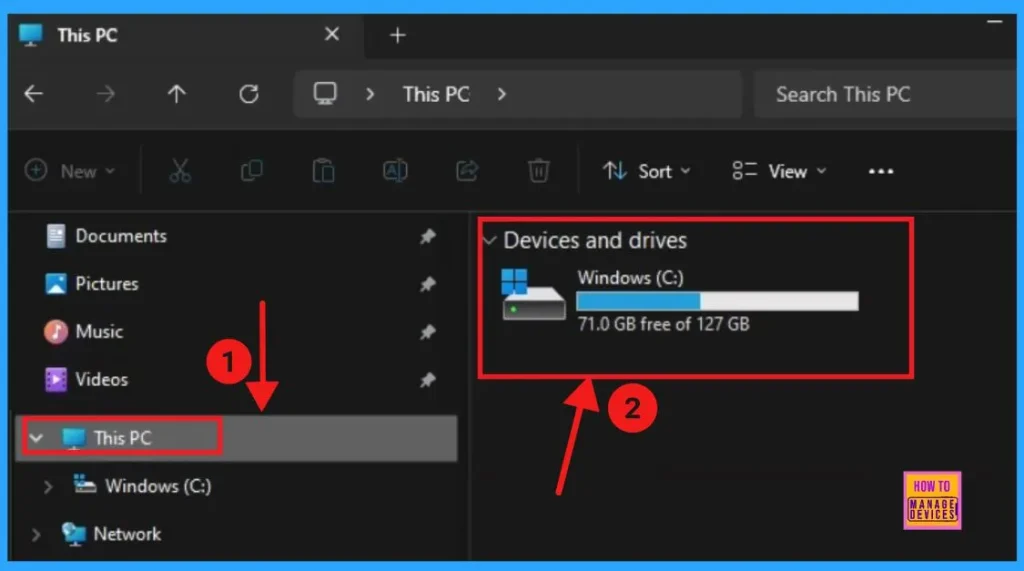
➡6 Different way to Find File System of a Drive in Windows 11
https://www.anoopcnair.com/6-different-way-to-find-file-system-of-a-drive/
📌Understanding and Managing File Systems
📌Different Methods of Managing File System
📌Importance of a Reliable and Efficient File System for Data Management
📌File Systems Supported for Disk Partitions in Windows 11
25th April 2024 – HTMD Newsletter 138
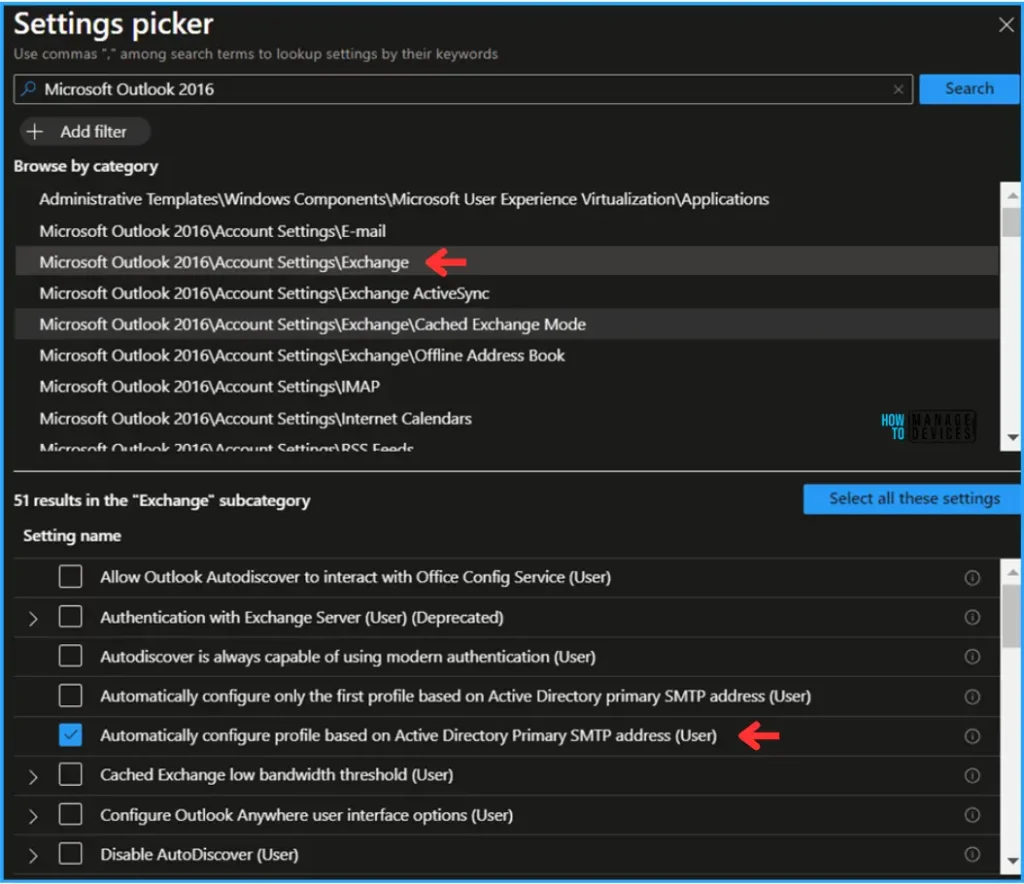
☑Best Way to Automatically Configure Outlook Profile for Windows with Intune
https://www.anoopcnair.com/configure-outlook-profile-for-windows-intune/
✔Benefits of Automatically Configure Outlook Profile for Windows
✔Microsoft Outlook 2016\Account Settings\Exchnage
✔Automatically configure profile based on Active Directory Primary SMTP address (User)
✔Monitor Device and User Check in status
✔End User Experience
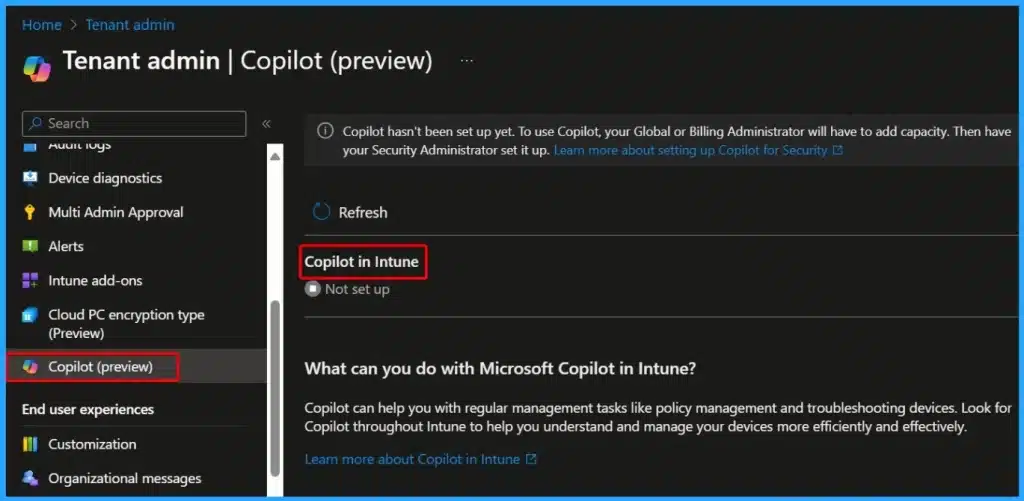
📢Microsoft Introduced CrowdStrike Falcon as a Mobile Threat Defense Partner with Intune
https://www.anoopcnair.com/crowdstrike-falcon-as-a-mobile-threat-defense/
⏩CrowdStrike Connector in Intune Admin Center
⏩Expected Publication Timing
⏩CrowdStrike Falcon is a mobile threat defence solution
⏩Undderstand the Control Access Based on Threats from Malicious Apps
⏩Block when Malicious Apps are Detected

⏩2404 Microsoft Intune New Features April Update
https://www.anoopcnair.com/2404-microsoft-intune-new-features-april-update/
⏳Intune New Features April Update
⏳Auto Update with Win32 App Supersedence
⏳CrowdStrike Falcon as Mobile Threat Defense Partner
⏳Windows Update Distribution Report in Intune
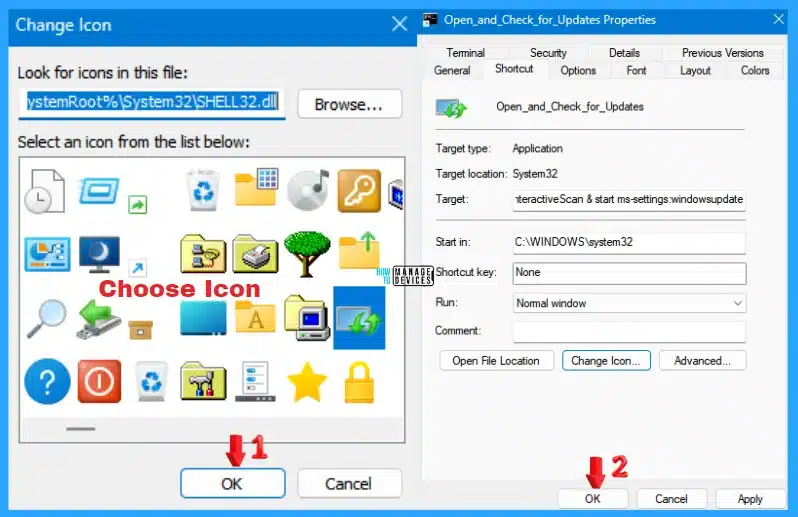
↘How to Create Different Shortcuts to Check for Windows Updates in Windows 11
https://www.anoopcnair.com/create-shortcuts-to-check-for-windows-updates-windows-11/
⚙Create a Shortcut for Windows Updates and Check for Updates
⚙Shortcut for Windows Updates Only
⚙Automatically Check Windows Updates
✔SCCM 2403 New Key Features and Improvements
https://www.youtube.com/watch?v=UVZHIYJbfLo
📌Key Highlights of SCCM 2403
📌Run Prerequisite Check for SCCM 2403
📌Install SCCM 2403 Update
📌Automated diagnostic Dashboard for Software Update Issues
📌Centralized Search Box in the SCCM Console
📌Added Folder Support for Scripts Node in Software Library
📌Enable HTTPS or Enhanced HTTP for Client Communication

26th April 2024 – HTMD Newsletter 138
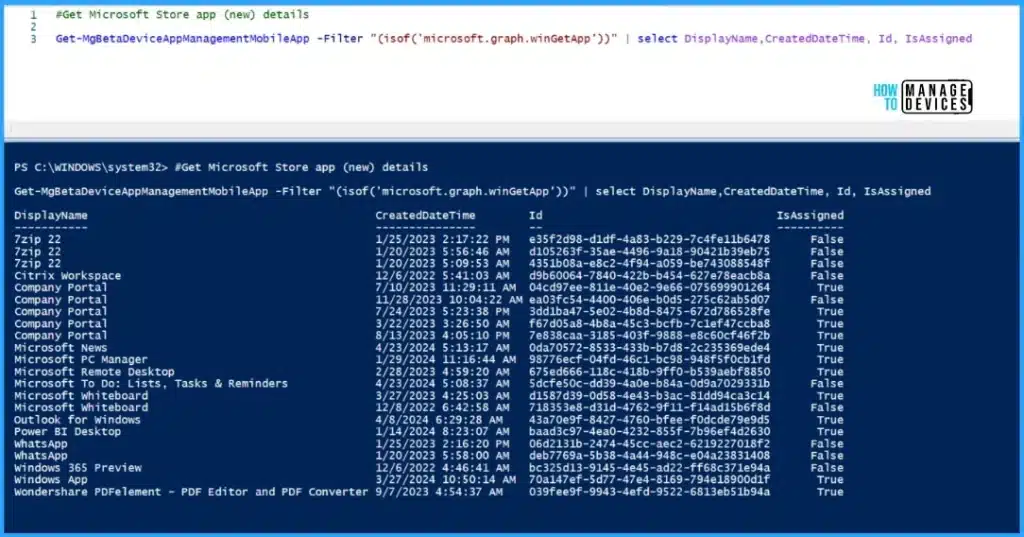
🎆Best Guide to Install Microsoft Graph PowerShell Modules
https://www.anoopcnair.com/install-microsoft-graph-powershell-modules/
📌Prerequisites for Installing Microsoft Graph PowerShell SDK
📌Install Microsoft Graph PowerShell Modules
📌How to Use the Microsoft Graph PowerShell SDK
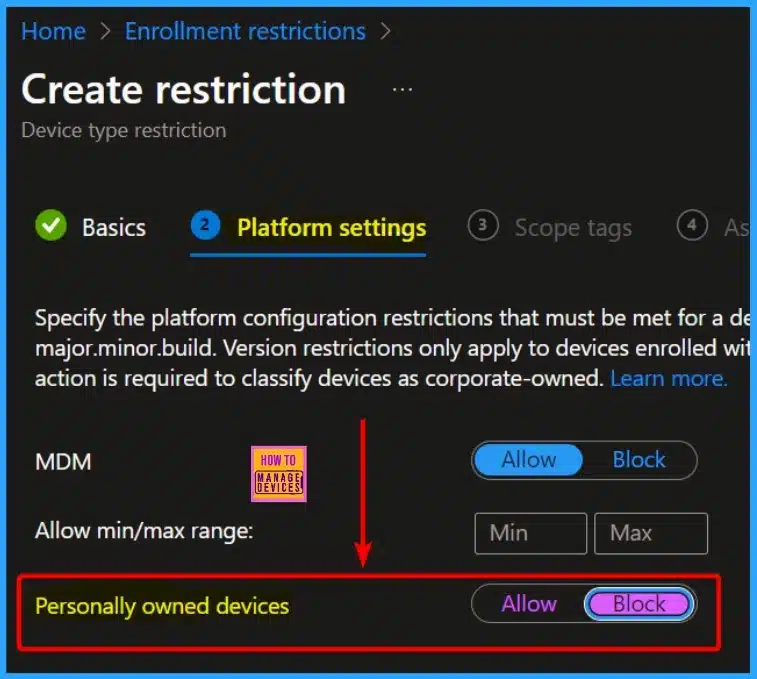
🎆Block Users Personal Devices to Join Entra ID using Intune
https://www.anoopcnair.com/block-users-personal-devices-join-entra-intune/
💡Microsoft Entra Join and Registration Settings
💡Users may Join their Personal Devices to Microsoft Entra
💡Disabling End User Devices Enrollment to Microsoft Intune
💡Restriction on Adding Windows Devices to Microsoft Entra ID
💡Exceptions for Hybrid Join and AutoPilot Self-Deployment Mode
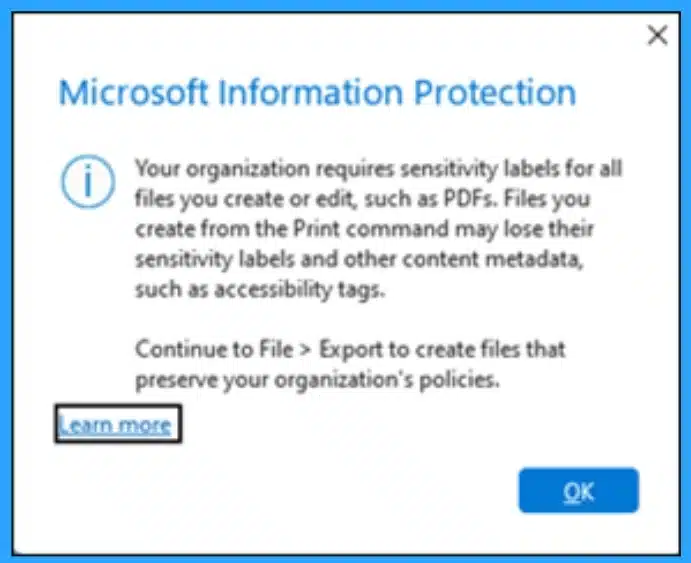
🎆Outlook Desktop Blocks Printing to PDF if Mandatory Labeling is Enabled
https://www.anoopcnair.com/outlook-desktop-blocks-printing-to-pdf/
🎉Understanding the Outlook Desktop Blocks Printing to PDF Issue
🎉What is a Mandatory Labeling
🎉Preserving Sensitivity Labels for PDFs
🎉Workaround using Export Function
🖱Microsoft Intune Introduces Full Control Support for MacOS Devices
https://www.anoopcnair.com/intune-introduce-full-control-support-for-macos/
▶Support for Mac full control
▶Control macOS remotely
▶Access Remote Help with macOS Devices



Discussion