












HTMD Newsletter 113 Summary from 30th October to 3rd November 2023
Welcome to the HTMD Newsletter 113 Summary from 30th October to 3rd November 2023! This is the list of posts and videos that the HTMD Community published this week and news from the IT industry. You can get all the information and details from Windows 11, Cloud PC, SCCM, Intune, Azure Virtual Desktop (AVD), Android, iOS, and Mac.
➡️ Here’s how you can be part of the HTMD Community, You can join us here.
➡️ Here, you can Subscribe HTMD Youtube Channel and welcome Video Messages about HTMD here.
➡️ We are on WhatsApp. To get the latest step-by-step guides and news updates, Join our Channel, HTMD WhatsApp.
Did you miss updates from last week? Check out the link below.
- 110th HTMD Newsletter – HTMD Newsletter 110 Summary from 9th to 13th October 2023
- 111th HTMD Newsletter – HTMD Newsletter 111 Summary from 16th to 20th October 2023
- 112th HTMD Newsletter – HTMD Newsletter 112 Summary from 23rd to 27th October 2023

30th October 2023 – HTMD Newsletter 113
🎥🎆Intune New FSLogix Policies Settings Catalog Administrative Template options
🎈AVD Optimization – Settings Catalog or Administrative Template
🎈Prevent Login With Failure
🎈Clear Cache on Forced Unregister
🎈New policies implemented in the Intune 2310 version
https://youtu.be/8-nEl29qIBo

🚀Configure Offer Remote Assistance Policy using Intune
✅Windows CSP Details UnsolicitedRemoteAssistance
✅Configure Offer Remote Assistance Policy using Intune
✅Intune Report for Configure Offer Remote Assistance
https://www.anoopcnair.com/configure-offer-remote-assistance-policy/

🎆MFA Authentication now Added to WhatsApp
🌟MFA Codes via WhatsApp and RCS on Android and iOS
🌟Enhanced Security Through Alternate Messaging
🌟WhatsApp Verification for Specific Country Codes
🌟Enabling SMS-Based Authentication in Microsoft Entra ID
https://www.anoopcnair.com/mfa-authentication-now-added-to-whatsapp/

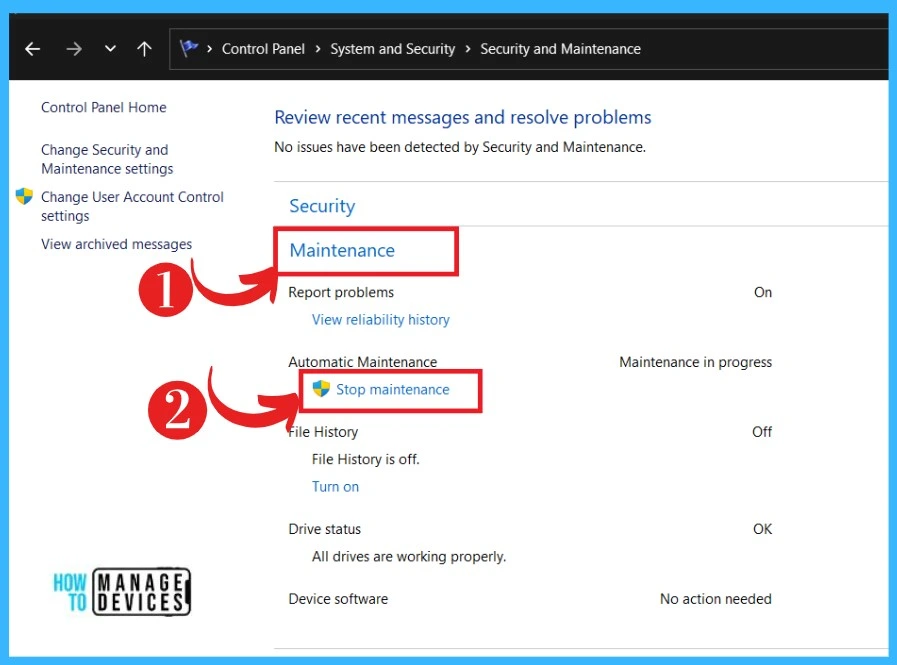
🎆Start or Stop Automatic Maintenance in Windows
▶Start or Stop Automatic Maintenance By Using Control Panel
▶Secure software hardware and security configurations up to date
▶To Start or Stop Automatic Maintenance in PowerShell
▶Stop Automatic Maintenance in PowerShell/ Command Prompt
https://www.anoopcnair.com/start-or-stop-automatic-maintenance-in-windows/
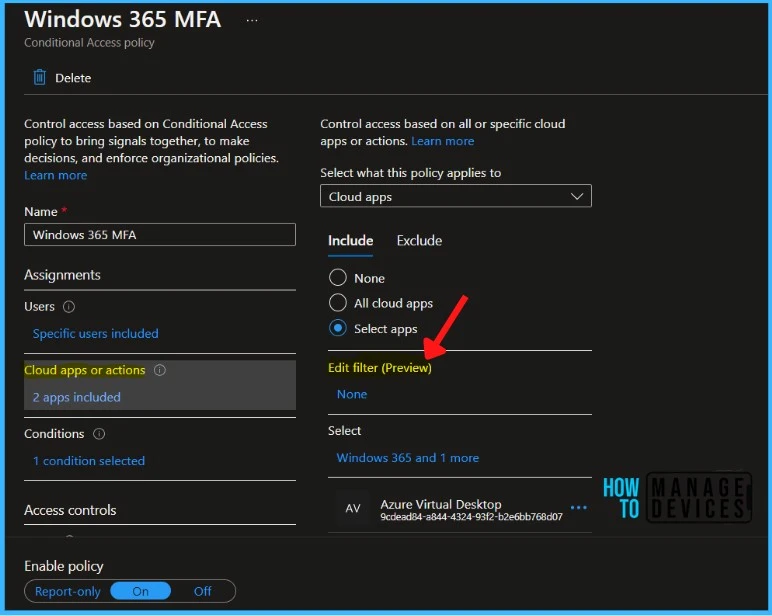
🔔Auto Rollout of Conditional Access Policy from Microsoft Entra ID
⏩Auto-rollout of Conditional Access policies
⏩Rollout Start Date?
⏩Expected General Availability?
https://www.anoopcnair.com/auto-rollout-of-conditional-access-policy-entra/
31st October 2023 – HTMD Newsletter 113
📢Best Guide for Multi-App Kiosk Mode for Corporate-Owned Devices in Intune
⏩Deploy Microsoft Home Screen
⏩Create a Device Configuration Profile Enable Multi-App Kiosk Mode
⏩End User Experience
https://www.anoopcnair.com/multi-app-kiosk-mode-for-corporate-owned-intune/

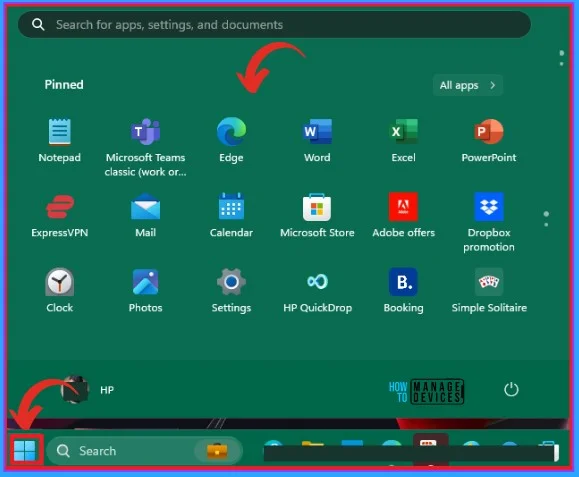
🎆Accent Colors in Windows Start Menu and Taskbar
🎆Easily customize the appearance of their desktop
🎆Clear Visual Identification
🎆Accent Colors on the Title Bar and Windows Borders
https://www.anoopcnair.com/accent-colors-in-windows-start-menu-and-taskbar/
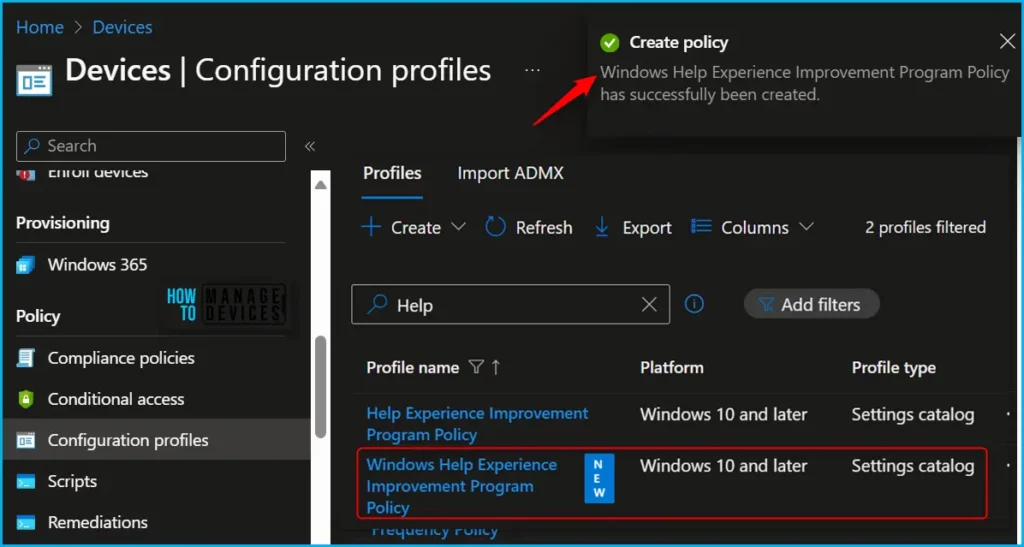
💥Import and Export Settings Catalog Policy
🕵♂Export JSON file from Intune Configuration profiles
🕵♂Import Intune Settings Catalog Policies
🕵♂Upload Json File
https://www.anoopcnair.com/import-export-settings-catalog-policy-intune/
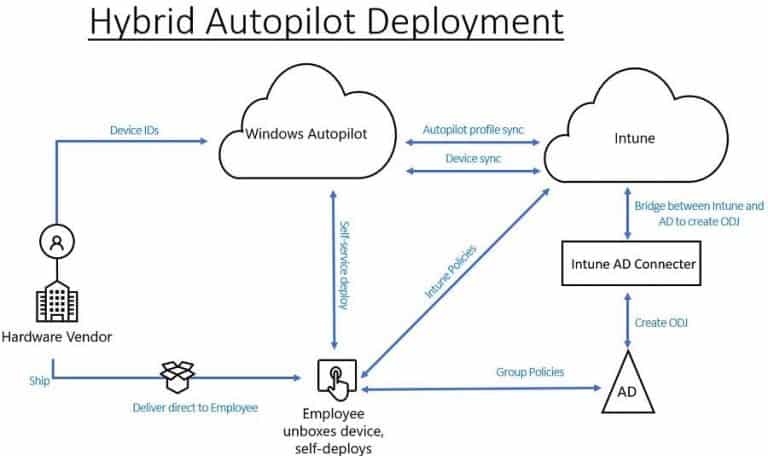
🎆Compare Hybrid Vs Entra Joined for Autopilot
👉Avoid Using Entra Hybrid Joined with Autopilot
👉Provisioning New Windows Endpoints
👉Managing Existing Hybrid Azure AD or AD Joined Windows Endpoints
👉Making the Right Endpoint Management Decision
https://www.anoopcnair.com/compare-hybrid-vs-entra-joined-for-autopilot/
1st November 2023 – HTMD Newsletter 113
🎈Allow Upload of User Activities Policy using Intune
🔃Windows CSP Details UploadUserActivities
🔃Allow Upload of User Activities Policy using Intune
🔃Intune Report for Allow Upload of User Activities Policy
🔃Registry-Key Verification for UploadUserActivities
https://www.anoopcnair.com/allow-upload-of-user-activities-policy/

🧑💻Best Method to Install Fonts on macOS using Intune
💥Install and use Fonts in macOS Manually
💥Create a Shell Script to Download and Install Font in macOS
💥Important Considerations Before Deploying Shell Scripts using Intune
💥Deploy Script to Install Fonts on macOS using Intune
💥End User Experience
https://www.anoopcnair.com/install-fonts-on-macos-using-intune/

📺🤖Intune MDM – Future of Device Management Apple’s DDM
🤖Software Updates and Passcode DDM Channel Policies
🤖Autonomous and Proactive Apple Devices
🤖Asynchronous – Avoid common performance and scalability issues
https://youtu.be/evIBYXYvZUI

⚙Windows 11 23H2 Upgrade using Intune Feature Updates Policy
💡Prerequisites for Windows 11 23H2 Upgrade
💡Configure Feature Updates Deployment Policy
💡Windows Update Rollout Options
https://www.anoopcnair.com/windows-11-23h2-upgrade-intune-feature-updates/

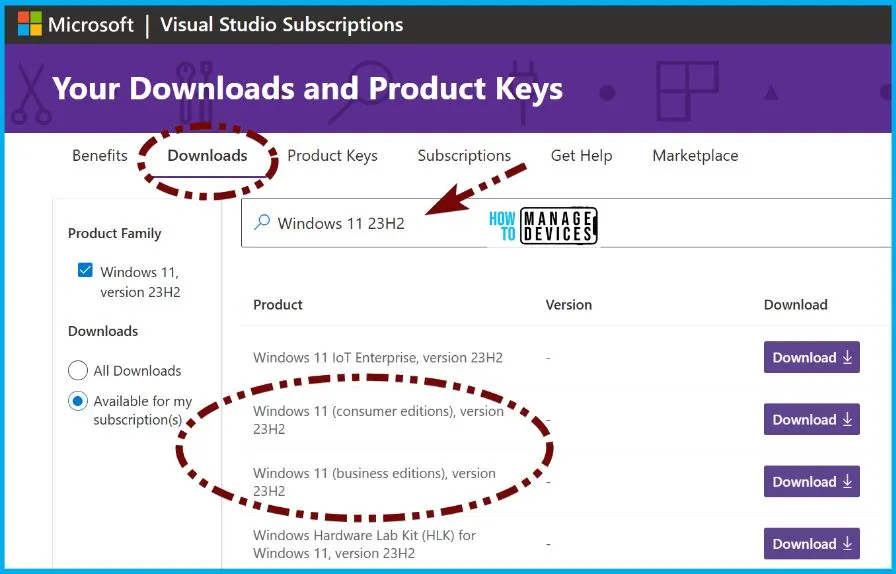
🎆How to Download Windows 23H2 ISO
🌟Windows 11 23H2 Update through various channels
🌟Visual Studio Subscriptions
🌟Software Download Center using the Update Assistant
🌟Windows 11 (consumer editions), version 23H2
🌟Windows 11 (business editions), version 23H2
🌟Password Removal for Device Unlock and In-Session Authentication
🌟Taskbar and Search Customization
🌟Ungroup Icons and Show Labels on the Taskbar
https://www.anoopcnair.com/how-to-download-windows-23h2-iso/
2nd November 2023 – HTMD Newsletter 113
🎆ClickUp App for Windows Detailed Review
🎈Download ClickUp on any and every device
🎈Mobile, desktop, voice assistants, and more
🎈ClickUp transform your productivity
🎈Easily Create Lists, Docs and more
🎈Allows third-party app integrations
🎈Different menus in ClickUp and their explanation
https://www.anoopcnair.com/clickup-app-for-windows-detailed-review/

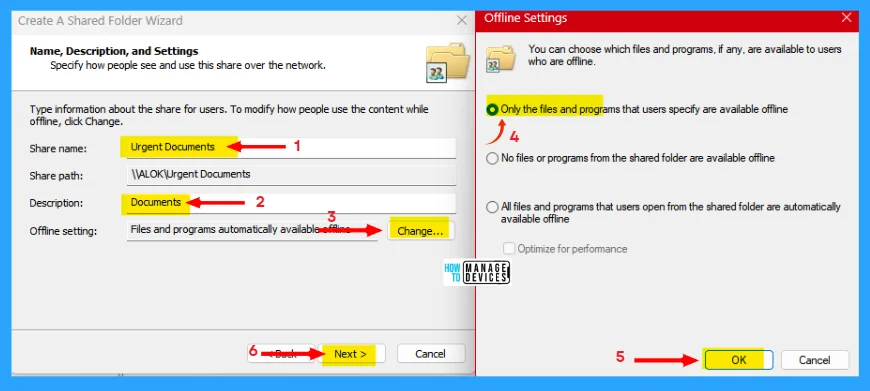
📍How to Share Files Folders on Network in Windows 11
↘Share Files and Folders in File Explorer Using Files Sharing
↘Share Files and Folders Over a Network From File Explorer
↘Drives Share Using Shared Folder Wizard
https://www.anoopcnair.com/share-files-folders-on-network-windows11/
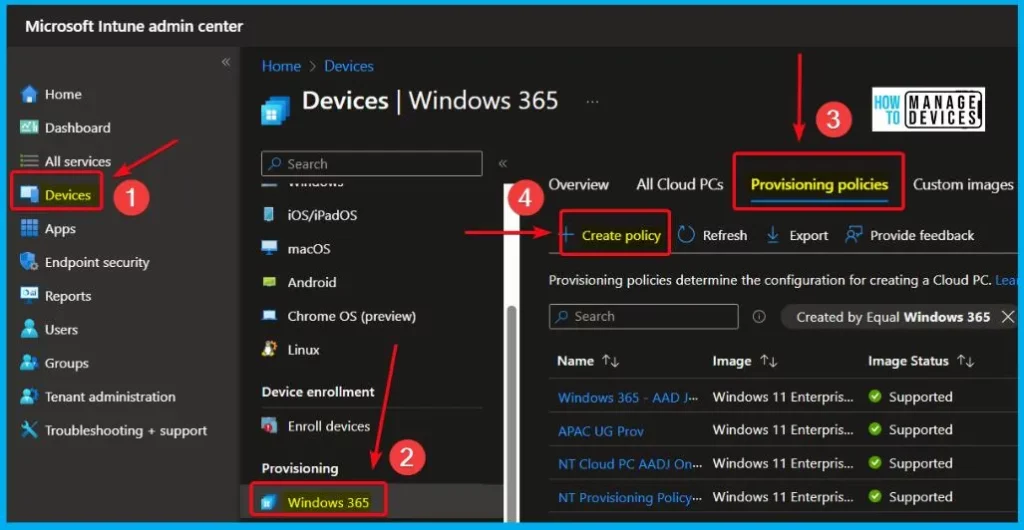
🎆Windows 365 Cloud PC 2310 October Update Service Release
👉Place Cloud PC under review
👉New 16 vCPU Offerings in Windows 365
👉New Gallery Images for Windows 11
👉New Graph API for Windows 365 Frontline
👉Audit Logs Supported in Azure Log Analytics
https://www.anoopcnair.com/windows-365-cloud-pc-2310-october-service/
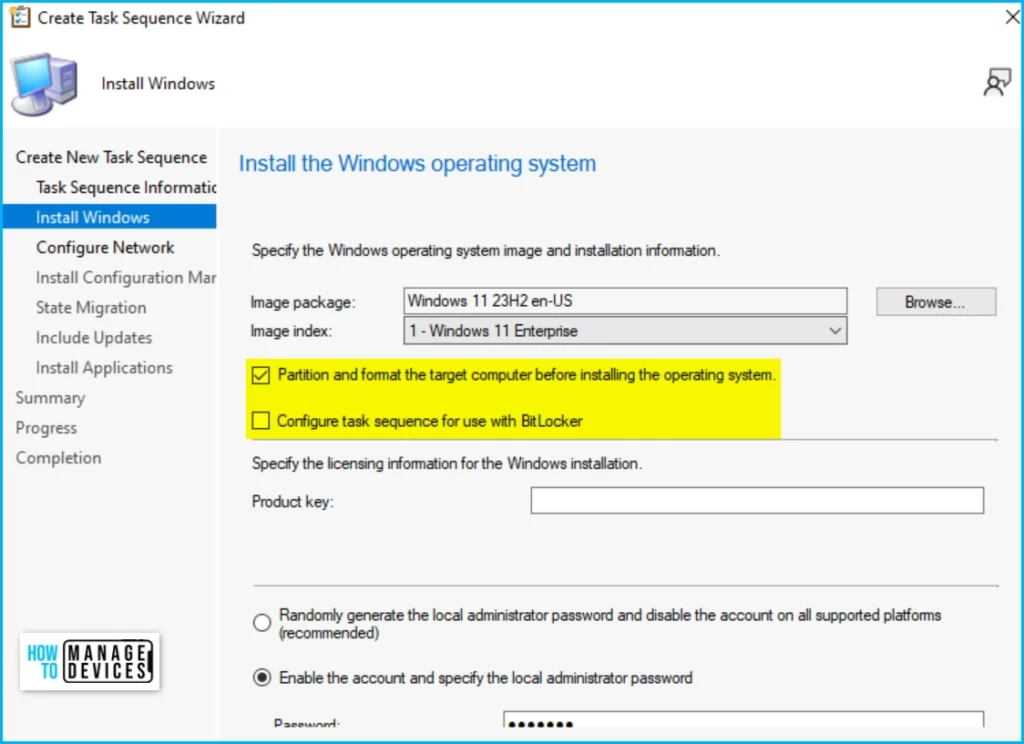
📢Deploy Windows 11 23H2 using SCCM Step by Step Guide
✅Import the Windows 11 23H2 Image in SCCM
✅Create Windows 11 23H2 Task Sequence
✅Bare Metal Task Sequence Deployment Steps
https://www.anoopcnair.com/deploy-windows-11-23h2-using-sccm-guide/
📺⭐Easiest Windows 11 23H2 Upgrade Process
💥Windows 11 23H2 End User Experience
💥Deploy Windows 11 23H2 using SCCM Step by Step Guide
💥Windows 11 23H2 Upgrade using Intune Feature Updates Policy
💥Check for Updates Enablement Package
https://youtu.be/0FwuOyeAiUs

3rd November 2023 – HTMD Newsletter 113
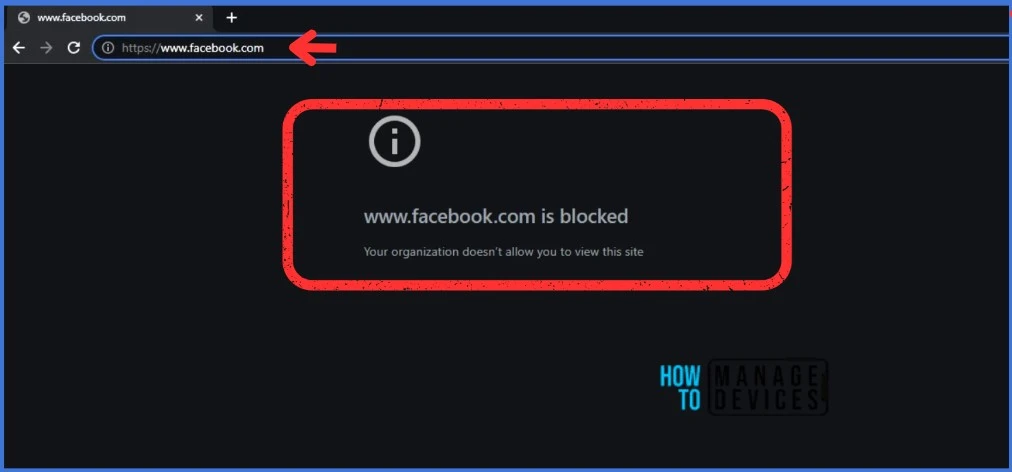
📢Best Guide to Block URLs on Google Chrome and Microsoft Edge using Intune
🎈Why are many Websites being Blocked in the Workplace?
🎈Configuration Profiles to Block URLs on Google Chrome and Microsoft Edge
🎈End-user experience after Blocking the URLs
🎈Monitor the Configuration Profile Deployment in Microsoft Intune
https://www.anoopcnair.com/block-urls-on-google-chrome-and-microsoft-edge/
↪Intune Unsaved Edit will be Discarded Error is getting Fixed
↪A False Alarm from Intune Services
↪Intune Admins confusion?
↪False Positive Warning
↪Issue to be resolved by early next week (2nd week of Nov 2023)
https://www.anoopcnair.com/intune-unsaved-edit-will-be-discarded-error-fix/

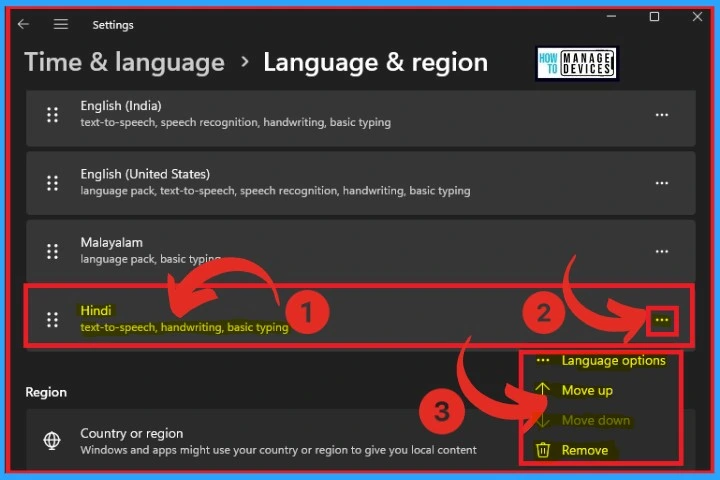
🎆Language Packs for Windows
✨Easily Add Multiple Preferred Languages to Your Windows PC
✨Display Languages vs Preferred Languages
✨Adding Keyboards to Your Preferred Language in Windows
https://www.anoopcnair.com/language-packs-for-windows-detailed-review/
🎆Do Not Display Network Selection UI Policy using Intune
⭐Windows CSP Details DontDisplayNetworkSelectionUI
⭐Do Not Display Network Selection UI Policy
⭐Intune Report for Do Not Display Network Selection UI Policy
⭐Intune MDM Event Log Network Selection UI Policy
https://www.anoopcnair.com/do-not-display-network-selection-ui-intune/

➡New Windows 11 23H2 Group Policy Settings List for Download
⏩Download Windows 11 23H2 Group Policy Settings Reference Spreadsheet
⏩New Windows 11 23H2 Group Policy Settings List
⏩Group Policy for User, Computer Configuration
https://www.anoopcnair.com/windows-11-23h2-group-policy-settings-download/

🎆AI-Powered Security from Microsoft
👉Compliance and Privacy Solutions – Priva and Purview
👉Security Solutions – Defender and Sentinel
👉Identity and Management Tools – Entra and Intune
👉Extra layer of protection in the digital world
👉custom solutions for different security needs
https://www.anoopcnair.com/ai-powered-security-from-microsoft/


Deb is an SCCM and Intune admin with many years of experience in enterprise environments. He is interested in Windows management, Task Sequence, SCCM, and modern management.

Discussion