











Copilot Capabilities in the Educational Sector
Let’s discuss Copilot Capabilities in the Educational Sector. Copilot is the best AI tool designed by Microsoft for users to meet their different needs quickly. Copilot is everyone’s known name, providing new features to protect commercial data.
Now the Copilot capabilities can be explored in the Educational sector. It is available to all faculty and higher education students aged 18 and above with Microsoft 365 or Office. This feature will make a great impact on the education sector this year.
In the last year, we have seen many incredible innovations, resiliency, and adaptability around the intersection of AI technology and education. With deep collaboration with educational institutions and thoughtful consideration, users can leverage AI to improve efficiency.
These changes will bring time and joy back to teaching and help prepare the future with AI. They can also create opportunities for generative AI to positively impact learning. This blog post will help you learn more about Copilot’s New Features for Expanding Education.
- Pin or Unpin Copilot Side Pane on Desktop in Windows 11
- Copilot AI Features make Microsoft Edge Go to Browser
Copilot Capabilities in the Educational Sector
Microsoft announced several expansions for education. Commercial data protection will be available to all faculty and higher education students ages 18 and above. The customers in the education sector can be confident using our services and the output they generate without worrying about copyright claims.
Commercial Data Protection of Copilot to all Faculty and Higher Education Students
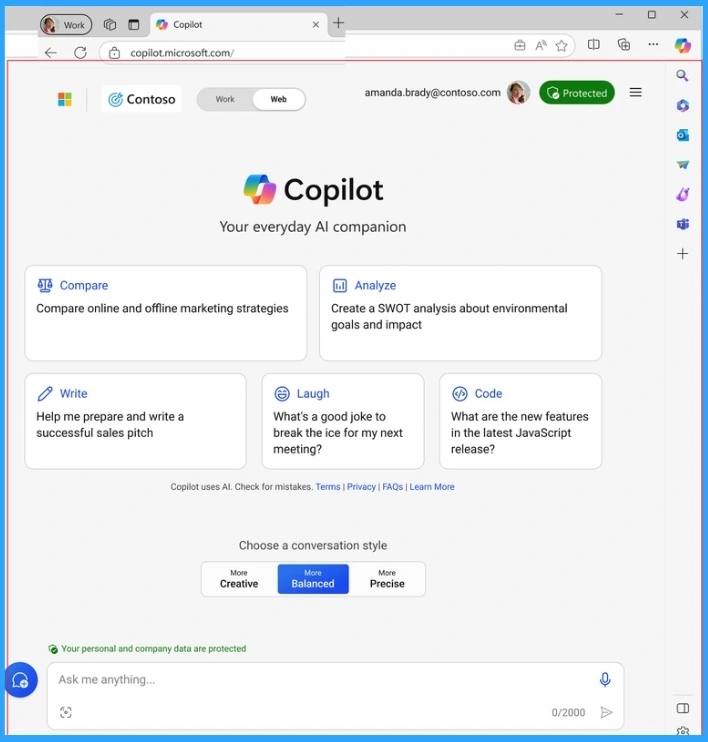
Microsoft will expand the eligibility for commercial data protection to all faculty users and to higher education students ages 18 and above. Copilot provides AI chat for the web with access to models like GPT-4 and DALL-E 3 at no additional cost.
Starting in early 2024, commercial data protection will be enabled when eligible users are signed in with their school account. Users and organization data are protected with Copilot commercial data protection. Chat prompts and responses in Copilot are not saved, and they have no eye access.
- 16 New Copilot Actions Released by Microsoft
- Use Windows Copilot to Automate Tasks using Power Automate
Feature of Copilot that Students Can leverage Innovations
Copilot has continued to introduce advanced capabilities and unlock new scenarios. It includes GPT-4 Turbo to tackle longer tasks, the new DALL-E 3 model with higher-quality images, Multi-Modal with Search Grounding for better image understanding, and Code Interpreter for more accurate calculations and analysis.
| Feature of Copilot that Students Can leverage Innovations |
|---|
| It Summarize information easily |
| It can Brainstorm and get started on assignments |
| Get step-by-step explanations for math solutions |
| It helps to find answers quickly, with links to sources |
| Allows them to improve their writing skills |
| Learn or study in the way that works best for them |
| Receive initial feedback on their work |
| Write code using natural-language requests |
| Make their projects more visually appealing |
| Free up time for what matters and interests them most |
Copilot for Microsoft 365 to Faculty and Staff
Microsoft is bringing exciting opportunities to education by extending the availability of the enterprise offer for Copilot for Microsoft 365 to faculty and staff at $30 per user per month. Copilot for Microsoft 365 combines the power of LLM.
- Microsoft sees opportunities outside the classroom to shift how staff spend their time to their most impactful work.
- The work includes research, communications, marketing, data analysis, fundraising, and management.
- Academic Medical Centers are experiencing improved efficiency and discovering new use cases to harness the potential of generative AI.
Creating Opportunities to Build AI Literacy
Microsoft brings the latest AI technology into education and continues developing training material and opportunities for learners to build AI literacy. They also launched a new resource called AI Classroom Toolkit.
It is a creative resource that blends engaging narrative stories with instructional information to create an immersive and effective learning experience for educators and students aged 13-15.
- The AI Classroom Toolkit helps teach and support students safely using generative AI.
- It can blend narrative stories with instructional information to create immersive and effective learning experiences for educators and their students.
I hope the guide on Copilot Capabilities in the Educational Sector is helpful. Please follow us on the HTMD Community and visit our website HTMD Forum, if you like our content. Suggest improvements, if any, and we would love to know which topic you want us to explore next.
Reference
Your AI-powered chat for the Web with commercial data protection | Microsoft Copilot
We are on WhatsApp. To get the latest step-by-step guides and news updates, Join our Channel. Click here –HTMD WhatsApp.


Discussion