









SCCM 2409 KB30385346 Hotfix Rollup Fixes CMG Issues and More
Let’s discuss SCCM 2409 KB30385346 Hotfix Rollup Fixes CMG Issues and More. Microsoft released a hotfix to address many issues in KB30385346 for SCCM (CM) version 2409. The main issue addressed in the hotfix is related to the Cloud Management Gateway (CMG).
The CMG issue is based on which had been experiencing connectivity problems. CMG (Cloud Management Gateway) is an SCCM feature that allows organizations to manage devices over the internet without requiring them to connect to the corporate network.
One notable problem is the failure of new CMG installations after updating to this version. Errors such as “ResourceOperationFailure” and “VMExtensionProvisioningError” have been reported, which indicate failures in resource deployment and virtual machine extensions.
In this blog post, I will help you to know different fixed issues in SCCM 2409 using hotfix. It resolves problems like internet-based clients failing to download content, deployment failures due to incorrect download links etc.
Table of Contents
SCCM 2409 KB30385346 Hotfix Rollup Fixes CMG Issues and More
Hotfixes act as quick, focused repairs to maintain or improve a system’s functionality. They’re particularly vital for systems like Configuration Manager, where smooth operation is crucial for managing devices and services.
- SCCM Alternatives
- SCCM 2309 Hotfix KB26129847 Client Discovery Data Fix
- SCCM High Level Architecture Design Guide
Fixed Issues in Hotfix Rollup KB30385346
There are many issues fixed with hotfix KB30385346. The issues that are resolved are going to be explained here. Internet based clients using the alternate content provider are unable to download content from a cloud management gateway or cloud distribution point. The following are table shows some other issues that are fixed.
| Issues Fixed |
|---|
| Deployment or auto-upgrade of cloud management gateways can fail due to an incorrect content download link. |
| Internet based clients can fail to communicate with a management point. The failure happens if the SMS Agent Host service (ccmexec.exe) on the management point terminates unexpectedly. Errors similar to the following are recorded in the LocationServices.log file on the clients. Console. |
| The Configuration Manager console displays an exception when you check the properties of a Machine Orchestration Group (MOG). |
| Membership of the MOG can’t be modified; it must be deleted and recreated. The exception happens when the only computer added to a MOG doesn’t have the Configuration Manager client installed. |
| Hardware inventory collection on a client gets stuck in a loop if the SMS_Processor WMI class is enabled and the processor has more than 128 logical processors per core. |
| If a maintenance window is configured with Offset (days) value, it will fail to run on clients if the run date happens on the next month. Errors similar to the following are recorded in the UpdatesDeployment.log file. |
| Hardware inventory collection on a client gets stuck in a loop if the SMS_Processor WMI class is enabled and the processor has more than 128 logical processors per core. |
| Multiple URLs are updated to handle a back-end change to the content delivery network used for downloading Configuration Manager components and updates. |
| The Configuration Manager console can terminate unexpectedly if a dialog contains the search field. |
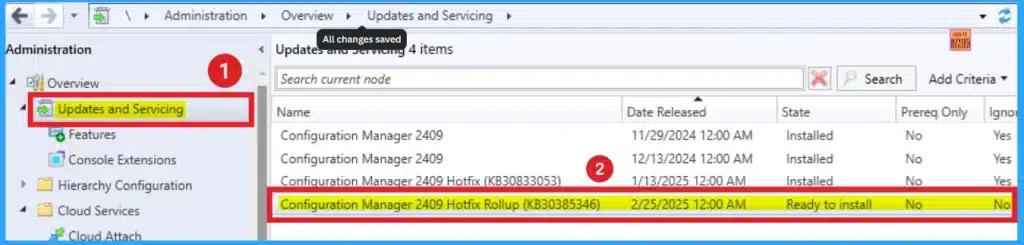
In the screenshot below, you can see that Configuration Manager 2409 Hotfix Rollup (KB30385346) is ready to install. The available hotfix can be accessed from the Updates and Servicing blade on SCCM Console.
Before installing the hotfix rollup, however, you checked on the status of your CMG. And to may great surprise,e after weeks (a month even) of being broken and disconnected, it was now connected.
Steps Before Installing Hotfix
Before installing the Hotfix, you have to run the connection analyser. To run the connection analyzer, select Testing the CMG Channel for management port ‘CM02.windowsnoob.lab.local. Click on the Start Button.
Installing the Hotfix Rollup
To start the Installation of Hotfix, Open the SCCM Console. Then go to Administration > Updates and Servicing. Click on the Configuration Manager 2409 Hotfix Rollup (KB30385346).
Need Further Assistance or Have Technical Questions?
Join the LinkedIn Page and Telegram group to get the latest step-by-step guides and news updates. Join our Meetup Page to participate in User group meetings. Also, Join the WhatsApp Community to get the latest news on Microsoft Technologies. We are there on Reddit as well.

Anoop C Nair is Workplace Technology solution architect with 25+ years (as of 2026) of experience in global enterprise organizations such as JP Morgan, Capgemini, etc. Microsoft Certified Trainer (MCT). Microsoft MVP from 2015 onwards for consecutive 11+ years! He also conducts Intune and modern workplace tech training for enterprise organizations. He is Blogger, Speaker, and Founder of HTMD Community and HTMD Conference. His main focus is on Device Management technologies like Intune, Windows, Cloud PC. He writes about technologies like Intune, SCCM, Windows, Cloud PC, Windows, Entra, Microsoft Security.


Discussion