











230th HTMD Newsletter 26th to 30th January 2026
Welcome to the 230th HTMD Newsletter, 26th to 30th January 2026 ! This is the list of posts and videos the HTMD Community published this week, and news from the IT industry. You can get all the information and details from Windows 11, Cloud PC, Intune, Android, iOS, and Mac.
Previous Weeks Newsletter
- 227th HTMD Newsletter – HTMD Newsletter 5th to 9th January 2026
- 228th HTMD Newsletter – HTMD Newsletter 12th to 16th Januvary 2026
- 229th HTMD Newsletter – HTMD Newsletter 19th to 23rd December 2026

Monday 26th January 2026
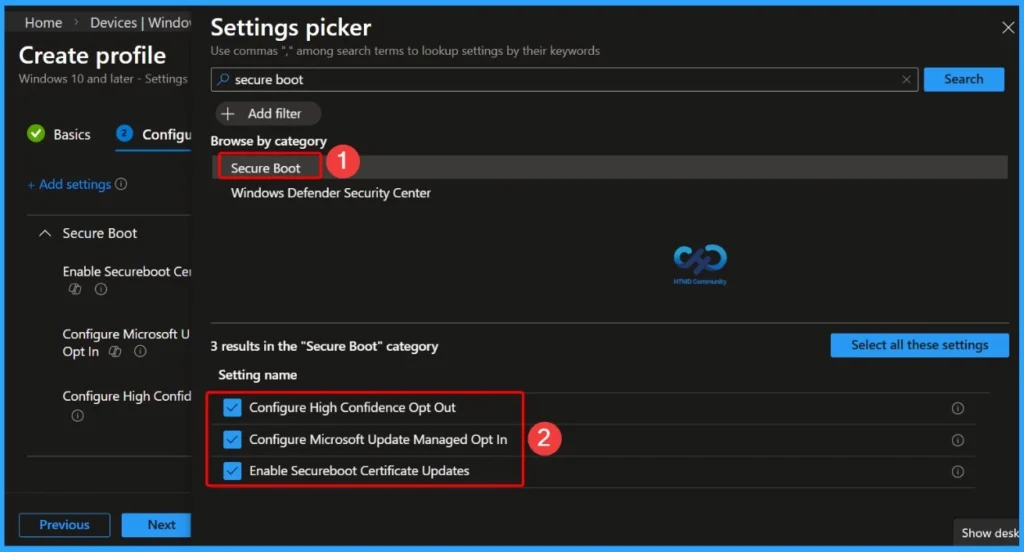
🎆How to Fix Secure Boot Certificate Expiry and Renewal Error 65000 in Microsoft Intune
https://www.anoopcnair.com/secure-boot-renewal-error-65000-intune/
🔔Error 65000 Does Not Automatically Mean Secure Boot is Disabled
🔔Subscription-Based Windows Enterprise Activation is a Key Trigger
🔔PowerShell Verification is the Most Reliable Check
🔔Secure Boot Certificates are Expiring in 2026
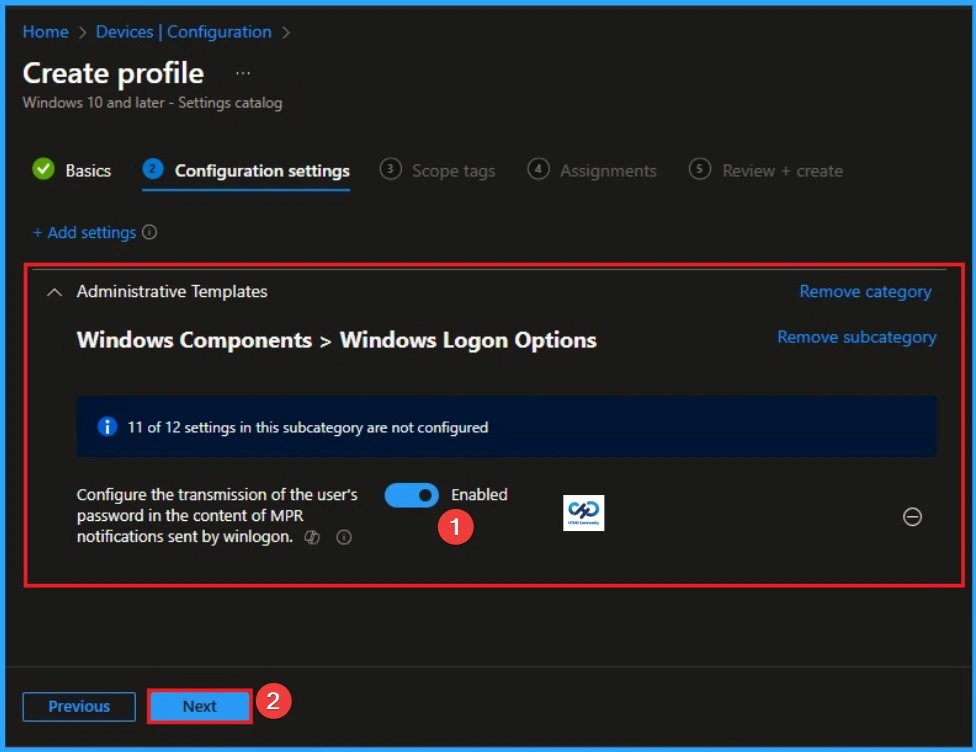
👉Enable MPR Notifications for System to Easily Sync Passwords using Intune
https://www.anoopcnair.com/mpr-notifications-for-system-to-using-intune/
🔊 MPR Notifications for System in Intune
🔊 Helps to Easily Sync Passwords
🔊 Reduce Delays and Mismatches between Local and Cloud Credentials
🔊 How this Policy Helps Admins
🔊 Client Side Verification
🔊 Device Check-in Status
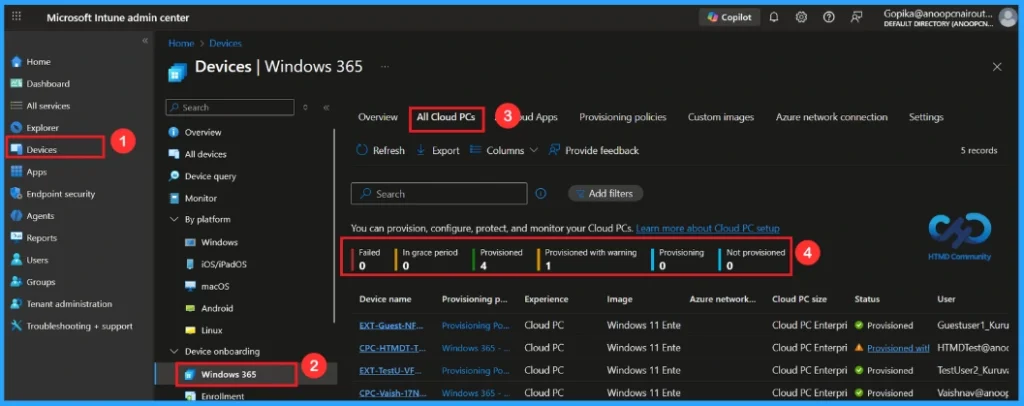
🎆6 AI Agentic Features within Windows 365 Cloud PC
https://www.anoopcnair.com/6-ai-agentic-features-windows-365-cloud-pc/
🔔Windows 365 Cloud PC Can Run AI Agents to Do Tasks Automatically.
🔔Cloud PCs are Shared and Used Only When Needed, Which Saves Cost.
🔔AI Agents Can see and Understand the Screen, So They Work Even if Apps Change.
🔔Humans Can Step in When Needed, Keeping Important Tasks Safe.
Tuesday 27th January 2026
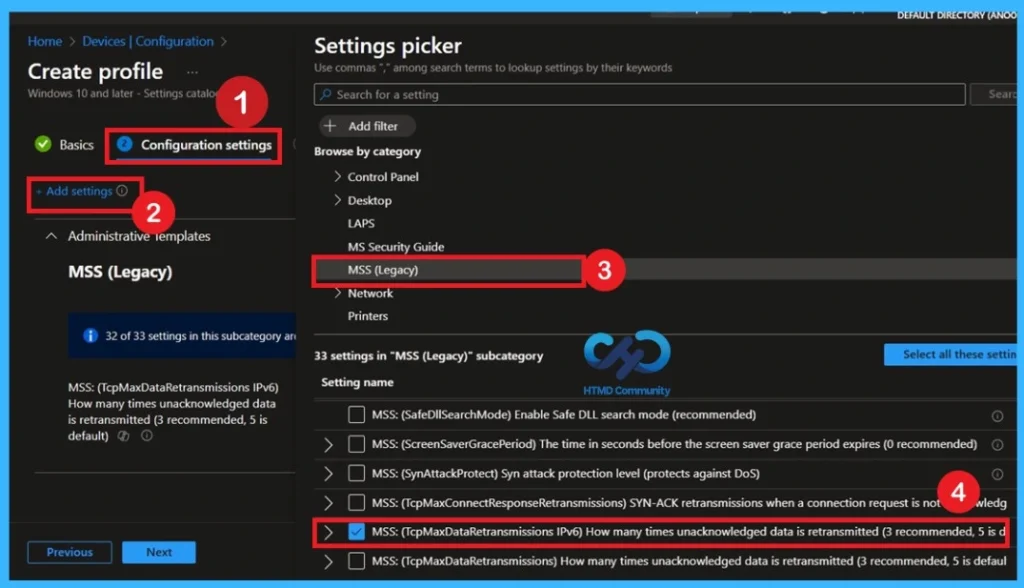
🎆 Securing TCP IPv6 Communications by Limiting Retransmissions using Intune Policy
https://www.anoopcnair.com/tcp-ipv6-communications-by-limiting-intune/
🔔Limits IPv6 Retransmissions to Reduce System and Network Load
🔔Improves Security and Performance by Setting Retry Value to 3
🔔Helps Protect Devices from Resource Exhaustion Attacks
🔔Supports CIS Level 2 Security Compliance
🔔Client-side Verification with Event Viewer
🔔This Policy Helps Protect Systems from Misuse
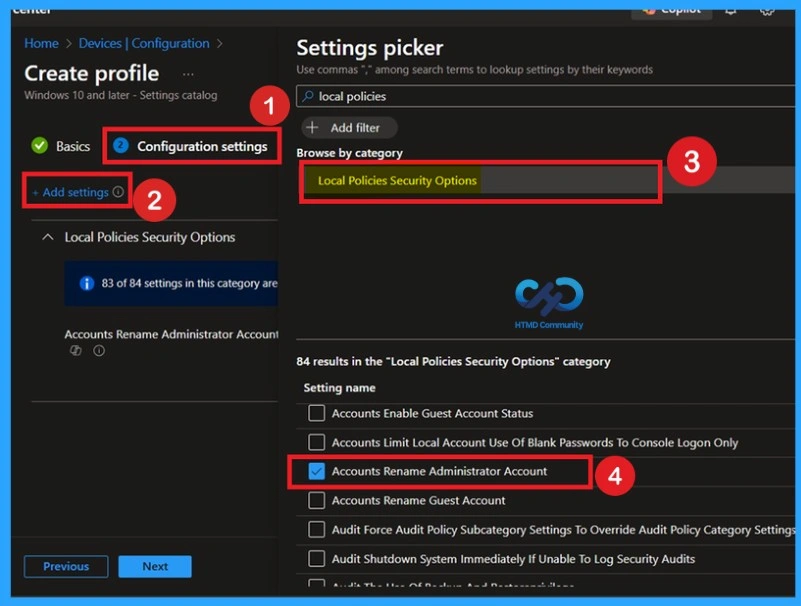
👉Enhancing Endpoint Security with Administrator Account Renaming using Intune Policy
https://www.anoopcnair.com/administrator-account-renaming-using-intune/
🔊 Administrator Account Renaming via Intune
🔊 Prevents Attackers from Targeting Default Admin Name
🔊 Reduces Risk of Password-Guessing Attacks
🔊 Ensures Consistent Security Across all Managed Devices
🔊 Simple Policy Change with Big Security Impact
🔊 Strengthens Endpoint Protection without Affecting Normal Work
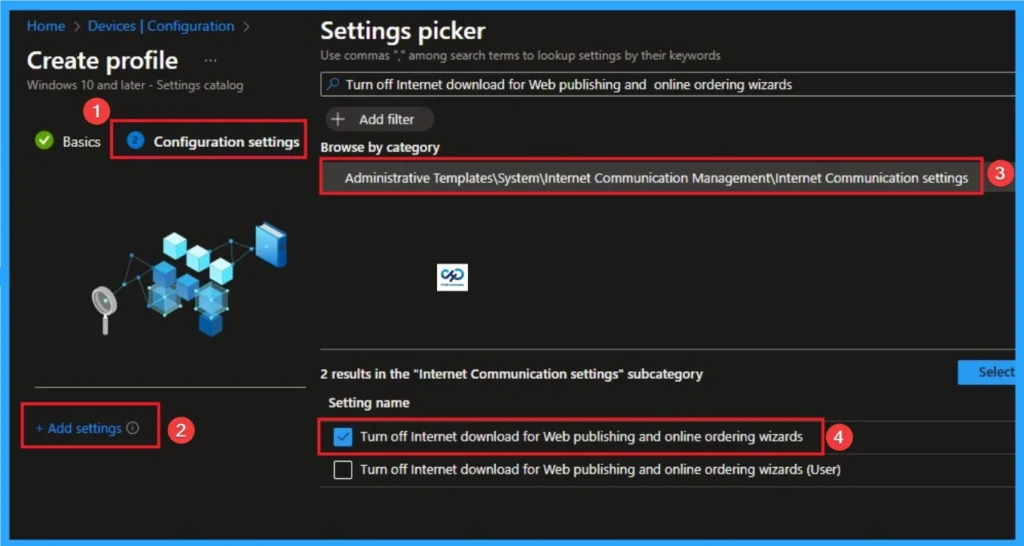
👉Stop Windows from Downloading Third-Party Wizard Providers for Maximum Privacy using Intune
https://www.anoopcnair.com/downloading-third-party-wizard-providers-intune/
🔊 Internet Download for Web Publishing and Online Ordering Wizards Policy in Intune
🔊 Ensuring Consistency and Automation with Microsoft Intune
🔊 Reduce Clutter and Improve Usability
🔊 How this Policy Helps Admins
🔊 Client Side Verification
🔊 Device Check-in Status
Wednesday 28th January 2026
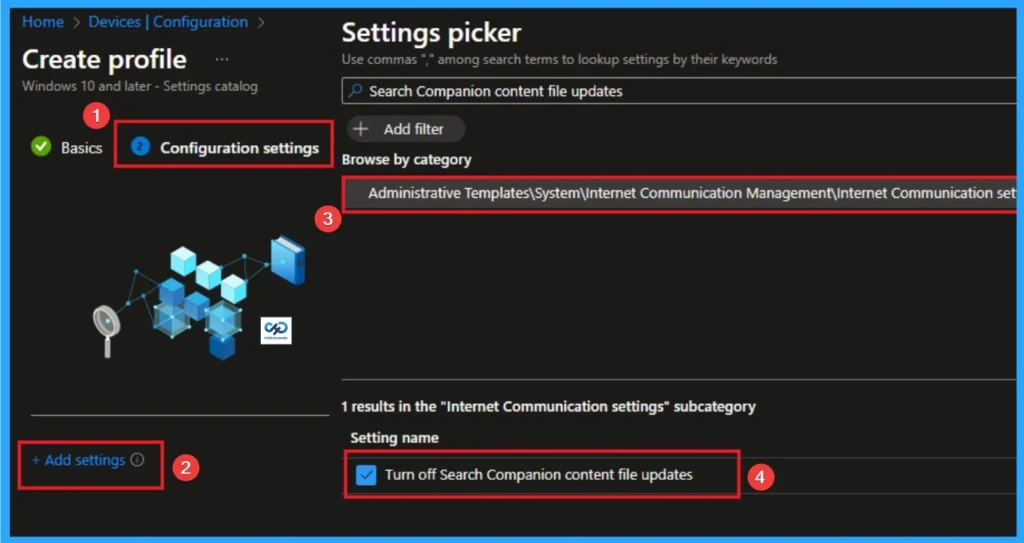
👉Enable Search Companion Content File Updates to Reclaim Your Network Bandwidth using Intune
https://www.anoopcnair.com/search-companion-content-file-updates-intune/
🔊 Manage Search Companion Content File Updates
🔊 Balancing Update Delivery with Network Health
🔊 Faster Access to Enterprise Resources
🔊 Helps to Organizations Control Bandwidth Usage
👉 Top 10 Intune Features Admins are Looking for in 2026
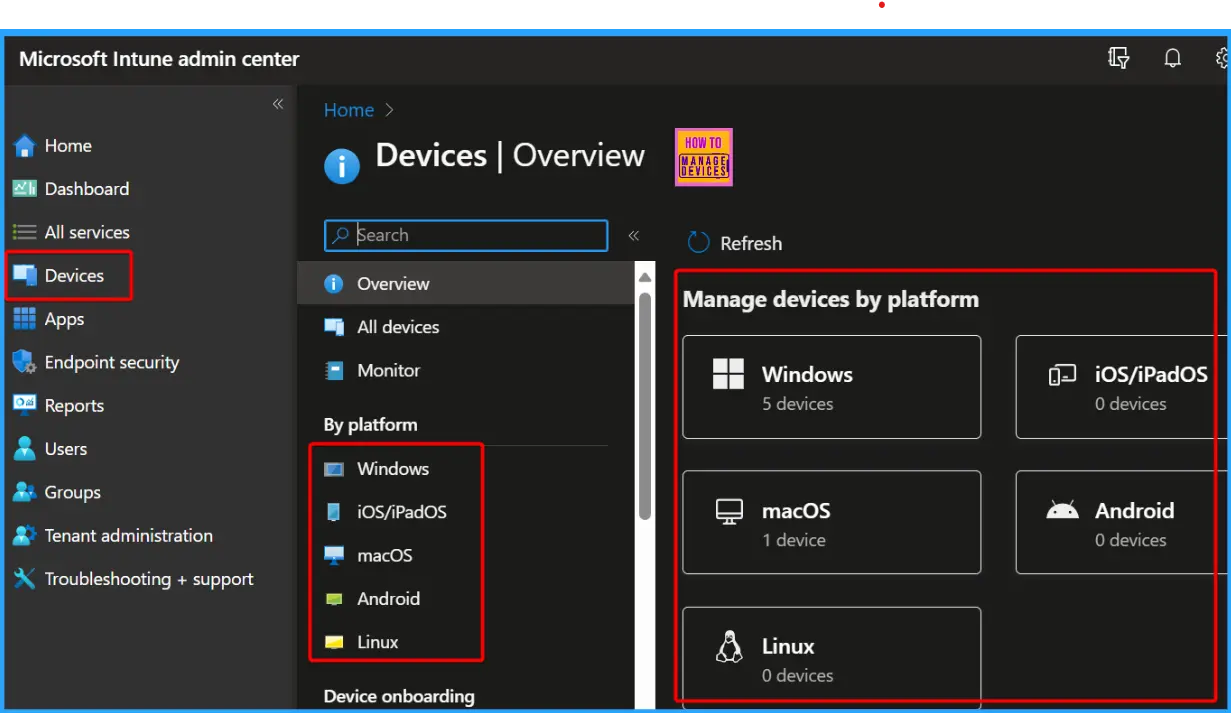
https://www.anoopcnair.com/top-10-intune-features-admins-are-looking-for/
🔊 Better Linux Support – Shared-PC Mode & DEM Accounts
🔊 Smoother iOS/macOS Enrollment Experience
🔊 Run Admin Scripts Directly from Company Portal
🔊 Manage or Block Microsoft Teams Pop-Up Notifications
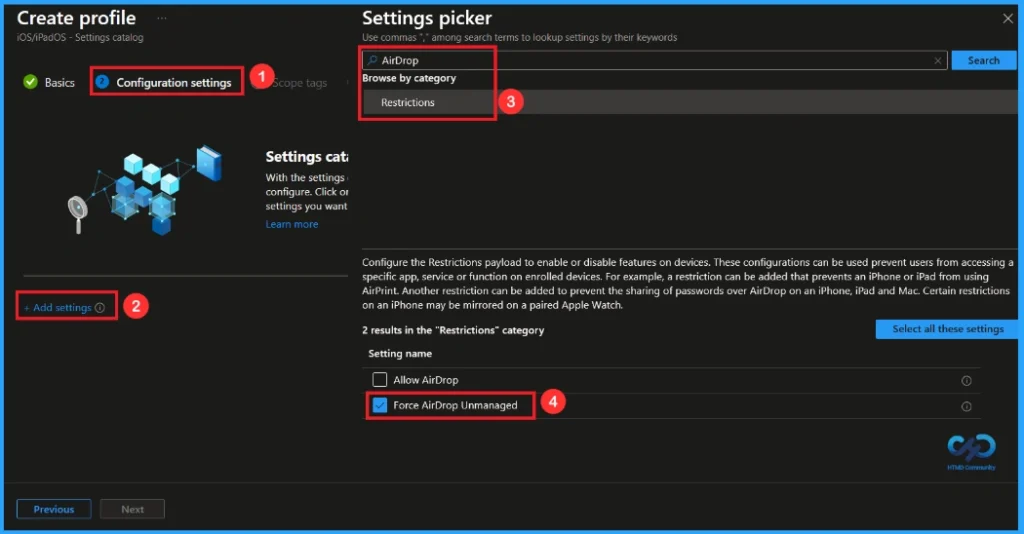
🎆Managing AirDrop as an Unmanaged Drop Target in iOS using Intune
https://www.anoopcnair.com/airdrop-unmanaged-drop-target-ios-using-intune/
🔔Helps Protect Company Data from Being Shared Externally
🔔 Makes No Changes When the Policy is Set to Not Configured
🔔Works on Both Supervised and Non-Supervised Devices
🔔Available on iOS 9+ and iPadOS 13.1+
🔔Device and User Check-in Status
Thursday 29th January 2026
🎯Windows 365 Cloud PC Top 5 Features Admins are Looking for in 2026
https://www.anoopcnair.com/windows-365-cloud-pc-top-5-features-admins-are/
🔥 Admins Want More Choices in Cloud PC Sizes
🔥 A 4 vCPU / 32 GB Option Would Cost Less and Work Better
🔥 Current Upgrades Make Companies Pay Extra for Things They Don’t Need
🔥 Easy Upgrade Options Would Save Time for IT Teams
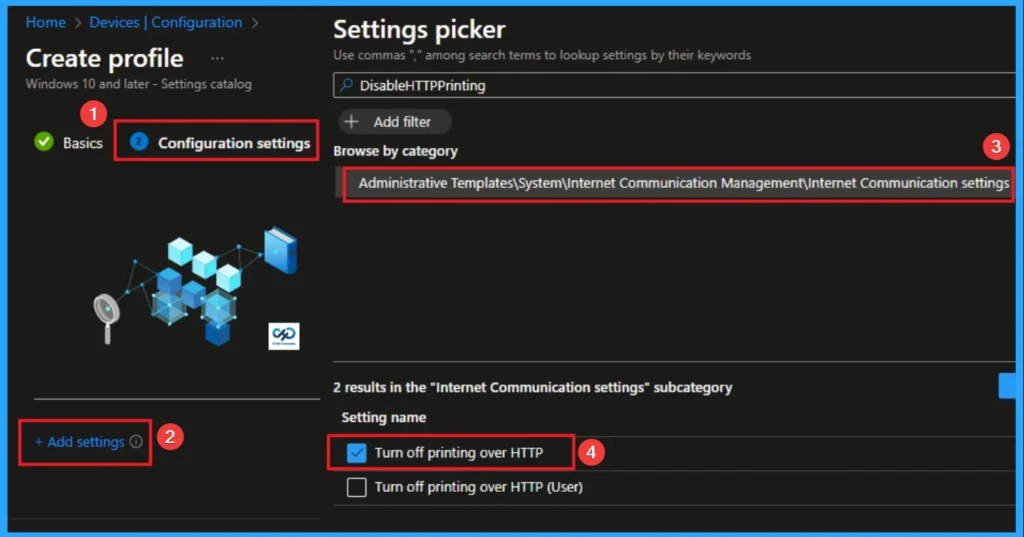
👉Disable Client Computer Printing Over both HTTP and HTTPS using Intune
https://www.anoopcnair.com/printing-over-both-http-and-https-using-intune/
🔊 Aligns with Zero Trust and Data Leakage Prevention Strategies
🔊 Targets Internet Printing Protocol (IPP) over HTTP/HTTPS
🔊 Ensure Sensitive Data must not be Printed via Unsecured Channels
🔊 Helps to Reducing Attack Surface
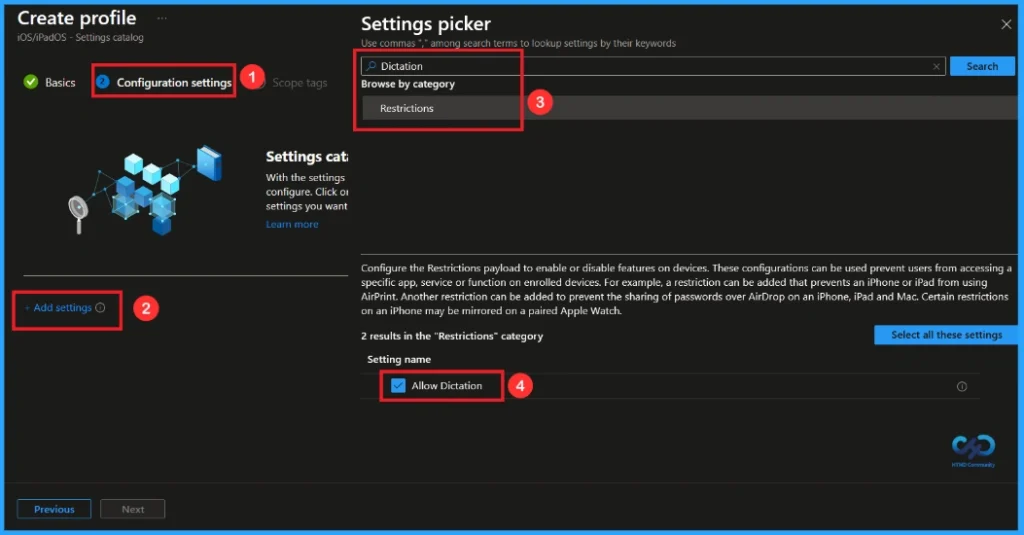
🎆Enhancing Security by Disabling Dictation on iOS Devices using Intune
https://www.anoopcnair.com/disabling-dictation-ios-devices-using-intune/
🔔Dictation in iOS Allows Text Entry Using Voice.
🔔It Helps Users Type Faster and More Easily.
🔔Users can Use Voice and the Keyboard Together.
🔔Users can Easily Switch Between Speaking and Typing
🔔Device and User Check-in Status
Friday 23rd January 2026
coming soon
Connect with the HTMD Community
Join the Telegram group to get the latest step-by-step guides and news updates. Join our Meetup Page to participate in User group meetings. Also, join the WhatsApp Community to get the latest news on Microsoft Technologies. We are there on Reddit as well.
HTMD Community Social Media Platform Links
| Social Media Platform | Link |
|---|---|
| LinkedIn: HTMD Community | https://www.linkedin.com/company/how-to-manage-devices/ |
| Telegram: SCCM Intune Technical Discussions | https://t.me/joinchat/Q9lE6G1_BO_bGq97 |
| Telegram: JOB SCCM Intune Group | https://t.me/joinchat/SIKr3OugR2FQ-Ej9 |
| WhatsApp: HTMD Community | https://chat.whatsapp.com/CeMXHSD61HtDBJwe78IZwV |
| Telegram: AVD/Windows 365 User Group | https://t.me/Inwvdcommunity |
| https://www.facebook.com/HTMDCommunity | |
| https://www.instagram.com/htmd_community/ | |
| https://twitter.com/htmdcommunity | |
| Facebook Group: SCCM | https://www.facebook.com/groups/ConfigMgr2012/ |
| Facebook Group: Intune | https://www.facebook.com/groups/1738789256382744 |

Anoop C Nair is Workplace Technology solution architect with 25+ years (as of 2026) of experience in global enterprise organizations such as JP Morgan, Capgemini, etc. Microsoft Certified Trainer (MCT). Microsoft MVP from 2015 onwards for consecutive 11+ years! He also conducts Intune and modern workplace tech training for enterprise organizations. He is Blogger, Speaker, and Founder of HTMD Community and HTMD Conference. His main focus is on Device Management technologies like Intune, Windows, Cloud PC. He writes about technologies like Intune, SCCM, Windows, Cloud PC, Windows, Entra, Microsoft Security.

Discussion