











209th HTMD Newsletter 1st to 5th September 2025
Welcome to the 209th HTMD Newsletter, 1st to 5th September 2025! This is the list of posts and videos the HTMD Community published this week, and news from the IT industry. You can get all the information and details from Windows 11, Cloud PC, SCCM, Intune, Azure Virtual Desktop (AVD), Android, iOS, and Mac.
Previous Weeks Newsletter
- 206th HTMD Newsletter – HTMD Newsletter 11th to 15th August 2025
- 207th HTMD Newsletter – HTMD Newsletter 18th to 22nd August 2025
- 208th HTMD Newsletter – HTMD Newsletter 25th to 29th August 2025
Monday 1st September 2025
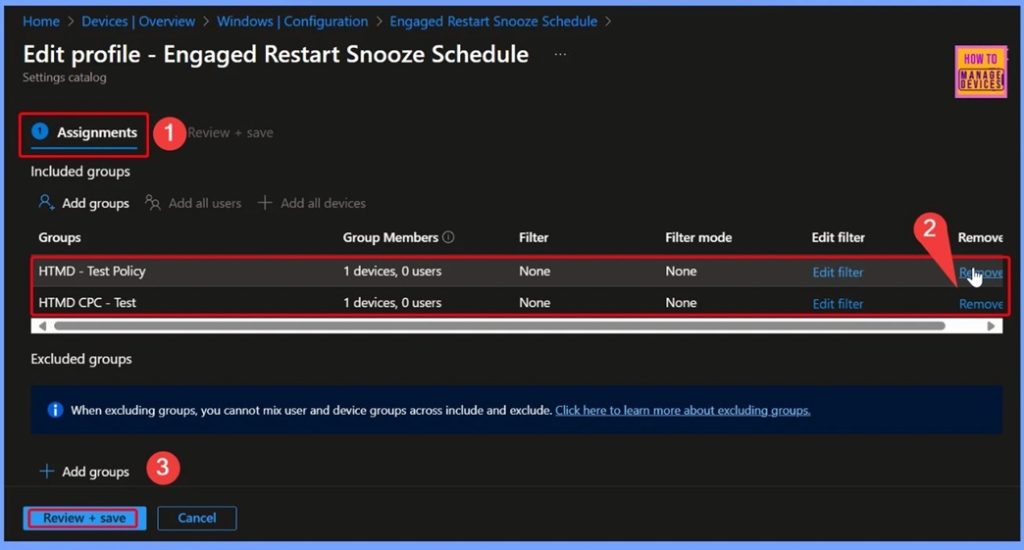
🎆How to Configure Engaged Restart Snooze options for End Users during Monthly Patch Cycle using Intune
–https://www.anoopcnair.com/engaged-restart-snooze-options-for-end-Intune/
▶️Windows Update for Business
▶️Engaged Restart Snooze Schedule Policy
▶️Windows CSP Details – Engaged Restart Snooze
▶️Check-in Status for Devices and Users
▶️MDM Policy Update – Engaged Restart Snooze Schedule
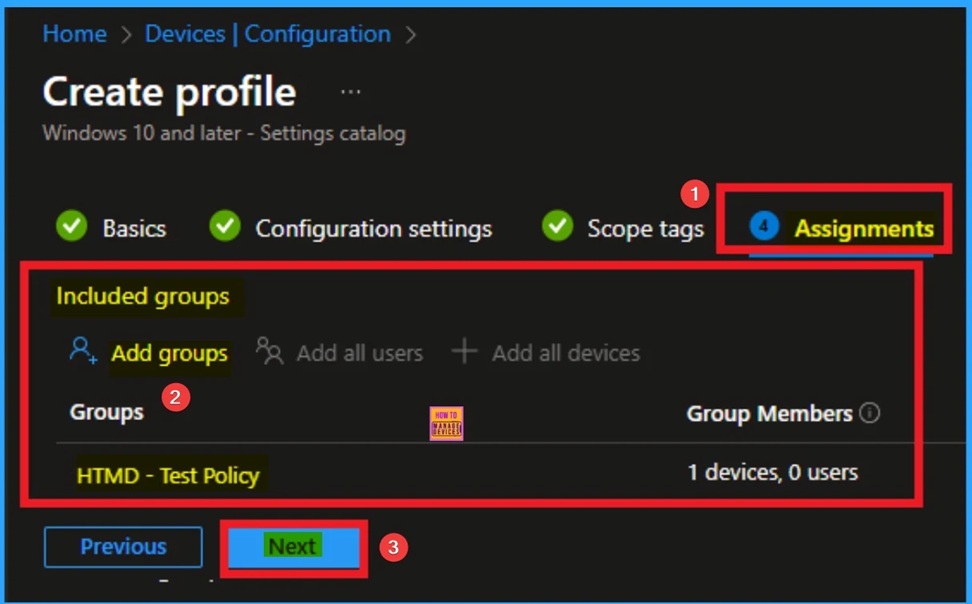
📌Enable AI Enhanced Search in History Policy in Microsoft Edge to Controls Data Privacy using Intune
–https://www.anoopcnair.com/ai-enhanced-search-in-history-in-edge-Intune/
✨Enable AI Enhanced Search in History Policy
✨Helps to Search using Synonyms Natural Language Phrases
✨Benefits of AI Enhanced Search in History Policy
✨How this Policy Helps Admin?
✨Monitoring Status
✨Client-Side Verification
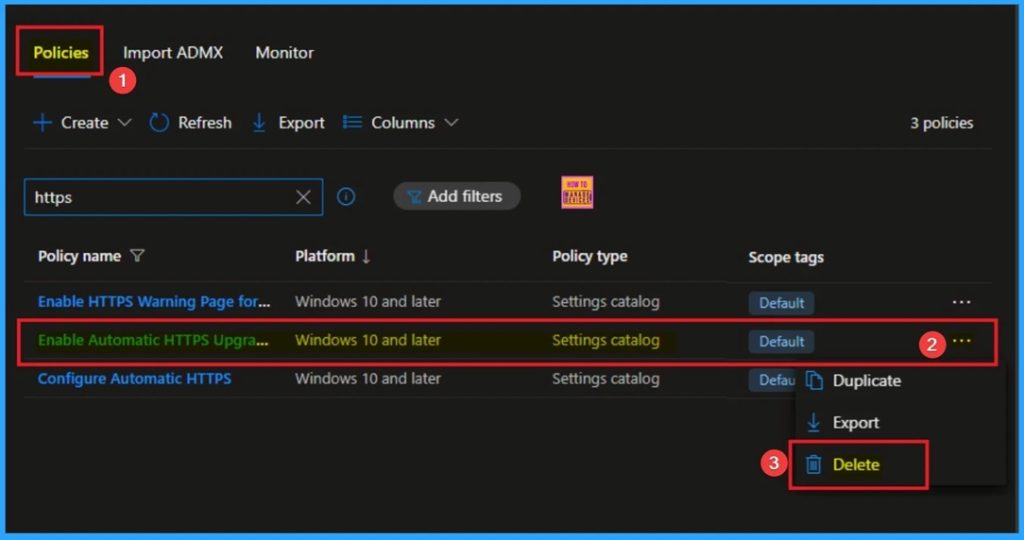
📌Enforce Automatic HTTPS Upgrades Policy for Microsoft Edge for Secure Connections using Intune
–https://www.anoopcnair.com/automatic-https-upgrades-policy-for-edge-Intune/
🔥Automatic HTTPS Upgrades Policy
🔥Helps for Secure Connections
🔥Benefits of Automatic HTTPS Upgrades Policy
🔥How this Policy Helps Admin?
🔥Monitoring Status
🔥Client Side Verification
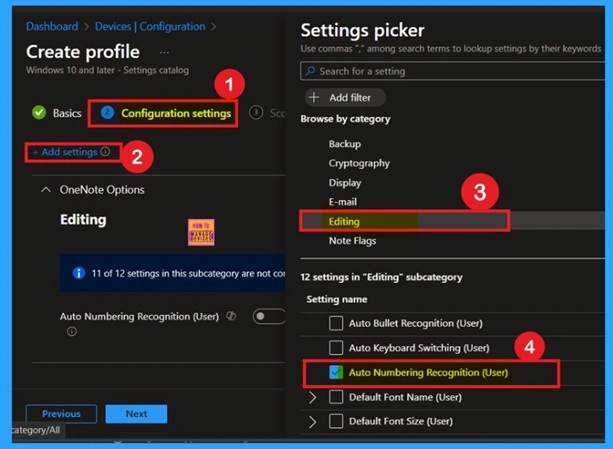
📌Auto Numbering Recognition user in OneNote in Intune Policy
–https://www.anoopcnair.com/auto-numbering-recognition-in-onenote-in-intune/
🔥Automatically Formats Numbered or Bulleted Lists
🔥Controlled by “Apply Numbering to Lists Automatically” Setting
🔥Enabled: Converts typed Patterns into Formatted lists
🔥Disabled: Leaves typed Numbers/Letters as Plain Text
🔥Gives Users Flexibility in Writing Style
🔥Configured via Settings Catalog in Microsoft Intune
🔥Policy Deployment through Configuration Profiles
🔥Supports Customization for User Experience
Tuesday 2nd September 2025
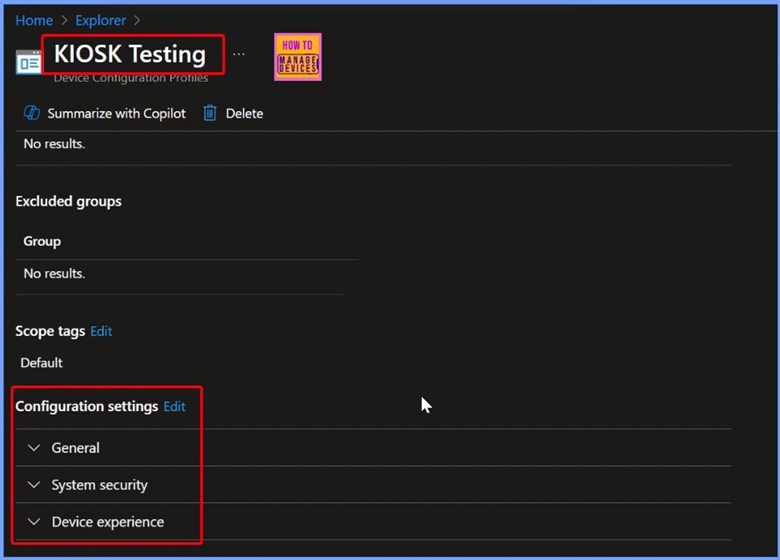
🎆How to Retrieve General Device Configuration Policies for Android Device Owner using Intune Copilot Explorer
–https://www.anoopcnair.com/general-device-configuration-policies-intune/
🎊Device Configuration Policies
🎊Get Device Configuration Policies that are of the Type Device Configuration Policy Type Name
🎊Querying Android Device Owner General Device Configuration Policies in Intune
🎊Other Useful Queries and Next Steps
🎊End Results
📌Web to Browser Sign-in Enabled Policy in MS Intune
–https://www.anoopcnair.com/web-to-browser-sign-in-enabled-policy-Intune/
🔥Web to Browser Sign-in Policy
🔥Helps for Seamless Identity Experience
🔥Benefits of Web to Browser Sign-in Policy
🔥How this Policy Helps Admin?
🔥What is the Default Behavior if the Policy is Not Configured?
🔥Monitoring Status
🔥Client Side Verification
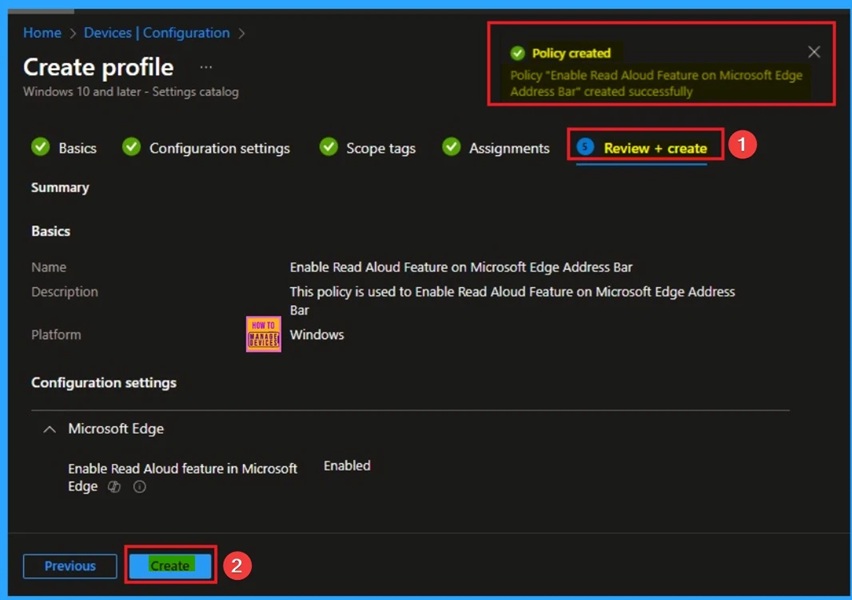
🎆Enable Read Aloud Feature on Microsoft Edge Address Bar More Menu to Enhance Accessibility using Intune
–https://www.anoopcnair.com/read-aloud-on-microsoft-edge-using-intune/
▶Read Aloud Feature on Microsoft Edge Address Bar
▶Get an Auditory Alternative to Text
▶Helps to Access Read Aloud Feature on Right-click Context Menu More Menu
▶Check-in Status for Devices and Users
▶Client-Side Verification
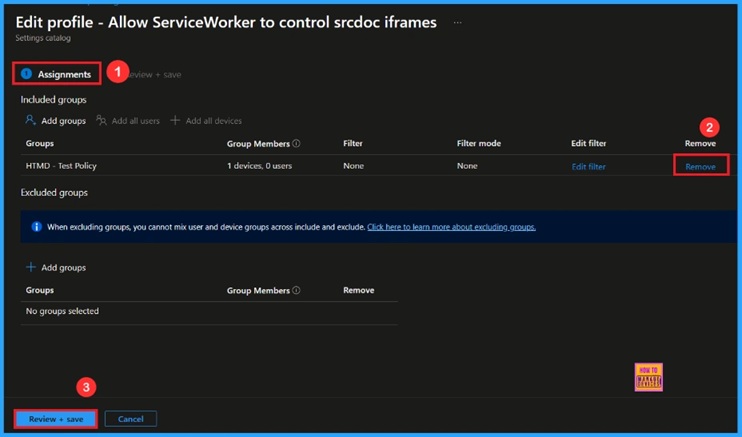
🎆Allow Service Worker in Microsoft Edge to Control Scrod Inflames using Intune
–https://www.anoopcnair.com/service-worker-in-Microsoft-edge-using-Intune/
🔔Allow Service Worker to Control Scrod Inflames
🔔Improve Overall Browser Stability
🔔Helps Balance Offline Support
🔔Help with Advanced Web Development
🔔Provide Enhanced Security and Control
🔔Device and User Check-in Status
Wednesday 3rd September 2025
🎆How to Get Android Work Profile Device Configuration Policies with Intune Explorer and Security Copilot
–https://www.anoopcnair.com/android-work-profile-device-Intune/
🎉Device Configuration Settings
🎉Quickly Retrieve Specific Device Configuration Policies in Intune Copilot Explorer
🎉Get Device Configuration Policies that are of the Type Device Configuration Policy Type Name
🎉Retrieve and Analyze Intune Device Configuration Policies with Detailed Output
🎉Queries to Track App Deployment and Compliance in Intune
🎉End Results
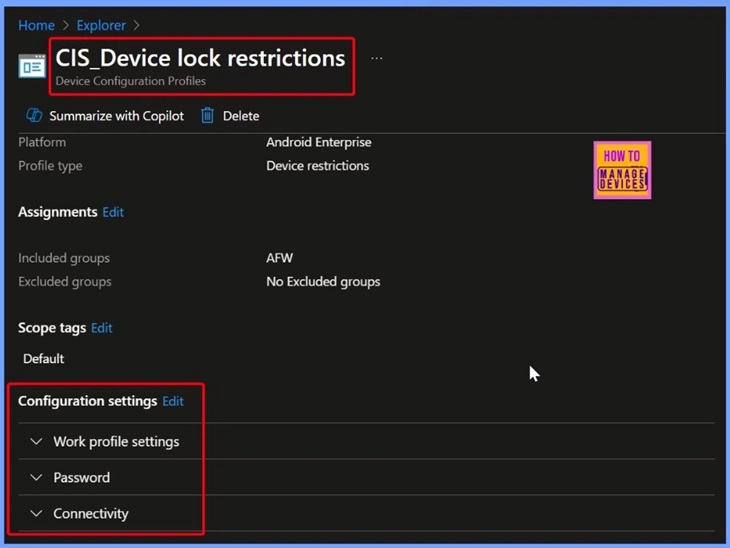
🎉CIS Device Lock Restrictions – Work Profile Settings for Security and Connectivity
🎉HTMD Android Device Restriction Policy – Secure Work Profile with Password, Security, and Connectivity Settings
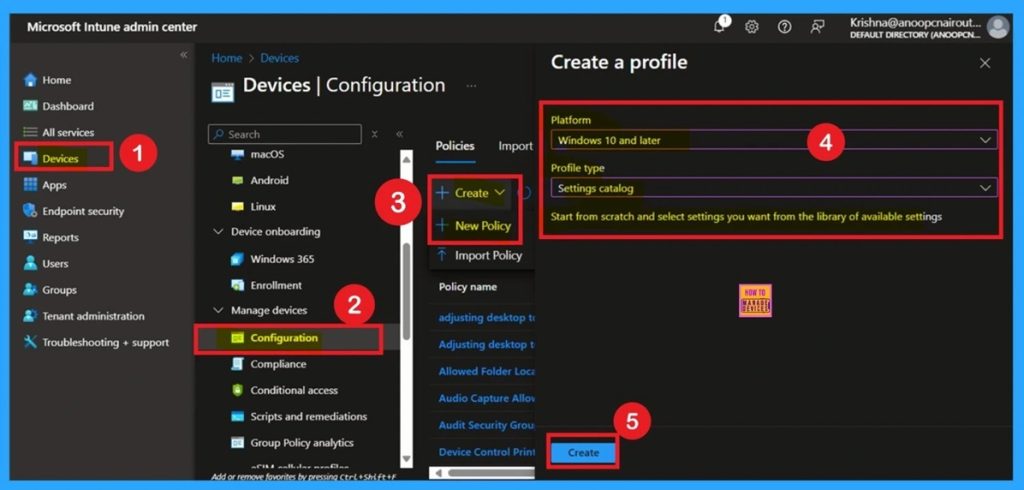
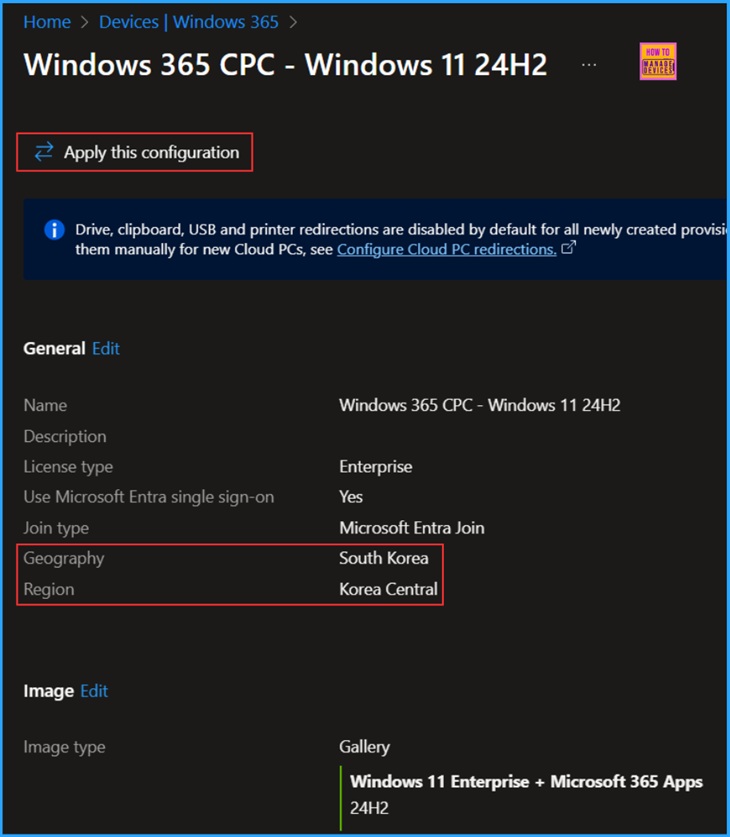
📌How to Change New South Korea Geography for Windows 365 Cloud PCs using Intune
–https://www.anoopcnair.com/new-south-korea-geography-windows-365-intune/
💡Windows 365 Cloud PC Service Available Geographies and Regions
💡Use the Provisioning Policy to Set up New South Korea Geography on Cloud PCs
💡Some Important Notes
💡End Result
🎆Enable Additional Search Box in MS Edge for Better Search Experience using Intune
–https://www.anoopcnair.com/additional-search-box-in-ms-edge-using-intune/
🔔Enable Additional Search Box in MS Edge
🔔Improve Search Experience on Edge Browser
🔔Helps to Reduce Potential Confusion about URL and Other Searches
🔔How this Policy Helps Admins?
🔔Provide Enhanced Security and Control
🔔Device and User Check-in Status
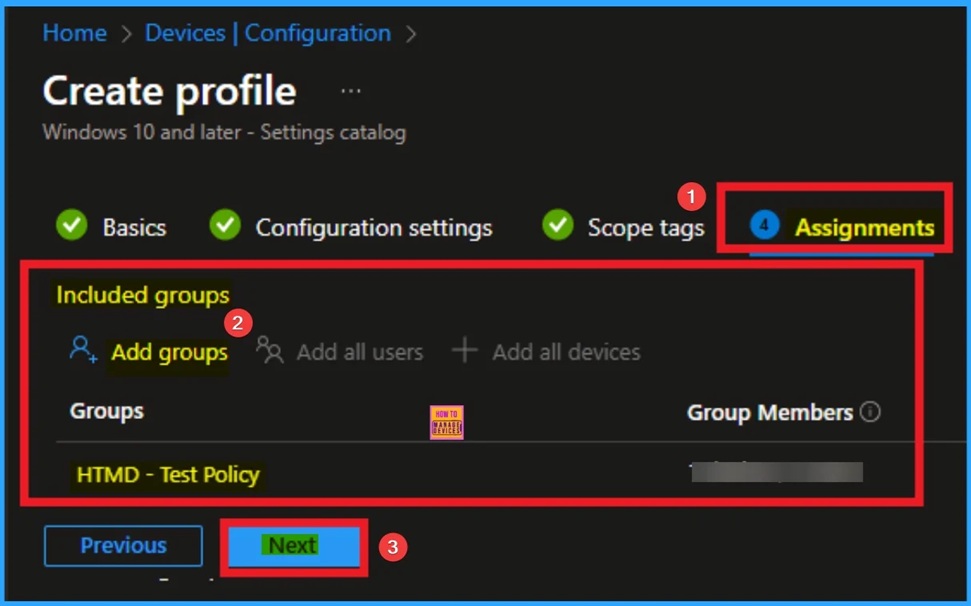
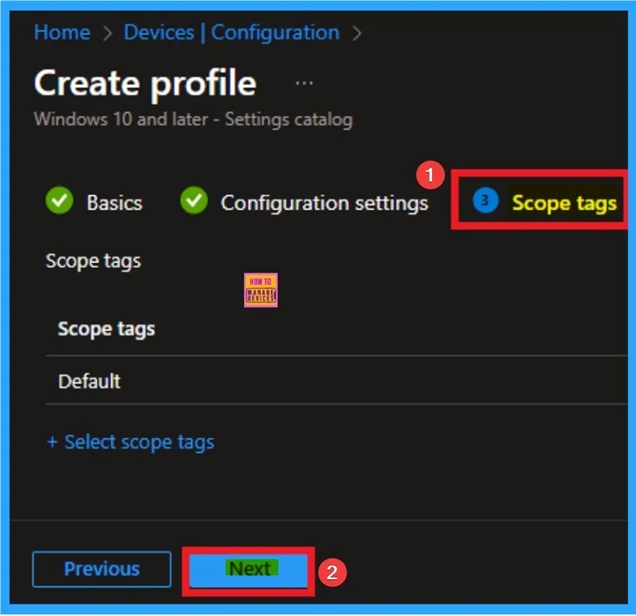
🎆Enable Tab Lifecycles Policy for MS Edge Browser to Optimise Performance using Intune
–https://www.anoopcnair.com/tab-lifecycles-policy-for-edge-browser-intune/
🔔Tab Lifecycles Policy for MS Edge Browser
🔔Difference Between Sleeping Tab and Tab Life Cycle in Microsoft Edge Browser
🔔Helps to Improve Optimized Browsing Experience
🔔How this Policy Helps Admins?
🔔Provide Enhanced Security and Control
🔔Device and User Check-in Status
Thursday 4th September 2025
🎆Troubleshoot Intune Enrolment Failures Post-Connector Server Switch
– https://www.anoopcnair.com/intune-enrolment-failures-post-connector-server/
🎉Intune Enrolment Failures
🎉Troubleshoot Intune Enrolment Failures
🎉Reasons of Enrolment Issue
🎉After Effects of this Issue
🎉Different Fixes of Issue
Intune #MSIntune #error #HTMDCommunity

📌Delay Before Running Idle Actions in MS Edge using Intune Policy
–https://www.anoopcnair.com/delay-before-running-idle-actions-edge-intune/
✨Idle Browser Actions Policy
✨Helps to Control Browser Behavior During Inactivity
✨What is the Purpose of the Idle Timeout Policy?
✨How this Policy Helps Admin?
✨Monitoring Status
✨Client-Side Verification
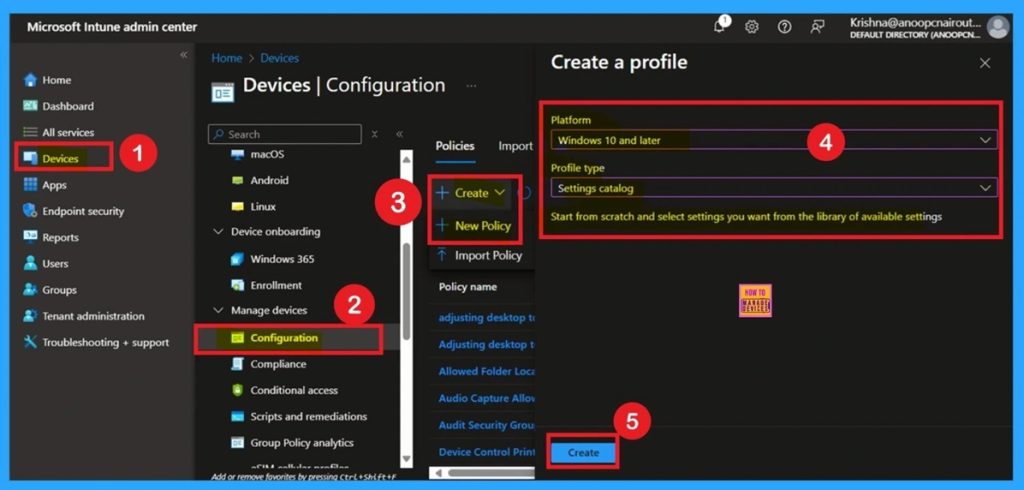
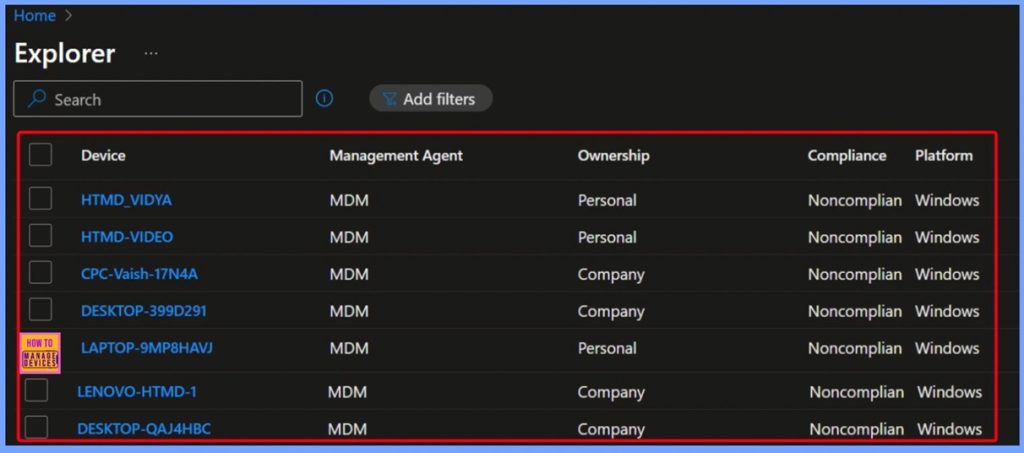
🎆How to Retrieve Noncompliant Windows Devices with Intune Explorer and Security Copilot
–https://www.anoopcnair.com/noncompliant-windows-devices-with-Intune-and/
▶️Get Platform Devices that are Compliance State
▶️Selecting Required Fields in the Query – Platform and Compliance
▶️Running the Query to Retrieve Noncompliant Windows Devices and Results Overview
▶️Other Useful Queries
▶️End Results
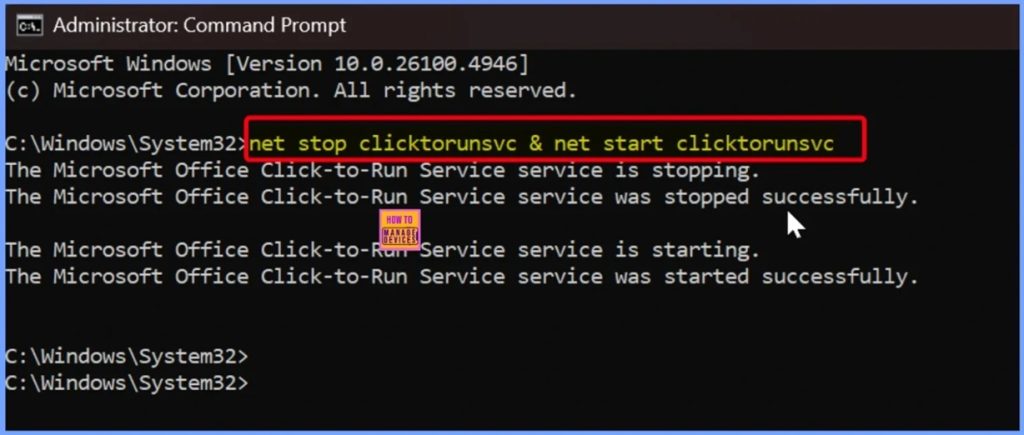
🎆How to Fix Office Update Error Code 30094-27 in Classic Outlook for Windows
–https://www.anoopcnair.com/update-error-code-30094-27-in-classic-outlook/
➡️Overview of Office Update Error Code 30094-27
➡️Impact on Outlook Users and Testing Programs
➡️Why the Error Occurs During Manual Updates
➡️Challenges for IT Admins Managing Affected Devices
➡️Workaround
Friday 5th September 2025
🎆How to Get iOS Device Features Configuration Policies with Intune Explorer and Security Copilot
–https://www.anoopcnair.com/ios-device-features-configuration-intune/
🎊Different Device Configuration Options in Intune Explorer
🎊Device Configuration Policy Type Name
🎊Get Device Configuration Policies that are of the Type iOS Device Features Configuration
🎊Queries for Tracking App Deployment and Compliance in Intune
🎊End Results
🎊Single Sign-On Settings in iOS/iPadOS Profile Creation and Account-Driven Enrollment
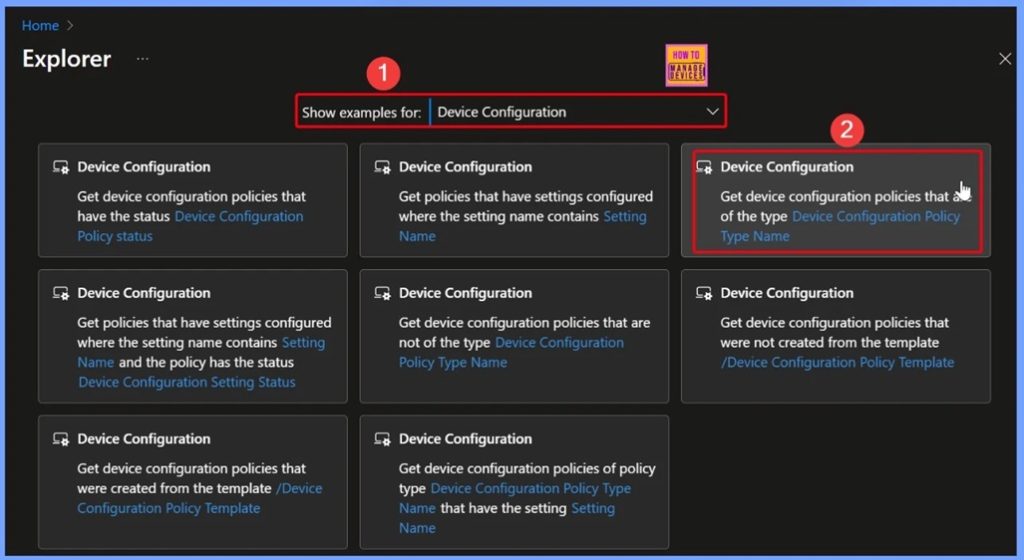
🎆How to Get Devices in Noncompliant State with Intune Explorer and Security Copilot
–https://www.anoopcnair.com/devices-in-noncompliant-state-with-intune/
▶️Get Devices in Noncompliant State with Intune
▶️Get devices that are Compliance state query
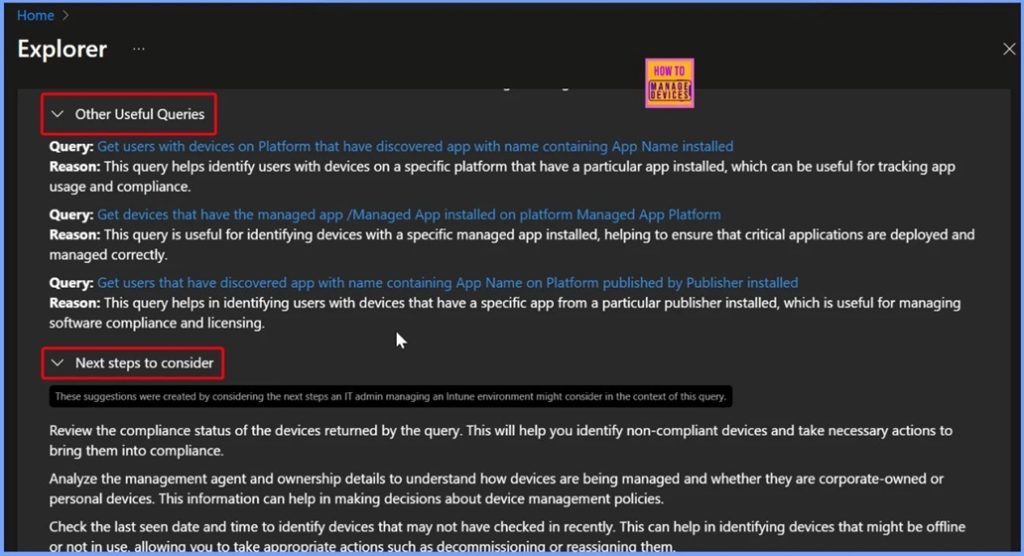
▶️Other Useful Queries in Intune Explorer
▶️End Results
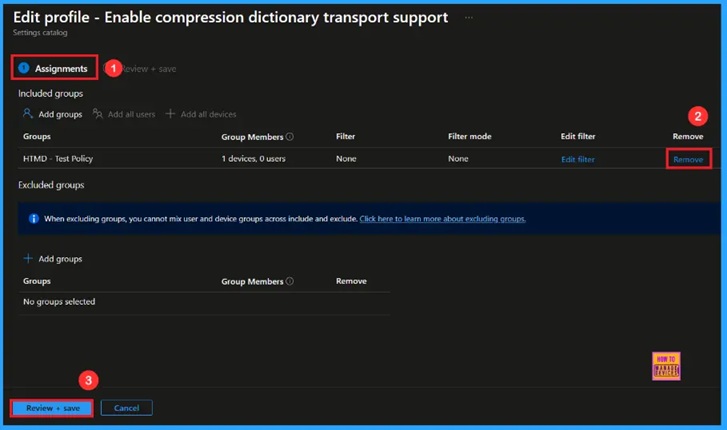
🎆Enable Compression Dictionary Transport Support in Microsoft Edge to Accept Web Content using Intune
–https://www.anoopcnair.com/compression-dictionary-transport-edge-Intune/
🔔Enable Compression Dictionary Transport Support
🔔Helps Optimize Performance
🔔Provides Better Efficiency
🔔improves User Experience
🔔Enhances Security Support
🔔Device and User Check-in Status
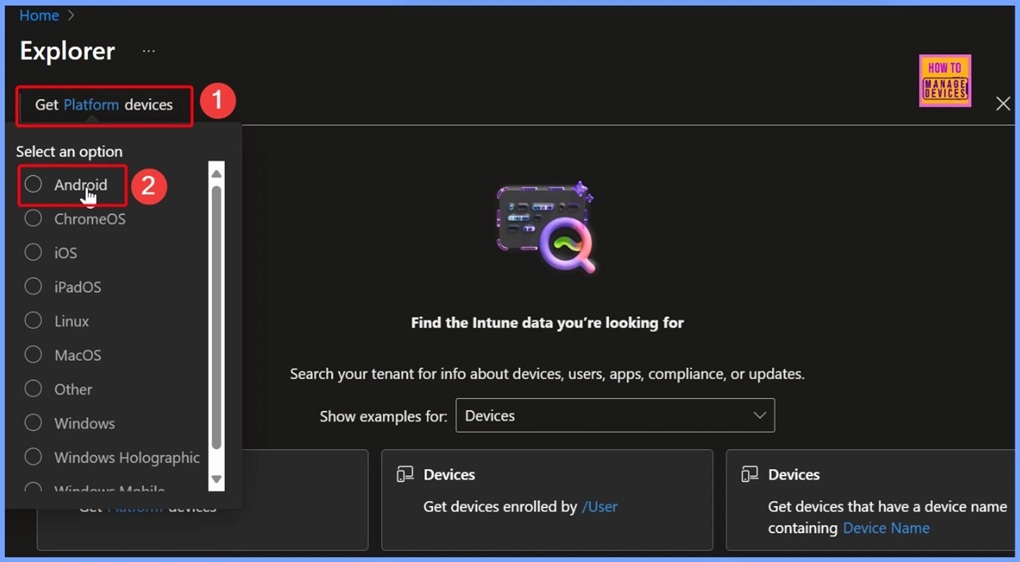
🎆Quickly Identify All Android Devices Enrolled in Intune with Copilot Explorer
–https://www.anoopcnair.com/android-devices-enrolled-in-intune-with-copilot/
➡How to Use Get Platform Devices Prompt to Search for Android
➡Quick Overview of Android Devices in Intune
➡Using Intune Explorer with Security Copilot
➡Key Details Retrieved from Queries
➡Benefits for IT Admins in Managing Android Devices
➡What is the Next Step to Consider
➡End Results
HTMD Daily Intune Tips
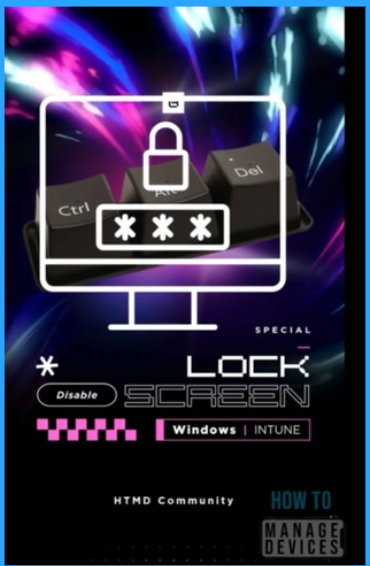
📻Screen Lock STOP Your PC From Locking! Intune Policy to Remove Ctrl Alt Del Lock Option from Users #intune #htmdcommunity #windows
–https://youtube.com/shorts/57_22X4j5Aw
▶️Policy Setting: System – Ctrl+Alt+Del Options – Remove Lock Computer (User)
▶️Why Organizations Enable or Disable This Policy
▶️Why an organization would Enable the Policy (Remove the “Lock Computer” option)
Connect with the HTMD Community
Join the Telegram group to get the latest step-by-step guides and news updates. Join our Meetup Page to participate in User group meetings. Also, join the WhatsApp Community to get the latest news on Microsoft Technologies. We are there on Reddit as well.
HTMD Community Social Media Platform Links
| Social Media Platform | Link |
| LinkedIn: HTMD Community | https://www.linkedin.com/company/how-to-manage-devices/ |
| Telegram: SCCM Intune Technical Discussions | https://t.me/joinchat/Q9lE6G1_BO_bGq97 |
| Telegram: JOB SCCM Intune Group | https://t.me/joinchat/SIKr3OugR2FQ-Ej9 |
| WhatsApp: HTMD Community | https://chat.whatsapp.com/CeMXHSD61HtDBJwe78IZwV |
| Telegram: AVD/Windows 365 User Group | https://t.me/Inwvdcommunity |
| https://www.facebook.com/HTMDCommunity | |
| https://www.instagram.com/htmd_community/ | |
| https://twitter.com/htmdcommunity | |
| Facebook Group: SCCM | https://www.facebook.com/groups/ConfigMgr2012/ |
| Facebook Group: Intune | https://www.facebook.com/groups/1738789256382744 |

Anoop C Nair is Workplace Technology solution architect with 25+ years (as of 2026) of experience in global enterprise organizations such as JP Morgan, Capgemini, etc. Microsoft Certified Trainer (MCT). Microsoft MVP from 2015 onwards for consecutive 11+ years! He also conducts Intune and modern workplace tech training for enterprise organizations. He is Blogger, Speaker, and Founder of HTMD Community and HTMD Conference. His main focus is on Device Management technologies like Intune, Windows, Cloud PC. He writes about technologies like Intune, SCCM, Windows, Cloud PC, Windows, Entra, Microsoft Security.

Discussion